394
5-7. Connecting Bluetooth
®
HIGHLANDER_U (OM0E017U)
Display the “Bluetooth* Setup” screen. (→P. 387)
Select the device.
Select “Device Info”.
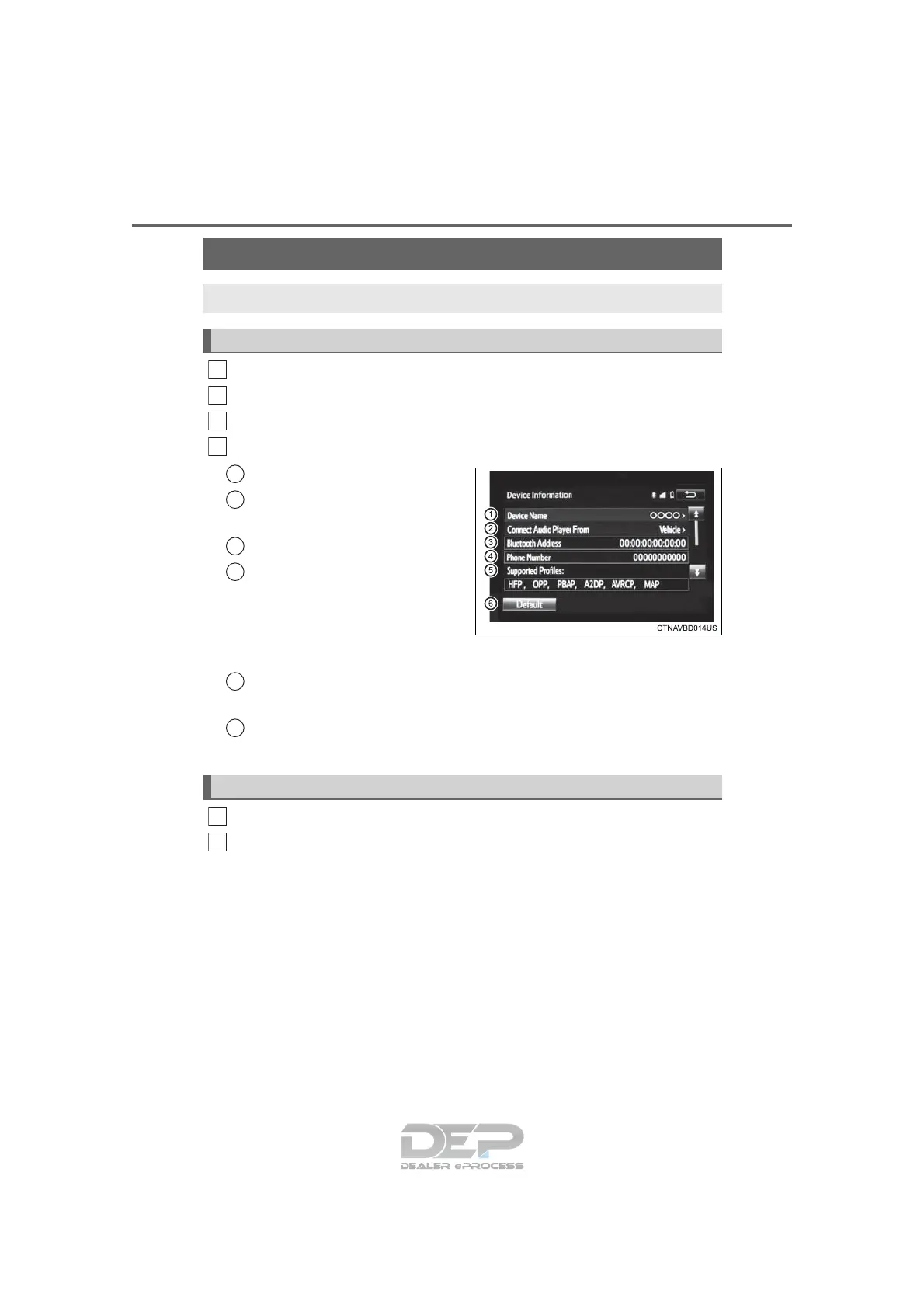
Following screen is displayed:
Change device Name
Change connection method
(→P. 394)
Bluetooth
* Address
Display your telephone num-
ber
The number may not be dis-
played depending on the
model of phone.
Compatibility profile of the
device
Restore default settings
*: Bluetooth is a registered trademark of Bluetooth SIG, Inc.
Select “Connect Audio Player from”.
Select “Vehicle” or “Device”.
“Vehicle”: Connect Entune Audio to the portable audio player.
“Device”: Connect the portable audio player to Entune Audio
Displaying a Bluetooth
®
device details
You can confirm and change the registered device details.
Bluetooth
®
device registration status
1
2
3
4
1
2
3
4
5
6
Changing connection method
1
2












 To Next Page