392
5-7. Connecting Bluetooth
®
HIGHLANDER_U (OM0E017U)
Press the “SETUP” button.
Select “Bluetooth
*”.
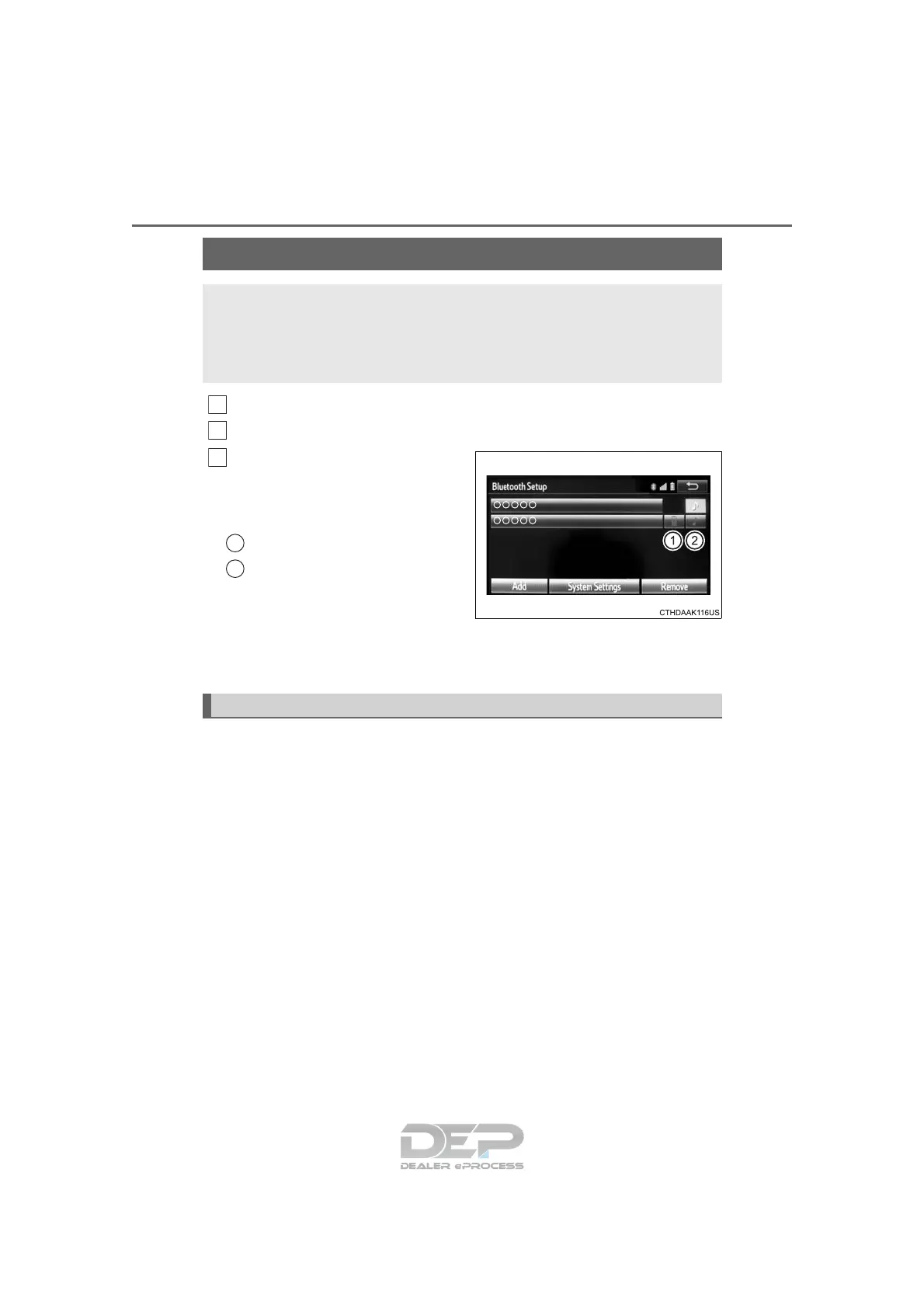
Select the device to be con-
nected.
Supported profile icons will be dis-
played.
Phone
Audio player
Supported profile icons for cur-
rently connected devices will illumi-
nate.
Dimmed icons can be selected to connect to the function directly.
*: Bluetooth is a registered trademark of Bluetooth SIG, Inc.
To turn auto connection mode on, set “Bluetooth* Power” to on.
(→P. 395)
When you register a phone, auto connection will be activated. Always
set it to this mode and leave the Bluetooth
®
phone in a place where a
connection can be established.
When Entune Audio is turned to on, the system will search for a nearby
cellular phone you have registered.
Next, the system automatically connects with the most recent of the
phones connected to in the past. Then, the connection result is displayed.
*: Bluetooth is a registered trademark of Bluetooth SIG, Inc.
Connecting a Bluetooth
®
device
Up to 5 Bluetooth
®
devices (Phones [HFP] and audio players
[AVP]) can be registered.
If more than 1 Bluetooth
®
device has been registered, select
which device to connect to.
1
2
3
1
2
Auto connection












 To Next Page