411
5-9. Bluetooth
®
phone
5
Audio system
HIGHLANDER_U (OM0E017U)
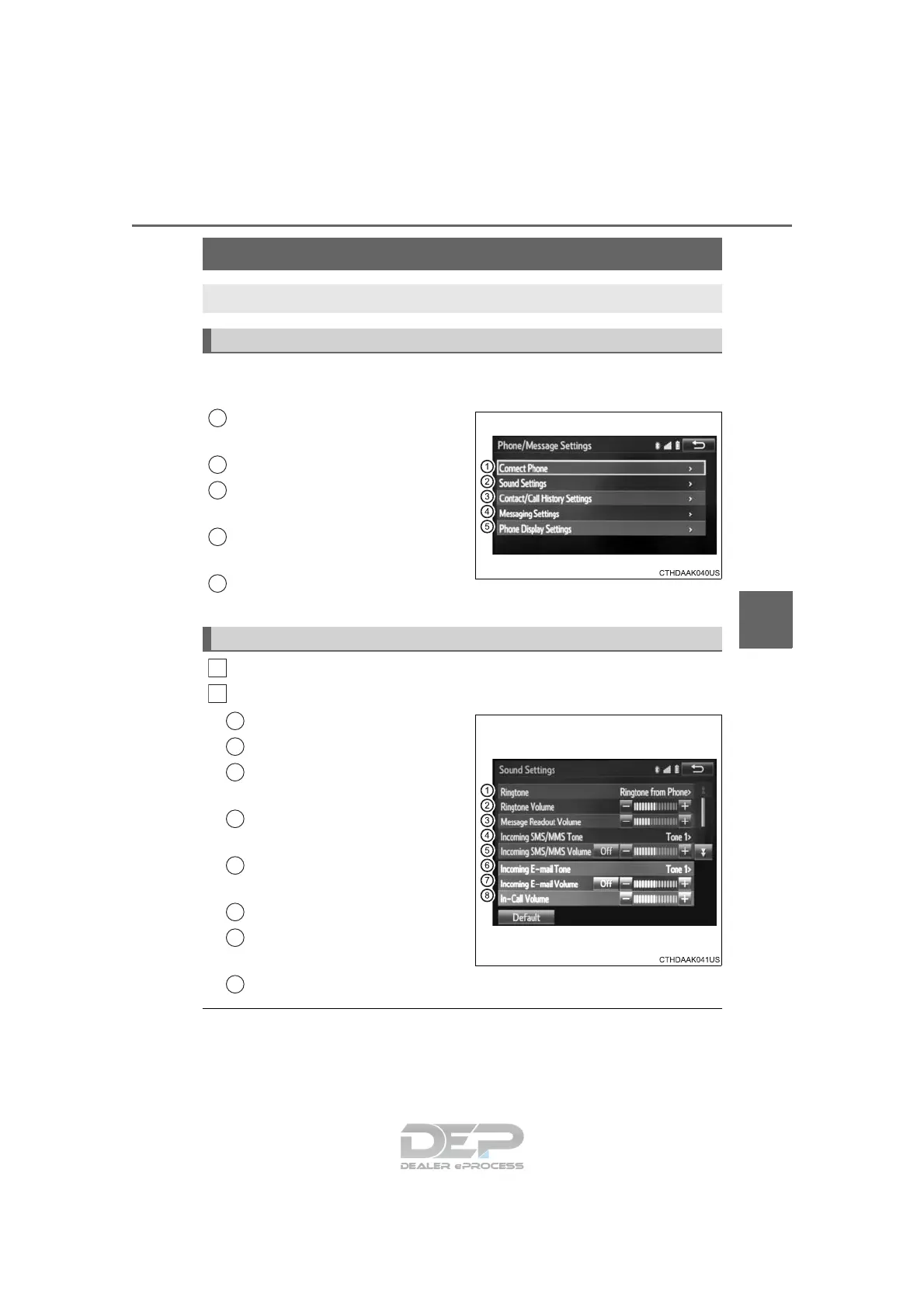
To display the screen shown below, press the “SETUP” button, and
select “Phone” on the “Setup” screen.
Set the phone connection
(→P. 390)
Setting the sound (→P. 411)
Contact/Call History Settings
(→P. 412)
Set the message settings
(→P. 419)
Set the phone display
(→P. 420)
Display the “Phone/Message Settings” screen. (→P. 4 11)
Select “Sound Settings” on the “Phone/Message Settings” screen.
Set the desired ringtone.
Adjust the ringtone volume.
Adjust the message readout
volume.
Set the desired incoming
SMS/MMS tone.
Adjust the incoming SMS/
MMS tone volume.
Set the incoming e-mail tone.
Adjust the incoming e-mail
tone volume.
Adjust the default volume of the other party's voice.
■ To return to the default volume settings
Select “Default”, and then “Yes”.
Bluetooth
®
phone settings
You can adjust the hands-free system to your desired settings.
“Phone/Message Settings” screen
1
2
13
14
5
Sound setting
1
2
1
2
13
4
5
6
7
8

















 To Next Page