400
5-9. Bluetooth
®
phone
HIGHLANDER_U (OM0E017U)
Press the off-hook switch on the steering wheel.
If the phonebook is empty, a message will be displayed.
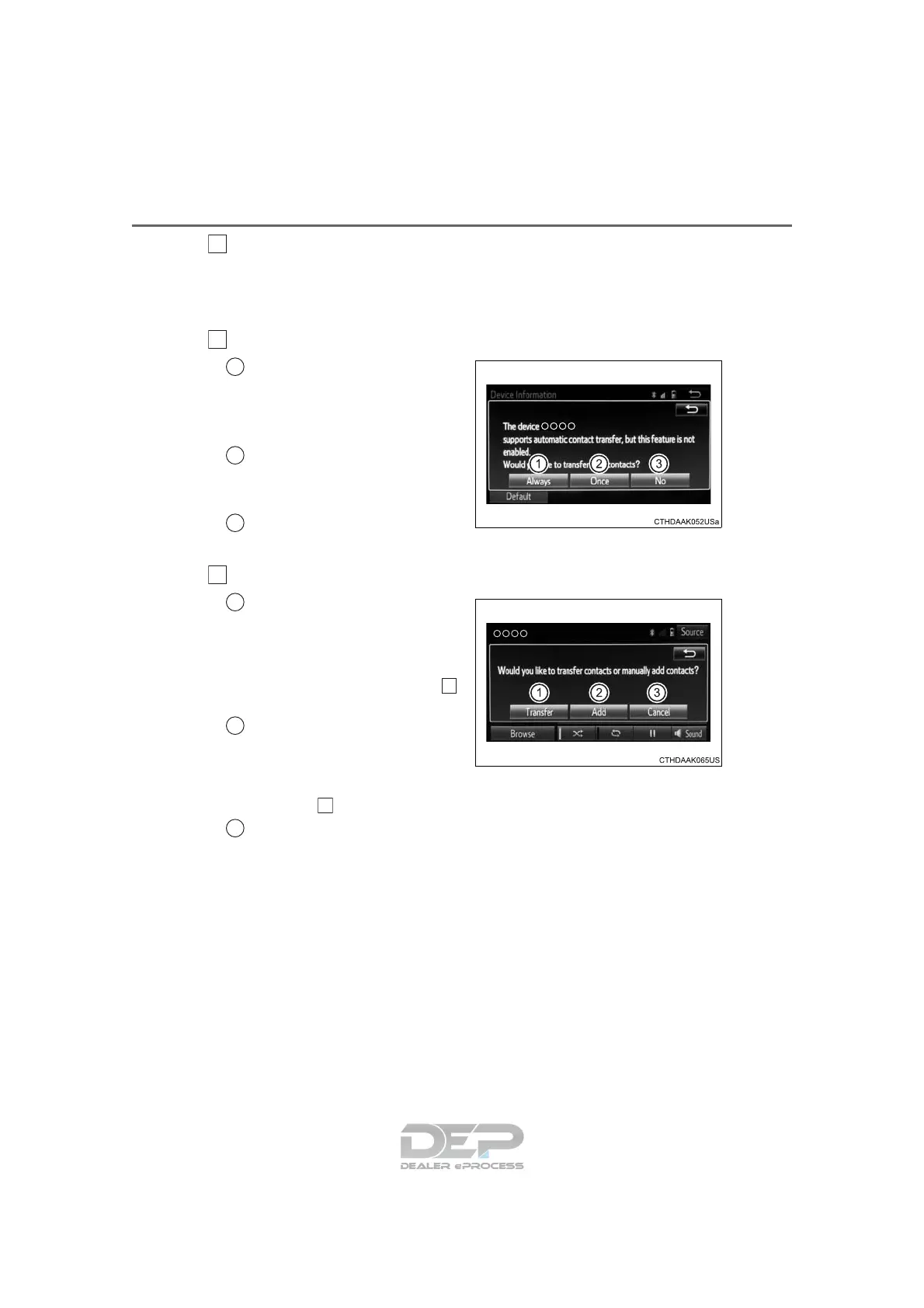
For a PBAP compatible Bluetooth
®
phone and “Automatic Transfer”
is off
Select the desired item.
Select to transfer new con-
tacts from a cellular phone,
select “Always” and then
enable “Automatic Transfer”.
Select to transfer all the con-
tacts from a connected cellu-
lar phone only once.
Select to cancel transferring.
For a PBAP incompatible but OPP compatible Bluetooth
®
phone
Select the desired item.
Select to transfer the con-
tacts from the connected cel-
lular phone.
Follow the steps in “Update con-
tacts from phone” from step .
(→P. 413)
Select to add a new contact
manually.
Follow the steps in “Registering
a new contact to the contact list”
from step . (→P. 414)
Select to cancel transferring.
1
2
1
2
3
2
1
2
2
2
3












 To Next Page