63
2
2-1. Instrument cluster
Vehicle status information and indicators
■
Display items
Odometer
Displays the total distance the vehicle
has been driven.
Trip meter A/trip meter B
Displays the distance the vehicle has
been driven since the meter was last
reset. Trip meters A and B can be used
to record and display different distances
independently.
■
Changing the display
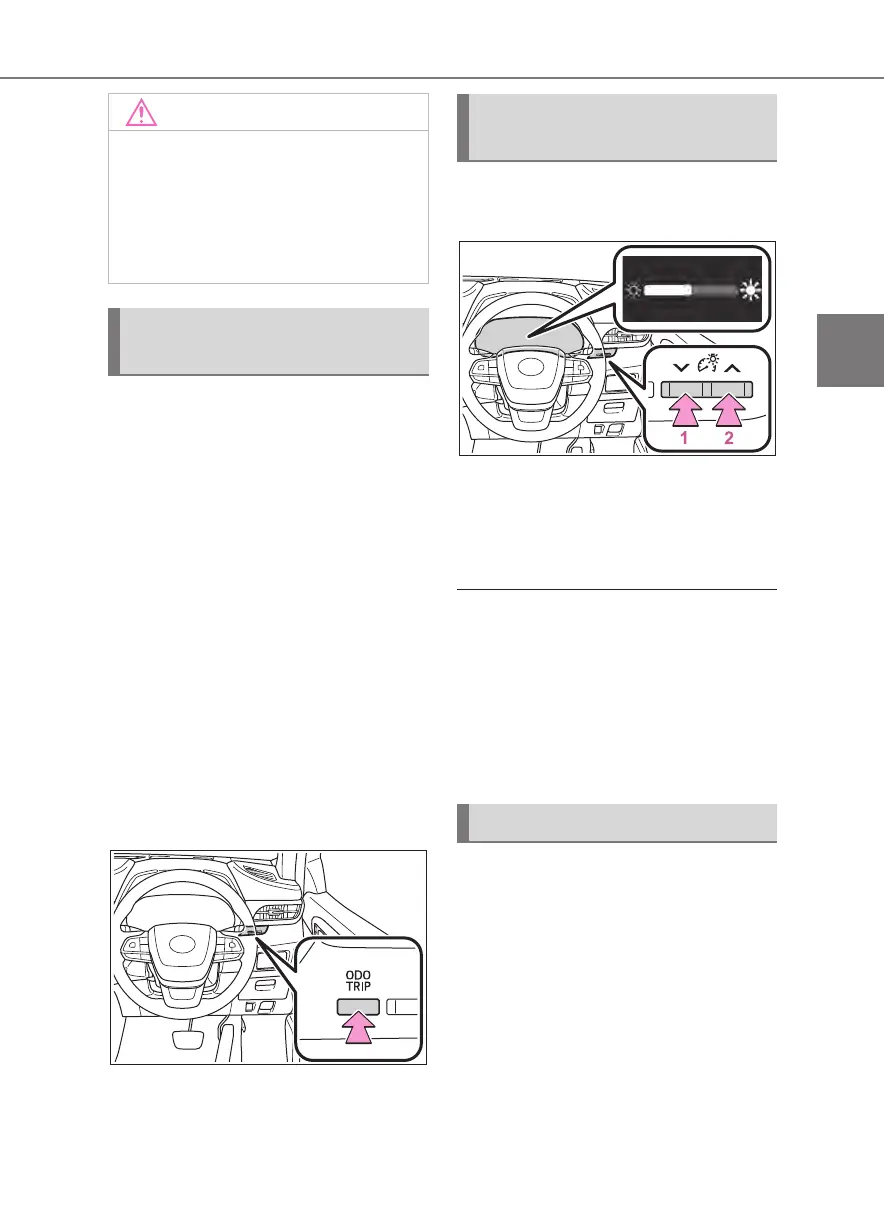
Each time the “ODO TRIP” switch
is pressed, the displayed item will
be changed. When the trip meter is
displayed, pressing and holding the
switch will reset the trip meter.
The brightness of the instrument
panel lights can be adjusted.
This image is for example only, and
may differ from the actual vehicle.
1 Darker
2 Brighter
■
Brightness of the meters (day
mode and night mode)
The brightness of the meters is changed
between day mode and night mode.
●
Day mode: When the surrounding
area is bright
●
Night mode: When the surrounding
area is dark
The clocks can be adjusted on the
audio system screen.
Refer to “Navigation and Multime-
dia System Owner’s Manual”.
●
The engine may be overheating if
the engine coolant temperature
gauge is in the red zone (H). In this
case, immediately stop the vehicle
in a safe place, and check the
engine after it has cooled com-
pletely. (P.383)
Odometer and trip meter
display
Changing the instrument
panel light brightness
Adjusting the clock













 To Next Page