84
2-1. Instrument cluster
■
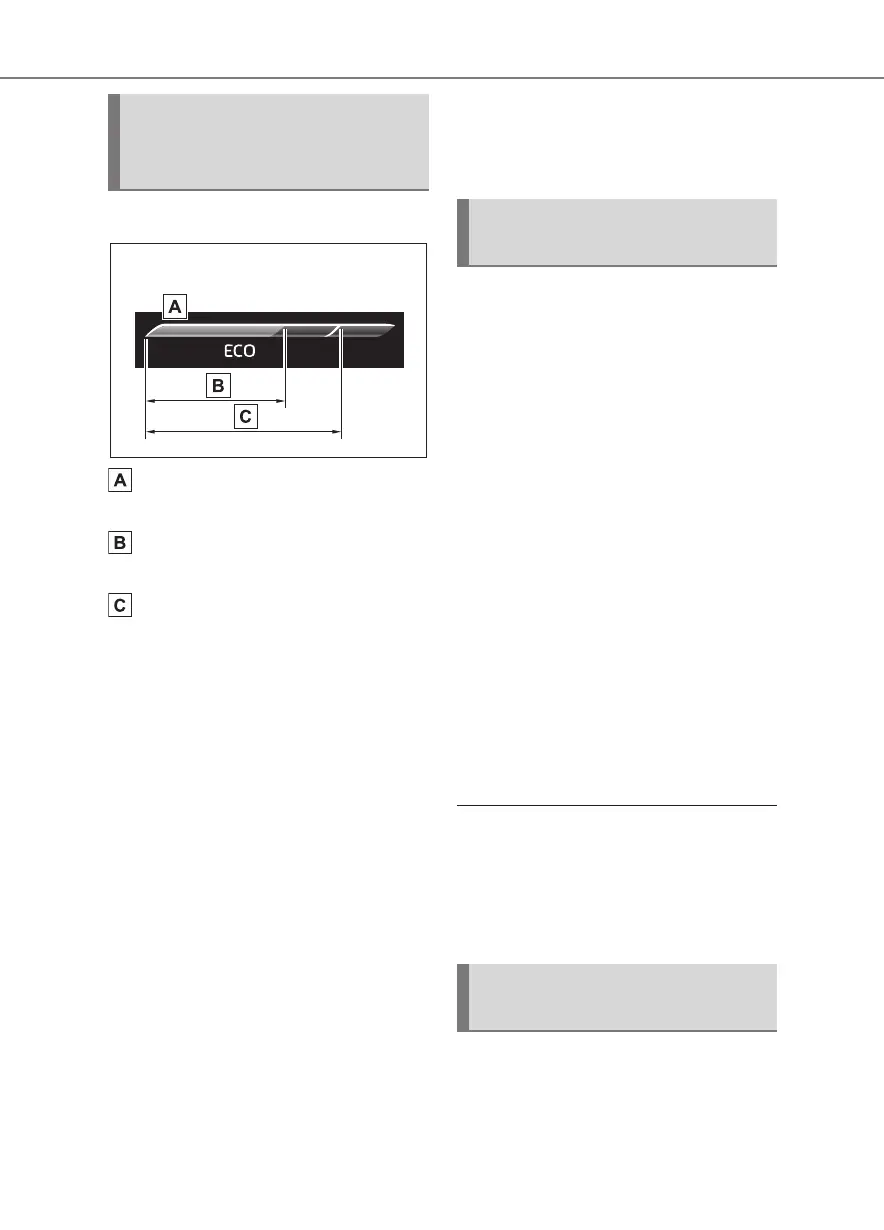
Eco Driving Indicator
Eco Driving Indicator Zone Dis-
play
Eco driving ratio based on
acceleration
Zone of Eco driving
Displayed content is the same as that
displayed on the multi-information dis-
play (Eco Driving Indicator). For details,
refer to P.74.
■
Tachometer
Displays the engine speed in revo-
lutions per minute.
■
Outside temperature
Displayed in the following situa-
tions:
When the engine switch is turned
to ON (Displayed for approxi-
mately 10 seconds)
When the low outside tempera-
ture indicator is flashing
Displayed content is the same as
that displayed on the multi-informa-
tion display. For details, refer to the
explanation of the outside tempera-
ture display on the multi-information
display. (P. 6 2)
Displays the following navigation
system linked items:
(Refer to “Navigation and Multime-
dia System Owner’s Manual”.)
■
Route guidance to destination
Displayed when the navigation sys-
tem is performing route guidance.
When approaching an intersection,
an arrow indicating the suggested
direction of travel will be displayed.
■
Street name
Depending on the situation, the
names of the streets of an
approaching intersection will be dis-
played.
■
Compass (heading-up display)
Displays the direction of travel.
■
Street name display (vehicles with
a navigation system)
Depending on the situation, such as
when no information is available in map
data, etc., the street names of an inter-
section may not be displayed.
Displays the operational status of
the following systems:
LTA (Lane Tracing Assist)
(P.194)
Eco Driving Indica-
tor/Tachometer/Outside tem-
perature
Navigation system-linked
display area (if equipped)
Driving assist system sta-
tus display area









 To Next Page