33
GB
Multifunctional Unit 5 in 1
5. Keep the unit in this mode for half day until the conduit is dried. Doing this helps to keep the
inside of the unit dry and prevents mold developing
6. Clean the fi lters as per fi lter cleaning procedure
7. Turn off the unit and pull out the plug.
8. Separate the air-exhausted pipe, fi shtail and exhaust mount and store them safely as you
received them.
9. Cover the unit and keep it in a dry place.
10. Take the batteries out of remote control and store, or dispose, them safely
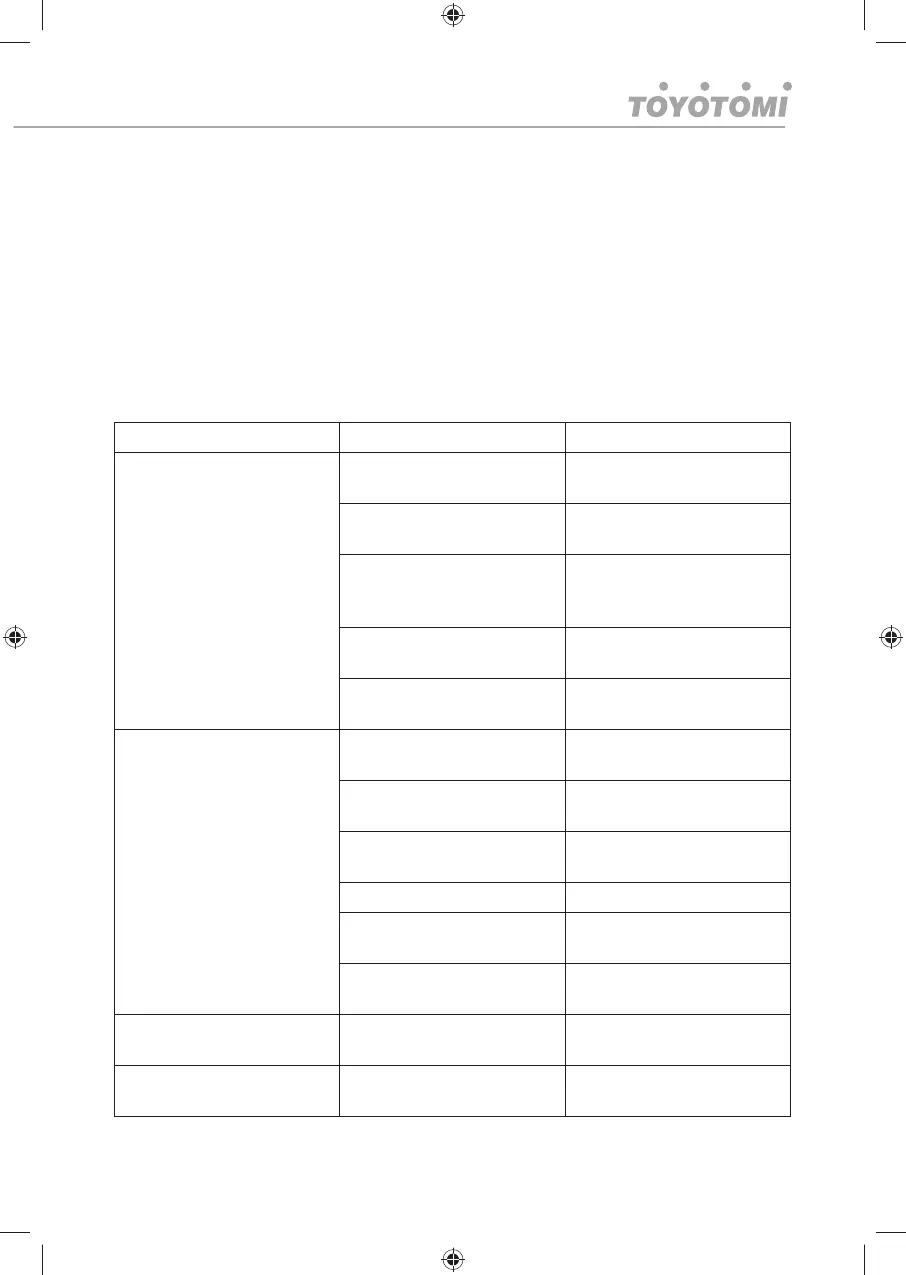
Troubleshooting
Do not repair or disassemble the unit by yourself, unauthorized repair attempts will invalidate the
warranty and may cause bodily harm.
Trouble Reason Solution
The unit does not work
No power supply Power-on and turn on the
unit.
Water-full indicator (E4) Drain the internal / external
water tanks
Filter change counter indica-
tor (E8)
Change fi lters and / or reset
the counter by pressing fan
speed key for 3 seconds
Timer function is active Cancel Timer function (press
power on)
Room temperature too low
or too high
Use only in ambient tem-
peratures between 7-35℃
The unit does not seem to
perform.
In direct sunlight Draw the curtains, also UV
affects RC
Windows or doors open. Κλείστε τις πόρτες και τα
παράθυρα
Large amount of people or a
heat source in the room.
Close windows and turn on
another air conditioner
Filter is very dirty Clean or change the air fi lter
Air inlet or air outlet is
blocked
Clear out debris
Room temperature is lower
than setting temperature
Change the setting tempera-
ture
The unit loud
The unit is not put on fl at
surface
Put the unit on fl at and hard
surface
Compressor does not work
Overheating protection is
active
Check venting.




 To Next Page