2
Introduction
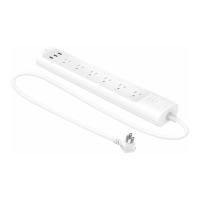
With independent control of 6 smart outlets and always-on USB ports to charge 3 others, the Kasa Smart Wi-Fi Power Strip is ideal for family rooms,
home oces and small businesses. Download the Kasa app and control your outlets remotely. The Kasa app provides easy step-by-step installation
instructions and convenient remote control from anywhere.
• 6 Smart Outlets - Independently control 6 smart outlets from your smartphone with the Kasa Smart app.
• Surge Protection - ETL certied surge protection shields electronics from power surges and overloading.
• 3 USB Ports - Charge your tablet, smartphone, or other devices using the always-on USB ports.
• Energy Monitoring - Monitor energy consumption of devices plugged into your smart power strip.
• No Hub Required - Connect to your existing Wi-Fi router.
• Scheduling - Set a schedule to automatically turn devices on and o.
• Voice Control - Use Alexa, Google Assistant, or Microsoft Cortana to control your devices with voice commands.
• Works with IFTTT - Have your smart power strip work together with other devices through support from IFTTT.
Surge ProtectionNo Hub RequiredControl from AnywhereIndividual Control
Energy Monitoring Scheduling
Supported Load Types:
Coee Maker: 800 W Heater: 1500 W Toaster: 850 W
Desk Lamp: 235.2 W Humidier: 260 W Tower Fan: 50 W
LCD: 270 W Iron: 1500 W





 To Next Page