TL-MR3040 Portable 3G/3.75G Battery Powered Wireless N Router
z Security Mode – Please refer to the Appendix C: Security Mode.
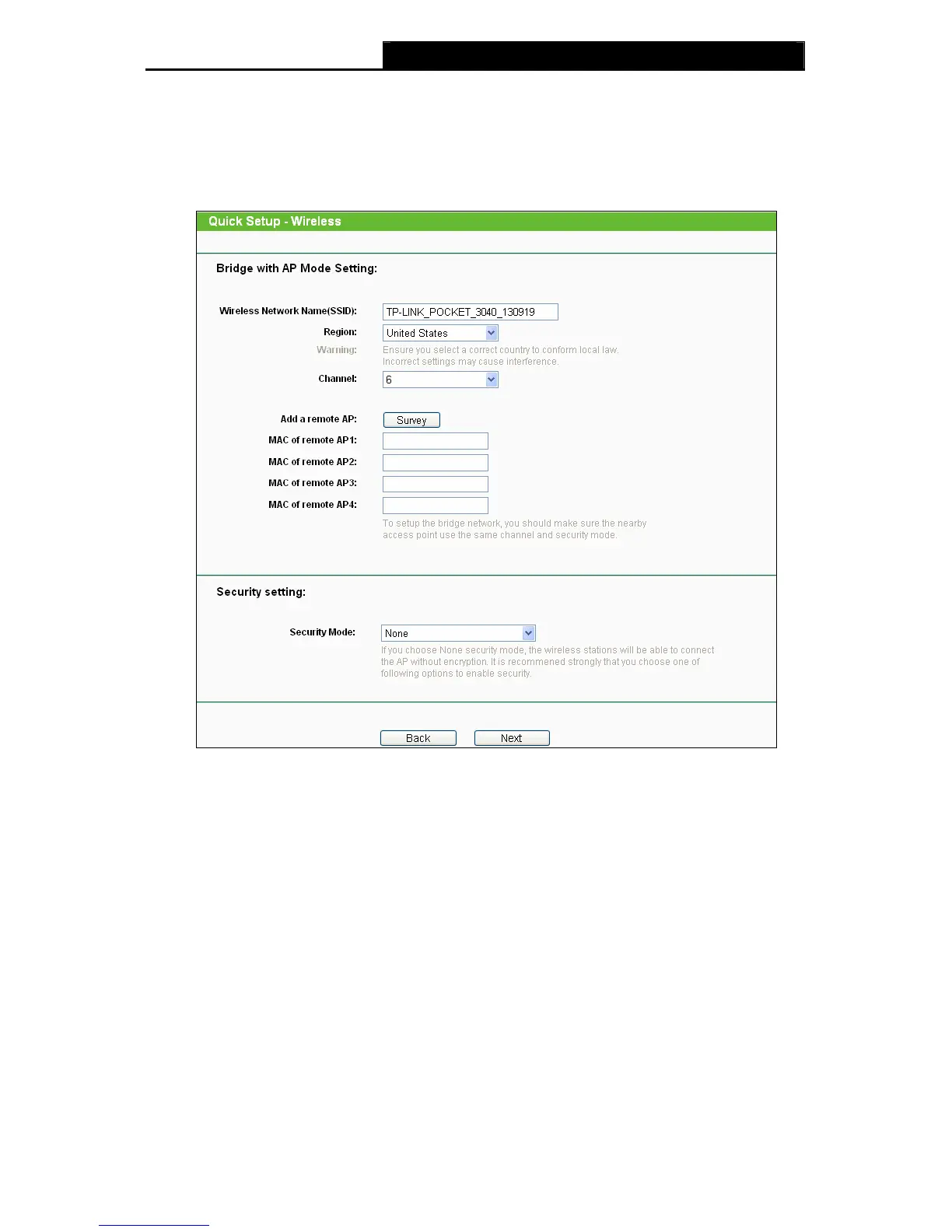
¾ If you choose Bridge with AP, the next screen will appear as shown in Figure 3-19.
This operation mode bridges the AP and up to 4 APs also in bridge mode to connect two
or more wired LANs.
Figure 3-19 Quick Setup – Bridge with AP
z Wireless Network Name (SSID) - Enter a value of up to 32 characters. To
achieve more information, you can read the same glossary in Access Point part.
z Region - This field determines which operating frequency will be used. To
achieve more information, you can read the same glossary in Access Point part.
z Channel - This field determines which operating frequency will be used. To
achieve more information, you can read the same glossary in Access Point part.
z Add a remote AP - Click the Survey button to fill in the MAC of remote AP (1-4)
field.
z MAC of remote AP (1-4) - Enter the MAC address of AP that you want to access.
z Security Mode – Please refer to the Appendix C: Security Mode.
¾ If you choose Client, the next screen will appear as shown in Figure 3-20. This
operation mode bridges the AP and up to 4 APs also in bridge mode to connect two or
more wired LANs.
-19-











 To Next Page