8.2 Multicast IP
In a network, receivers can join different multicast groups appropriate to their needs. The switch
forwards multicast streams based on multicast address table. The Multicast IP can be
implemented on Multicast IP Table, Static Multicast IP page.
8.2.1 Multicast IP Table
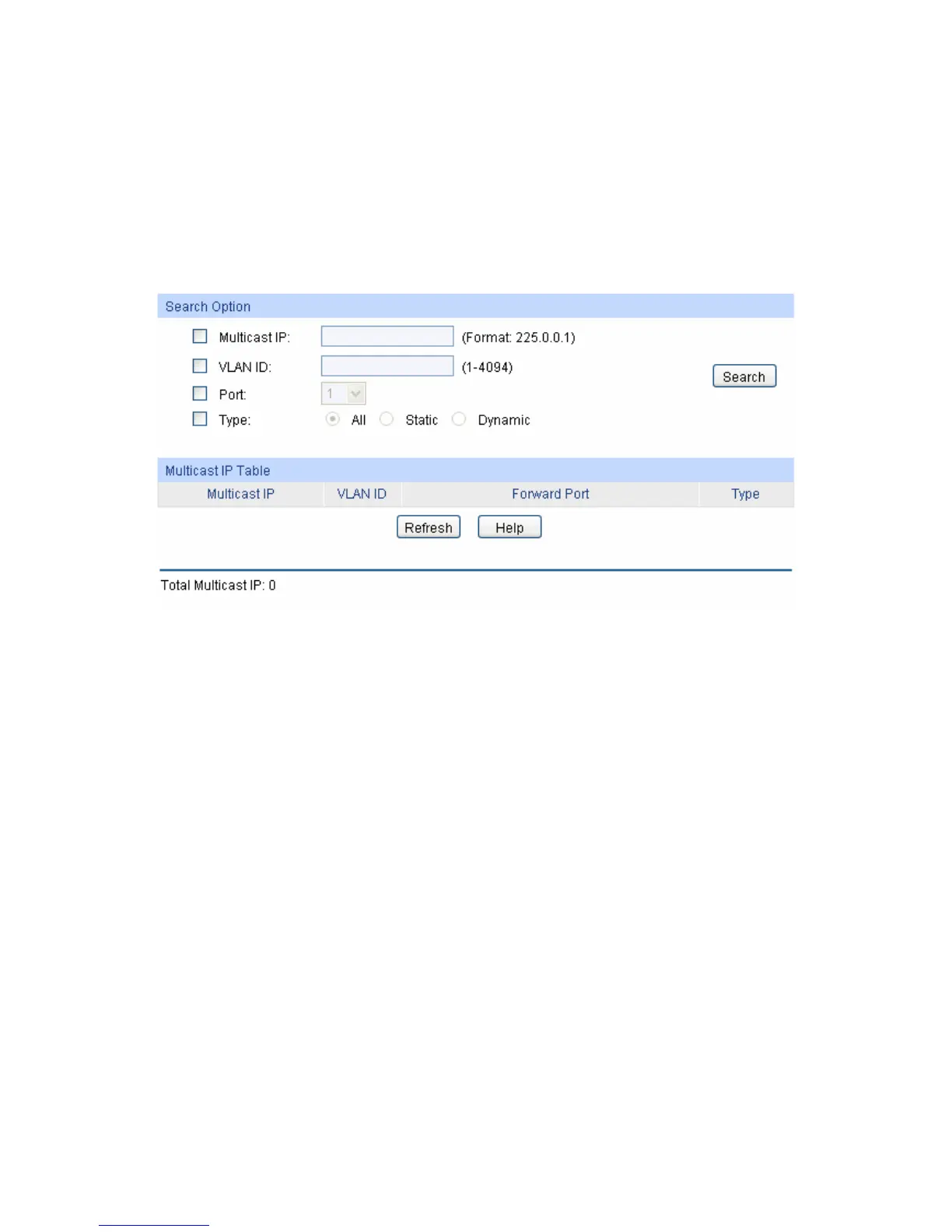
On this page you can view the multicast IP table on the switch.
Choose the menu Multicast→Multicast IP→Multicast IP Table to load the following page.
Figure 8-8 Multicast IP Table
The following entries are displayed on this screen:
Search Option
Multicast IP: Enter the multicast IP address the desired entry must carry.
VLAN ID: Enter the VLAN ID the desired entry must carry.
Port: Select the port number the desired entry must carry.
Type: Select the type the desired entry must carry.
All: Displays all multicast IP entries.
Static: Displays all static multicast IP entries.
Dynamic: Displays all dynamic multicast IP entries.
Multicast IP Table
Multicast IP Displays multicast IP address.
VLAN ID: Displays the VLAN ID of the multicast group.
Forward Port Displays the forward port of the multicast group.
Type: Displays the type of the multicast IP.
104











 To Next Page