Need help?
Do you have a question about the TP-Link TL-SX1008 V1 and is the answer not in the manual?
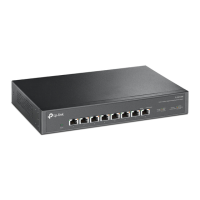
Details the front panel layout, including power indicators and 10 Gbps RJ45 ports.
Describes rear panel features: Kensington security slot, power socket, and grounding terminal.
Step-by-step instructions for placing the switch on a desk or flat surface.
Instructions for securely mounting the switch into a standard server rack.
Covers standards, protocols, interfaces, MAC table, switching capacity, and forwarding rates.
Details certifications, operating/storage temperature, and humidity requirements.
Essential safety warnings, ESD prevention, and measures against lightning surges.
Guidelines for optimal operating environment, clearness, EMI mitigation, and placement.
Includes EU Declaration of Conformity and general safety information.
This document describes the TP-Link 8-Port 10G Multi-Gigabit Desktop/Rackmount Switch, a versatile networking device designed for high-speed data transmission in various environments. The switch facilitates the connection of multiple network devices, offering robust performance and flexible installation options.
The TP-Link 8-Port 10G Multi-Gigabit Desktop/Rackmount Switch is engineered to provide high-bandwidth connectivity, supporting multiple Ethernet speeds across its eight RJ45 ports. Each port is capable of operating at 100 Mbps, 1 Gbps, 2.5 Gbps, 5 Gbps, and 10 Gbps, making it suitable for a wide range of applications from standard office networks to demanding environments requiring ultra-fast data transfer, such as those involving 8K video streaming, high-performance workstations, NAS/servers, and Wi-Fi 6 access points.
The primary function of this switch is to enable seamless communication between connected devices by forwarding data frames efficiently. It employs a store-and-forward transfer method, which ensures data integrity by checking for errors before transmission. The switch also features automatic MAC address learning and aging, allowing it to build and maintain an efficient address table for optimal data routing. This intelligent management of MAC addresses helps in reducing network congestion and improving overall performance.
Quality of Service (QoS) is an integral feature, supporting 802.1p/DSCP, which allows for the prioritization of network traffic. This is crucial in environments where certain applications, like voice or video calls, require consistent bandwidth and low latency to function effectively. By prioritizing critical data, the switch helps ensure a smooth and reliable user experience even under heavy network loads. Additionally, 802.3x flow control is implemented to prevent packet loss during periods of high traffic by regulating the data flow between devices.
The switch is designed for plug-and-play operation, meaning it requires minimal configuration. Its auto-negotiation feature automatically detects the speed and duplex mode of connected devices and adjusts accordingly, simplifying network setup. The auto MDI/MDIX function eliminates the need for crossover cables, further streamlining the connection process by automatically detecting and correcting cable types.
For security, the switch includes a Kensington Security Slot, allowing users to physically secure the device and prevent theft, which is particularly useful in public or shared environments. The device also incorporates a grounding terminal, providing an additional layer of protection against lightning and electrical surges, ensuring the longevity and reliability of the switch and connected equipment.
The TP-Link 8-Port 10G Multi-Gigabit Switch offers significant flexibility in terms of installation and deployment. It supports both desktop and rackmount installations, catering to different spatial requirements and network setups.
For desktop installation, the switch can be placed on any flat, stable surface. Its compact design makes it suitable for small offices or home environments where space might be limited. The device's feet ensure stability and prevent it from scratching surfaces.
For rackmount installation, the switch comes with rack-mounting brackets and screws, allowing it to be securely fitted into a standard server rack. This is ideal for data centers, server rooms, or larger network infrastructures where multiple devices are organized within a rack system. When rack-mounting, it is important to ensure proper air circulation by leaving sufficient gaps around the devices (5 to 10 cm) and avoiding placing heavy objects on top of the switch. The device should be mounted with its bottom facing downwards, and devices should be mounted in sequence from bottom to top, maintaining clearance for heat dissipation.
The front panel of the switch features LED indicators for power and each individual port. The power LED indicates whether the device is on or off. Each port has two LEDs: a left LED (10G/5G) and a right LED (2.5G/1G/100M). These LEDs provide immediate visual feedback on the connection status and activity of each port. A green light on the left LED indicates a 10 Gbps connection, while amber signifies 5 Gbps. For the right LED, green indicates 2.5 Gbps, and amber indicates 100/1000 Mbps. When an LED is on, it means there is a connection but no activity, while a flashing LED indicates data transmission or reception. This intuitive LED system allows users to quickly assess the network status and troubleshoot connectivity issues.
The power socket is designed to connect directly to an AC outlet, supporting an input voltage range of 100-240 V~ at 50/60 Hz, making it compatible with various regional power standards. The inclusion of a grounding terminal further enhances safety by allowing the switch to be grounded via a PE (Protecting Earth) cable or a dedicated ground cable, providing protection against electrical surges and ensuring stable operation.
The switch supports various network media types, including UTP/STP cables of different categories (Cat. 5, Cat. 5e, Cat. 6, Cat. 6a, Cat. 7) depending on the desired speed and distance. For instance, 10GBASE-T connections can utilize Cat 6 cables up to 55 meters or STP Cat 6, 6a, 7 cables up to 100 meters, offering flexibility in cable selection based on network requirements.
Maintaining the TP-Link 8-Port 10G Multi-Gigabit Switch involves several simple practices to ensure its longevity and optimal performance. These practices primarily focus on environmental control, physical care, and electrical safety.
Environmental conditions play a crucial role in the switch's reliability. It is essential to keep the equipment room at an appropriate level of temperature and humidity. Extreme humidity can lead to insulation issues, electrical leakage, and corrosion, while high temperatures can accelerate the aging of insulation materials, significantly shortening the device's lifespan. Therefore, ensuring the operating temperature and humidity remain within recommended ranges is vital.
Dust accumulation is another factor that can negatively impact performance. Dust can be absorbed by static electricity, leading to poor contact at metal points and potentially damaging internal electronic components. Regular dusting of the device and maintaining a clean indoor environment are recommended. It is important to cut off the power supply before cleaning the device and to avoid using water or any other liquid cleaning methods. A dry cloth is suitable for cleaning.
Proper grounding is a critical safety and maintenance feature. The switch should always be well-earthed, and the power socket should have a good contact with the ground. This helps in dissipating static electricity and provides protection against lightning and electrical surges. The integrated lightning protection mechanism, combined with the option to connect a dedicated ground cable, enhances the device's resilience to electrical disturbances. For outdoor wiring, using a signal SPD (Surge Protective Device) is advised to prevent induced lightning damage.
To minimize electromagnetic interference (EMI), the switch should be kept away from high-frequency and strong-current devices, such as radio transmitting stations. Using a power supply that effectively filters interference from the power grid and employing electromagnetic shielding when necessary can further reduce the impact of external interferences on the switch's electronic components.
When installing the device, ensure that the rack or workbench is flat, stable, and sturdy enough to support its weight. Good ventilation in the equipment room is also crucial to prevent overheating. The device should be placed with its bottom surface downward for proper heat dissipation.
For safety, users should never attempt to disassemble, repair, or modify the device themselves. If service is required, it is recommended to contact TP-Link support. Only power cords provided with the switch should be used, and the supply voltage must match the specifications indicated on the device's rear panel. The power plug on the cord serves as the disconnect device, so the socket-outlet should be easily accessible.
By adhering to these maintenance guidelines, users can ensure the TP-Link 8-Port 10G Multi-Gigabit Desktop/Rackmount Switch operates reliably and efficiently for an extended period, providing consistent high-speed network connectivity.
 General
| Ports | 8 x 10/100/1000 Mbps RJ45 ports |
|---|---|
| Switching Capacity | 16 Gbps |
| Packet Forwarding Rate | 11.9 Mpps |
| MAC Address Table | 8K |
| Jumbo Frame | 9 KB |
| Operating Humidity | 10% to 90% non-condensing |
| Storage Humidity | 5% to 90% non-condensing |
| Fan Quantity | Fanless |
| Standards and Protocols | IEEE 802.3, IEEE 802.3u, IEEE 802.3ab |
| Quality of Service | 4 priority queues |
| Operating Temperature | 0°C to 40°C |
| Storage Temperature | -40°C to 70°C (-40°F to 158°F) |
| Power Supply | 100-240V~50/60Hz |

 To Next Page