
 Need help?
Do you have a question about the TP-Link TL-SX105 and is the answer not in the manual?
Explains the power indicator light status and its meaning for the switch.
Describes how to secure the device using the Kensington lock slot to prevent theft.
Details the function of port LEDs and their corresponding network speeds (10G/5G, 2.5G/1G/100M).
Lists general technical specifications including standards, protocol, network media, interface, and switching capacity.
Outlines operating and storage conditions for temperature and humidity for the switch.
Addresses common issues and checks when the power LED does not light up.
Helps diagnose why port LEDs may not light up when a device is connected to the corresponding port.
The TP-Link 5-Port 10G Multi-Gigabit Desktop Switch (TL-SX105) is a high-performance networking device designed to expand your network's capacity and speed, particularly for demanding applications. This switch allows you to connect multiple devices, such as computers, servers, gaming consoles, and network-attached storage (NAS) devices, at multi-gigabit speeds, enhancing data transfer rates and overall network efficiency.
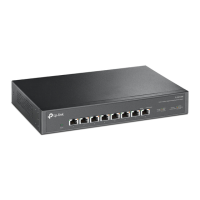
The primary function of the TL-SX105 is to provide high-speed wired network connectivity. It features five RJ45 ports that support multiple speeds: 10 Gigabit (10G), 5 Gigabit (5G), 2.5 Gigabit (2.5G), 1 Gigabit (1G), and 100 Megabit (100M). This multi-gigabit capability ensures compatibility with a wide range of devices, from older 100Mbps Ethernet devices to cutting-edge 10Gbps equipment, allowing for seamless integration into existing and future network infrastructures.
The switch operates on a "store-and-forward" transfer method, which means it receives an entire data frame, checks it for errors, and then forwards it to the appropriate destination port. This method helps ensure data integrity and reduces network errors. It also supports MAC Address Learning, automatically detecting and storing the MAC addresses of connected devices to efficiently direct traffic. The switch's auto-negotiation feature automatically detects the link speed of a connected device and adjusts its own speed accordingly, simplifying setup and ensuring optimal performance. Additionally, the auto MDI/MDIX function eliminates the need for crossover cables, allowing you to use straight-through cables for all connections.
For enhanced network management and performance, the TL-SX105 incorporates advanced features such as Quality of Service (QoS). This includes support for 802.1p/DSCP, which prioritizes network traffic to ensure that critical applications, such as online gaming or 8K video streaming, receive sufficient bandwidth and experience minimal latency. The switch also supports 802.3x flow control, a mechanism that prevents data loss during periods of high network congestion by temporarily pausing data transmission from sending devices.
The device is designed for desktop use, making it suitable for small offices, home offices, or advanced home networks where high-speed data transfer is crucial. It connects to your existing router via one of its Ethernet ports, effectively expanding the number of available high-speed wired connections. Power is supplied via an external power adapter, and the switch itself has a power LED indicator to show its operational status.
The TL-SX105 is designed for ease of use with a plug-and-play setup. There is no complex configuration required; simply connect your devices to the switch's Ethernet ports and power it on. The auto-negotiation and auto MDI/MDIX features handle most of the setup automatically.
Each of the five Ethernet ports is equipped with two LED indicators: a left LED for 10G/5G speeds and a right LED for 2.5G/1G/100M speeds. These LEDs provide immediate visual feedback on the connection status and activity of each port.
These indicators are invaluable for quickly diagnosing network issues or confirming connection speeds without needing to access a management interface. For example, if a device connected to a port is not showing any activity, the LED will be on (solid) rather than flashing. If the LED is off, it suggests a problem with the connection, such as an unplugged cable or an inactive device.
The switch is ideal for connecting various high-bandwidth devices. For instance, you can connect a 10G NAS/Server for rapid data backup and access, a workstation for demanding tasks like video editing, a gaming computer for low-latency online gaming, an 8K video streaming device for ultra-high-definition content, or a 2.5G Wi-Fi 6 Access Point to extend high-speed wireless coverage. The multi-gigabit ports ensure that each of these devices can operate at its maximum potential speed, provided the connected device and cabling also support those speeds.
The device's compact desktop design allows for flexible placement in various environments. It is designed to be placed with its bottom surface downward, ensuring stability and proper ventilation.
The TL-SX105 is designed for minimal maintenance, primarily focusing on ensuring proper power and cable connections.
In summary, the TP-Link TL-SX105 is a robust and user-friendly multi-gigabit desktop switch that provides essential high-speed networking capabilities with straightforward setup and clear visual indicators for monitoring its operational status. Its design prioritizes performance and ease of use, making it an excellent choice for upgrading network infrastructure to handle modern bandwidth-intensive applications.
 General
| Stackable | - |
|---|---|
| Certification | CE, FCC , RoHS |
| Product color | Black |
| Rack mounting | No |
| LED indicators | Yes |
| Switch type | Unmanaged |
| Basic switching RJ-45 Ethernet ports type | 10G Ethernet (100/1000/10000) |
| Basic switching RJ-45 Ethernet ports quantity | 5 |
| Storage temperature (T-T) | -40 - 70 °C |
| Operating temperature (T-T) | 0 - 40 °C |
| Storage relative humidity (H-H) | 5 - 90 % |
| Operating relative humidity (H-H) | 10 - 90 % |
| Power source | DC |
| Input current | 2 A |
| Input voltage | 12 V |
| Power consumption (max) | 21.4 W |
| Jumbo frames | 10000 |
| Forwarding rate | 74.4 Mpps |
| MAC address table | 32000 entries |
| Packet buffer memory | 16 MB |
| Package type | Box |
| Package depth | 315 mm |
| Package width | 240 mm |
| Package height | 70 mm |
| Package weight | 1580 g |
| Cables included | AC |
| Networking standards | IEEE 802.1p, IEEE 802.3ab, IEEE 802.3an, IEEE 802.3bz, IEEE 802.3u, IEEE 802.3x |
| Harmonized System (HS) code | 85176990 |
 Weight and Dimensions
| Depth | 131 mm |
|---|---|
| Width | 226 mm |
| Height | 35 mm |










 To Next Page