AC750 Wireless Travel Router
- 6 -
an Ethernet cable. And you can plug in a 3G/4G USB modem to obtain a continuous network.
Devices could connect to the router wirelessly.
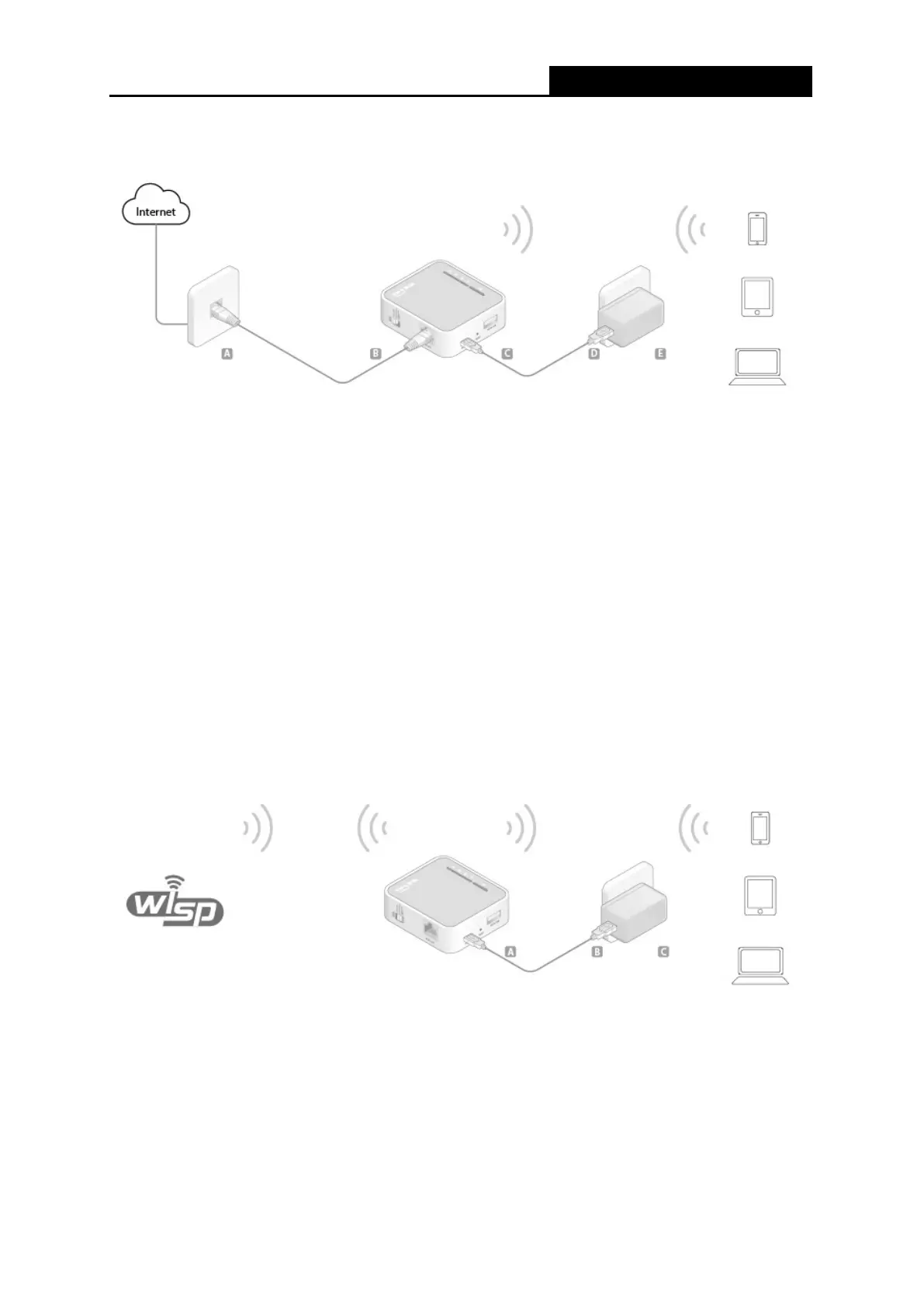
1. Switch the mode of the router on Share ETH.
2. Connect the router according to the steps A to E in the diagram above.
Tips: Plug in a 3G/4G USB modem with a SIM/UIM card as you need.
2.3.2 Hotspot Mode
In Hotspot mode, TL-WR902AC enables user to create your personal Wi-Fi Hotspot from a public
Wi-Fi network such as in a hotel room, trade show, etc.
On this mode, the LAN port devices share the same IP from public Wi-Fi through Wireless port.
While connecting to public Wi-Fi, the Wireless port works as a WAN port. The LAN/WAN port acts
as a LAN port.
1. Switch the mode of the router on Share Hotspot.
2. Connect the router according to the steps A to C in the diagram above.
2.3.3 Access Point Mode
As the supplement of wired LAN, TL-WR902AC enables the wired LAN to connect to the Internet
wirelessly.











 To Next Page