Instrument Overview
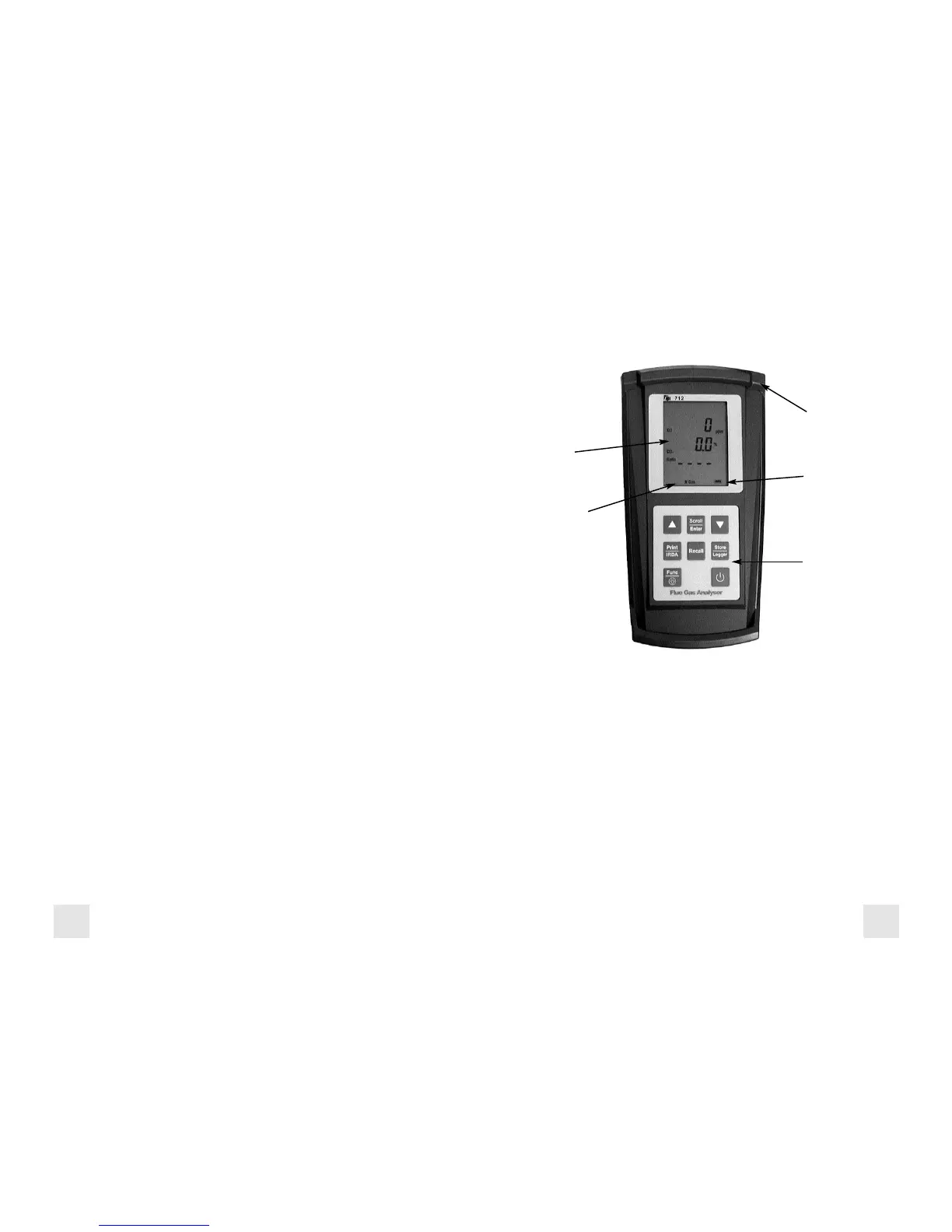
Front View
Rubber Boot Protects the instrument from accidental damage
Display Large 3 Parameter Backlit LCD Display
Battery Condition Icon Shows condition of rechargeable batteries.
Keypad Selects all available functions
Selected Fuel Type N GAS, LPG, LIGHT OIL, HEAVY OIL, OPT 1
(Bituminous Coal), OPT 2 (Anthracite Coal),
OPT 3 (Coke), OPT 4 (Butane), OPT 5 (Wood),
OPT 6 (Bagasse)
Rubber
Boot
LCD
Display
Keypad
Battery
Condition
Icon
Selected
Fuel Type
General Overview (Continued)
Never over saturate your sensors by performing tests on equipment
with gas levels beyond the capability of you analyzer.
Always keep the A762 water trap / filter assembly clean and replace the
filter as necessary. Replacement filter part number is A762F.
This manual will guide you through the functions of the TPI 712 which
will give you many years of reliable service.
Your TPI 712 Flue Gas Analyzer comes complete with the following
standard accessories:
( ) Denotes part number
• TPI 712 Analyzer
• Rubber Boot (A765) 1 each installed on analyzer
• Soft Carrying Case (A768) - 1 each
• Flue Sampling Probe (A770) - 1 each
• In-Line Filter / Water Trap installed on Flue probe (A795) - 1 each
• Disc water filter installed in water trap (A794W) - 1 each
• Spare In-Line Filter - 1 each (A794F is a package of 5 filters)
• Temperature Probe (GK11M) - 1 each
• Battery Charger (A766) - 1 each
• Mini Pump Protection Filter Assembly (A763) - 1 each
• Exhaust Spigot Removable (A764) - 1 each
• Pressure Tubing (A774) - 1 each 6’ piece
• Static Pressure Tips (A776) - 2 each
• 1/4” barbed to 1/8” NPT fitting (A603) - 2 each
• Gas Valve Adapter (A611) - 1 each
• Adapter Tubing (A791) - 1 each 4” piece
• Instruction Manual
Your TPI 712 Flue Gas Analyzer has the following options available:
• A772 PC Software for analysis of Data Logging results
• A767 Infrared adapter for PC communication
• A740 infrared printer (Included with 712A740)
NOTE: When selecting oil as fuel be sure to use the optional
oil filter (A773) or readings could become erratic. See
Appendix E for installation instructions.
2 3



 To Next Page