See training videos at TrackMyOps.com Page 12
©Output Technology, Inc. Jan15.—All rights reserved. Specifications subject to change. TRACKER™ Real-Time, Real Results
Status Types: add, edit, or remove Event Status Types.
Go to this Line item to make changes to the default Status
Types or to add new Status Types. The TR units can
display up to 32 Status Types.
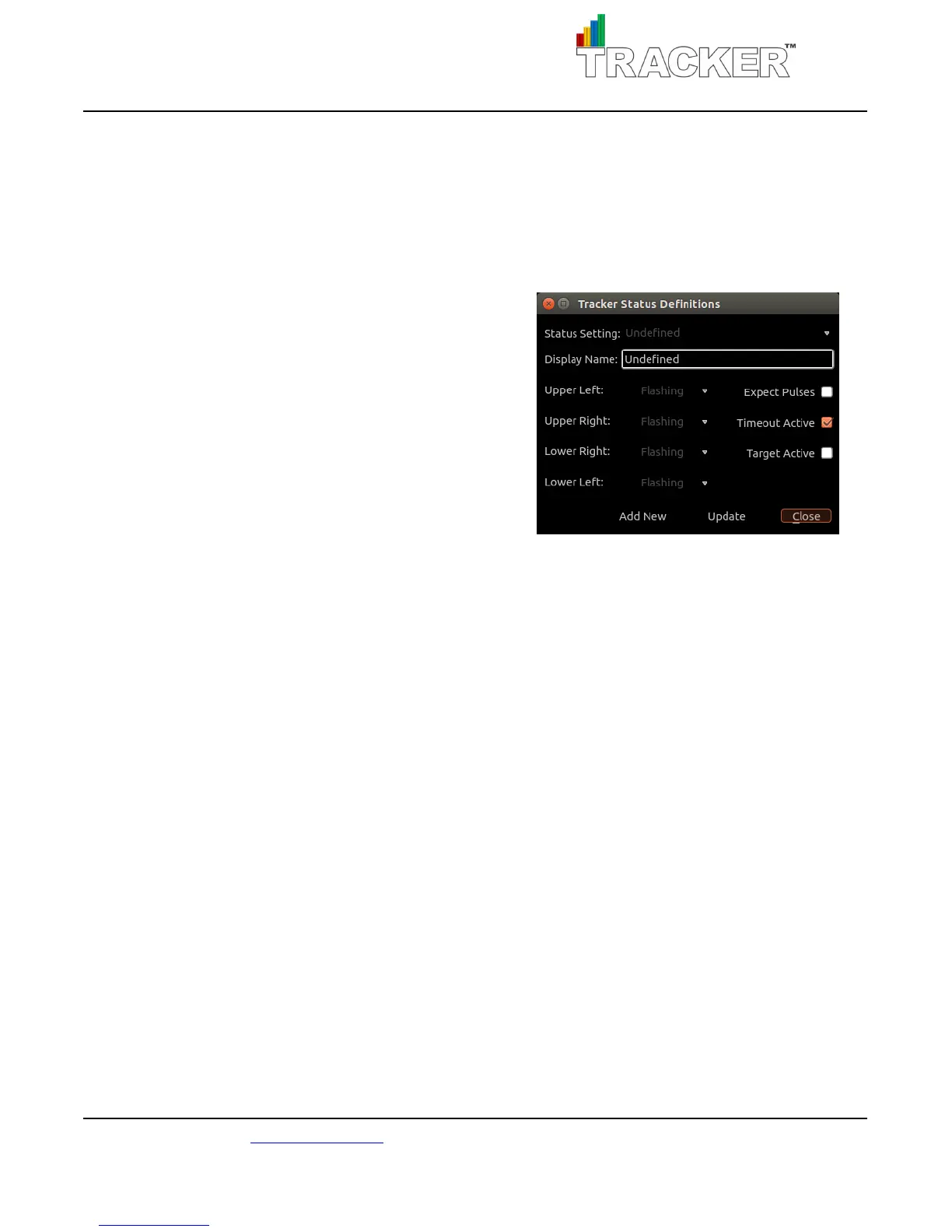
Status Setting: currently selected status template.
Display Name: title of the template.
Upper/Lower Left/Right: colored Andon light display,
settable to on, off, or flashing.
Expect Pulses: this box is checked if the sensor will be receiving input pulses from a moving line.
For example, the status of “Running” will expect pulses because the line is in operation, but “Down for
Service” will not expect pulses because the line has stopped. The default setting for “Job Setup” is
expecting pulses, but if in your operations there will be no movement on the line during setup you would
uncheck the expect pulses box.
Timeout Active: this box is checked if after a set amount of time (Pulse Timeout field in the “Update
Tracker Settings” screen on the TR unit) the TR will go into an “Undefined” status if the opposite of the
Expect Pulses setting is happening.
For example, if a TR is in the status “Running” and there are no pulse inputs, the TR will go into an
“Undefined” status, prompting the operator to set the TR to the correct status. Alternatively, if a TR is in
the status “Down for Service” and there are pulses incoming, the “Undefined” status is entered.
Target Active: this box is checked if the target/takt fields should increase during an event status.
For example, if a TR is in the status “Running” the takt will increase because the line is in normal
operation. If a TR is in the status “Job Set Up” the takt will not increase because the any incoming pulses
are considered a part of the setup process and not normal operation. Whereas the status “Out of
Product” will increase the takt because the line should procedurally not run out of products while
normally operating.



 To Next Page