See training videos at TrackMyOps.com Page 4
©Output Technology, Inc. Jan15.—All rights reserved. Specifications subject to change. TRACKER™ Real-Time, Real Results
Establishing a Wireless Network
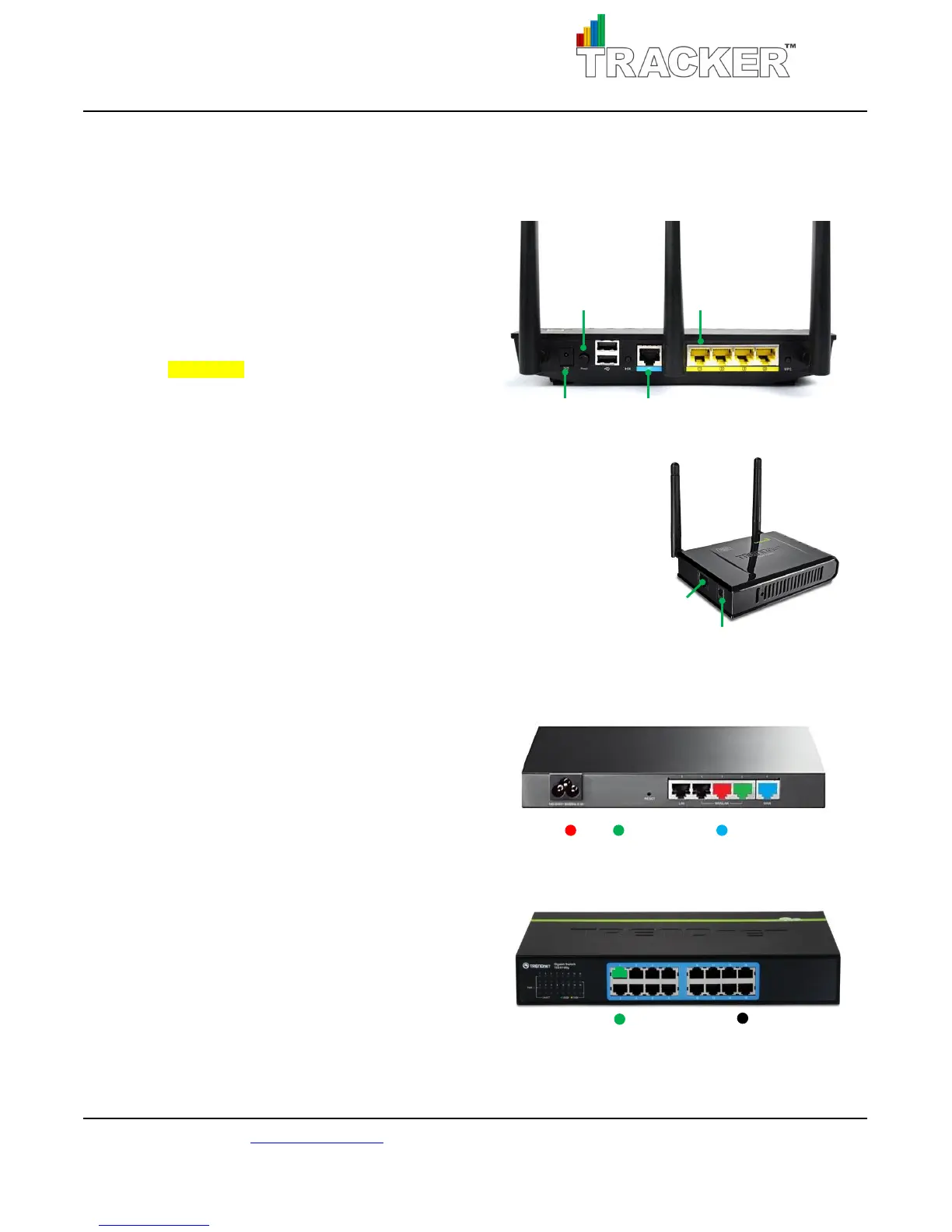
Powering Up Your Wireless Router
1. Plug in power supply.
2. Connect WAN (internet) into blue Ethernet port.
3. Connect Ethernet cable from yellow Ethernet port 1
to left Ethernet port in the HUB.
Please note: only use the left port of the HUB.
4. Turn on power switch.
Powering Up Your Access Points
1. Plug in power supply.
2. Connect Ethernet cable from TR Ethernet port to Access Point.
3. Repeat for every TR.
Establishing a Wired TR Network
Powering Up Your Ethernet Router
1. Plug in power supply.
2. Connect WAN (internet)
3. Connect HUB.
4. Connect Switch
5. Turn on.
Powering Up Your Ethernet Switch
1. Plug in power supply.
2. Connect cable from HUB left Ethernet port
to Ethernet switch Port 1.
3. Connect Ethernet cable from TR Ethernet port
to Ethernet switch Ports 2-16



 To Next Page