14
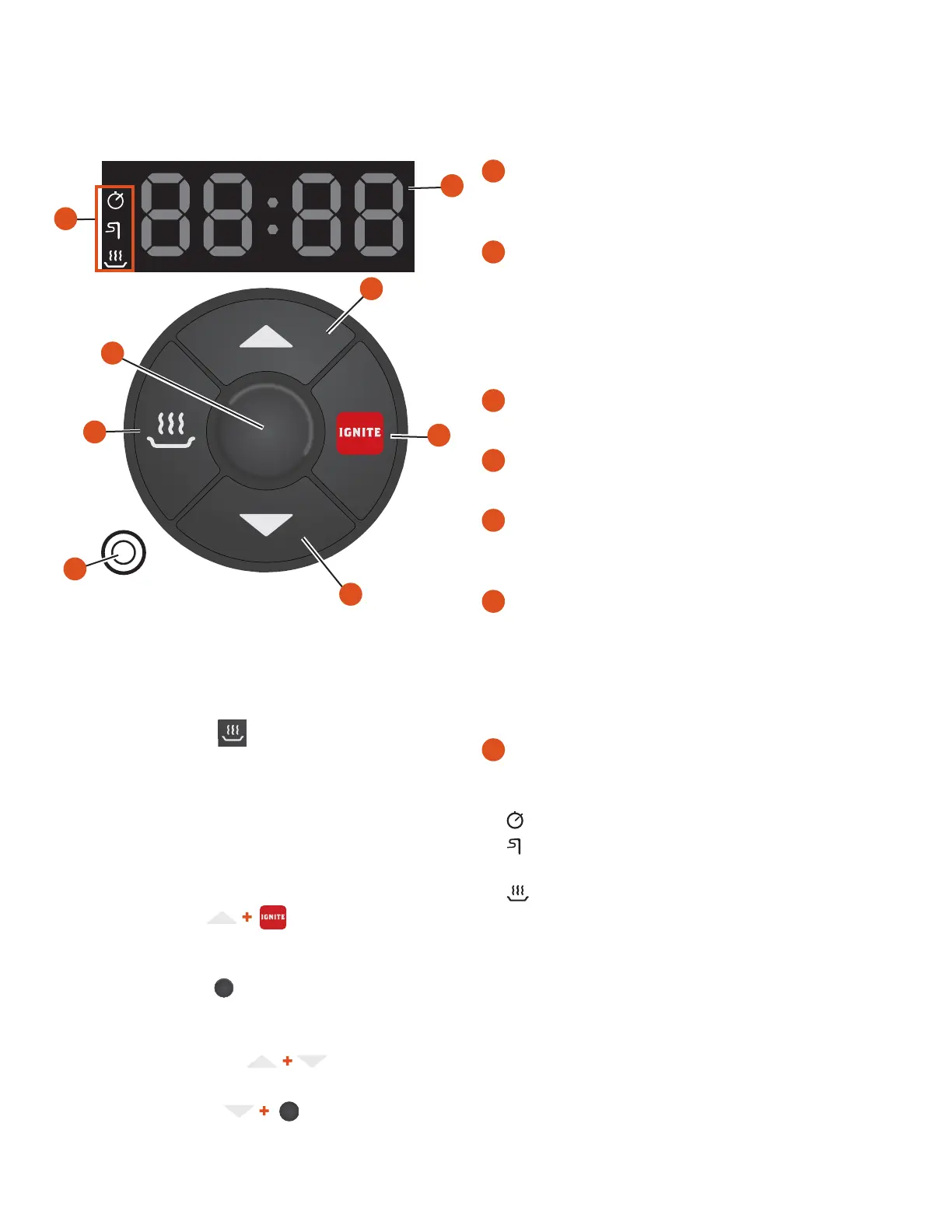
YOUR CONTROL PANEL AND DISPLAY Your Traeger® Grill is equipped with a digital controller with AGL (Advanced Grilling Logic).
Before you begin using the grill, it will be helpful to familiarize yourself with the dierent features of the control panel.
ARC CONTROLLER GUIDE
KEEP WARM FUNCTION
Keep Warm can be used to pause the cook cycle at any time during
grilling. Simply press “Keep Warm” again to resume cooking. Keep
Warm maintains the grill temperature at 215°F (102°C).
PRESS AND HOLD FUNCTIONS
NOTE: For the following, when the grill is in standby mode, press and
hold the buttons indicated for 2 seconds.
PRIME THE AUGER
“Pri” will flash on the display, and the auger will prime for
30 seconds. Repeat to cancel.
GRILL SHUTDOWN
“OFF” will flash on the display nine times. Grill will display “COOL DN” for
15 minutes as it cools down. To cancel, repeat while “OFF” is flashing.
CHANGE BETWEEN °F/°C
Grill will change the display between °F and °C.
DISPLAY FIRMWARE
Firmware will scroll across the display.
NOTE: The letter “v” will display as “u.”
NOTE: Temperature fluctuations are normal for Traeger® Grills. Any
significant fluctuation could be the result of wind, air temperature,
improper use, or lack of grill maintenance.
GETTING TO KNOW YOUR GRILL CONTINUED
2
3
4
5
7
1
6
2
1
STATUS DISPLAY
Shows current temperature, time remaining in timer mode, or probe
cooking temperature.
2
UP/DOWN BUTTONS
Press the “Up” or “Down” button to increase or decrease
temperature or time. Press and hold to increase or decrease the
time rapidly.
NOTE: Press and hold the “Up” and “Down” buttons at the same
time for 3 seconds to switch between Celsius and Fahrenheit.
3
IGNITE
Press IGNITE to start the grill.
4
MEAT PROBE JACK
Plug the meat probe into the jack for probe cooking.
5
KEEP WARM
This feature maintains the grill temperature at 215°F (102°C) to
keep food warm.
6
CENTER BUTTON
Use this button to turn on the grill and cycle through TEMPERATURE >
TIMER > PROBE ALARM modes. Press and hold for two seconds to
cancel a setting.
To put the grill in the shutdown cycle, press and hold the button for
two seconds in Temperature Adjustment mode.
7
INDICATOR LIGHT PANEL
The icons on this panel will light up when the corresponding
feature is active.
The Timer icon will light when the timer is active.
The Meat Probe icon will light once the probe is plugged in and
recognized by the grill.
The Keep Warm icon will light while this feature is active.


 To Next Page