Trouble Shooting
This section offers some helpful information to overcome most of the problems that you may
encounter. We also hope that this section assists you to achieve a quick and easy
installation/setup.
Problem Diagnosis
This innovative digital wireless solution integrates advance Frequency Hopping Spread
Spectrum (FHSS) technology. This technology greatly reduces the interference that comes
from other devices using the same radio frequency (2.4GHz), e.g. WIFI, Bluetooth, cordless
phones etc. You now can enjoy superior wireless picture quality without a flickering or noisy
image. However, weaker signal (lag or still image) may be observed from time to time,
depending on the environment where the system is installed.
The system complies with FCC part 15.247, ETSI (EN) 300 328, audio/video signals transmitted
about, or over 500 feet / 150 metre in the ‘line of sight’. However, ‘line of sight’ installation is
difficult to achieve due to obstacles etc. Factors affecting transmission include microwave ovens
and/or other high frequency electromagnetic waves. Reinforced concrete walls, large-scale metal
products and objects should not be located near to the camera, or the monitor. Water also creates
an obstacle to signal transmission, as it absorbs the signal and should be avoided. People etc
passing through the transmission area may also cause unstable signal quality. However, in ‘normal
use’ as a rear-view or interior (vehicle) camera, the system should offer excellent performance and
provide a clear and interference-free image/view.
How to improve the wireless signal quality?
If possible, remove any obstacles from between the camera and monitor that might reflect/absorb
the signal. Obstacles could include furniture, cabinets or walls. If the wireless signal strength is low,
position the monitor/antenna at a new angle (ideally vertically), or readjust camera/monitor position
until an improvement is achieved. Or, if possible, relocate the camera closer to the monitor.
Why Image Compression?
In order to achieve a secure and interference free signal, this digital wireless system utilises a
narrow 2Mb frequency-hopping bandwidth. Different from traditional 2.4GHz analogue wireless
systems, the digital wireless signal is compressed and then transmitted in Motion JPEG (MJPEG)
format. By digitising and compressing the raw analogue data the available bandwidth is used more
efficiently/securely. Consequentially, you might observe an indent image line if you are using a
larger display monitor, or a plasma TV.
How to improve the image quality when using large display screens?
When QVGA is selected, ‘pixel scattering’ is unavoidable. However, you can change the image to
VGA and by doing so, more pixels are ‘scattered’ on the screen. Therefore to achieve the best
display performance, when outputting the video/signal, a 32" or smaller monitor / TV is
recommended.
Getting Started
Step1: System Connections
Camera Connection:
3.
1.
2.
AB
-168
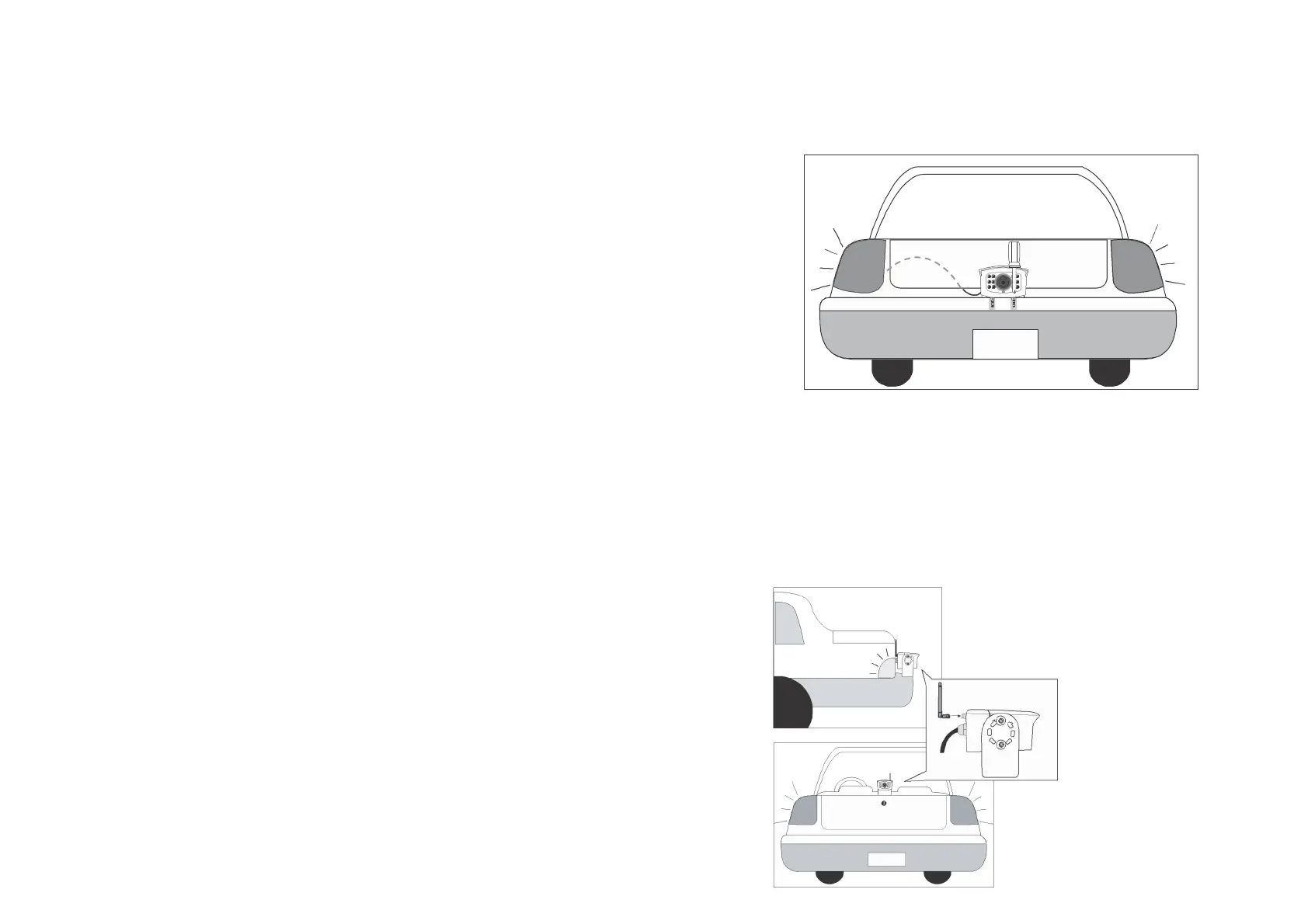
1. For reversing, choose a location on the rear bumper etc that you wish to
install t h e c a m e r a (usually in the middle of bumper), for a HGV etc high up
and looking down, usually gives the best view. For inside a horsebox/trailer,
mount the camera high up and ideally behind the horse(s).
2. Screw the camera's mounting bracket to the desired location.
3. For reversing, connect the power cable to the reversing light of the vehicle
and th e c amer a will be automatically powered when the vehicle is in reverse;
otherwise connect to any available power source (ideally use a switched
source to prevent inadvertent battery drain).
Antenna Installation to t he Camera:
Screw the dipole antenna to the antenna
connector.
OR
AB
-168


 To Next Page
 Loading...