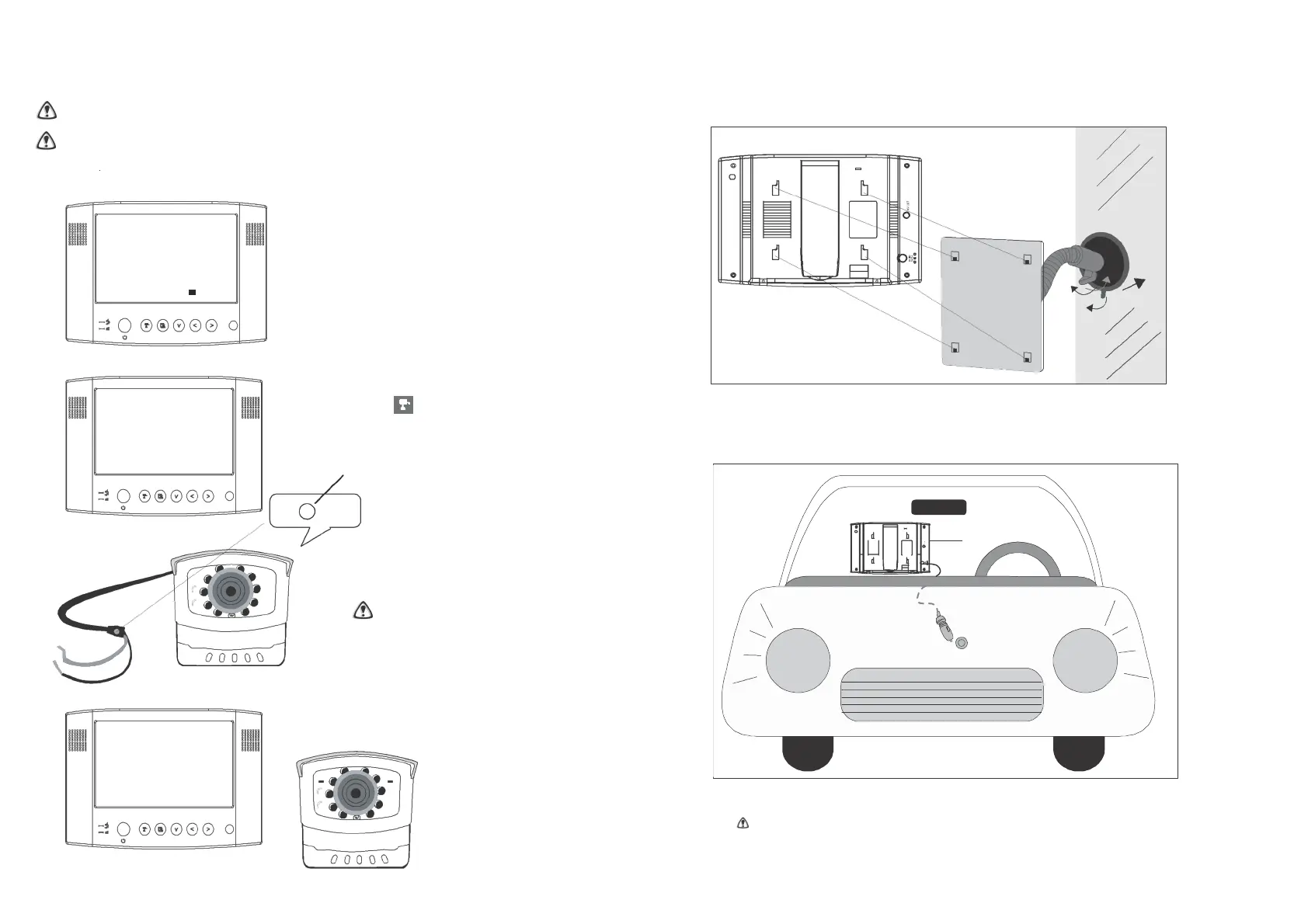
Pairing a Camera(s)
Proceed with this function ONLY when the camera cannot be found by the system or when you
have a n additional/new camera(s) to view.
Before pairing the camera, make sure tha t th e camera power cord is correctly connected to a live
power source & the blue LED is illuminated.
LCD Monitor
Connection
Pair CAM 1 2 3 4
A. Simply pair the camera by selecting the
desired channel in Menu Mode.
B. Only assign one camera to one channel.
Channel memory will be overwritten if
2
another camera is assigned to the same channel.
1
3
C. Pairing a new camera to channel 3, settings
as shown:
Please Press
Pair Key
on Camera Side
D. Press (Pair).
E. System will count down within 60
seconds, system message as shown:
Pairing key
1. Fasten the metal panel to the monitor.
2. Attach the rubber pad to the windscreen. Make sure the glass is clean and dry to ensure that the
holder fixes securely.
3. Pull the lock knob down to fix the holder (this holder is not designed to be left permanently in the
windscreen – please use the dashboard mount for perm anent fixture).
F. Within t h e 60-second
count down, press the
Link/Pairing Key on the
camera cable.
To complete Pairing, the camera needs to
be powered, which may mean that the
reverse gear will need to be selected
(without the engine running and with the
hand-brake applied).
DC Input
Cigarette Power
Source
G. Once pairing is
completed, the
camera and
monitor status
indicators will
illuminate.
4. Connect the cigarette adaptor to the DC power jack of the LCD monitor.
ONLY use the pr ov ided power adaptor (a hard-wire power adapter is available separately).
5. Plug the power unit to the cigarette power source (w hic h may operate via the ignition)
.
6. Position the monitor antenna (& camera antenna) vertically to achieve the best reception.


 To Next Page