11
Pairing camera(s)
Complete the Pairing proces
s if an additional/new
camera is utilised, or if
the monitor
doesn’t display a camera; use this process to pair the camera with the monitor.
IMPORTANT:
1. To complete the Pairing process, ensure the camera is powered (reverse gear
may need to be selected).
.
2. Complete the Pairing process ONLY when a camera cannot be displayed,
or when an extra/new camera(s) is utilised.
3.
Before pairing the camera, make sure that the camera power cable is
connected to a power source.
4. Only assign one camera to one
channel. Channel memory will be overwritten
if another camera is assigned to the same channel.
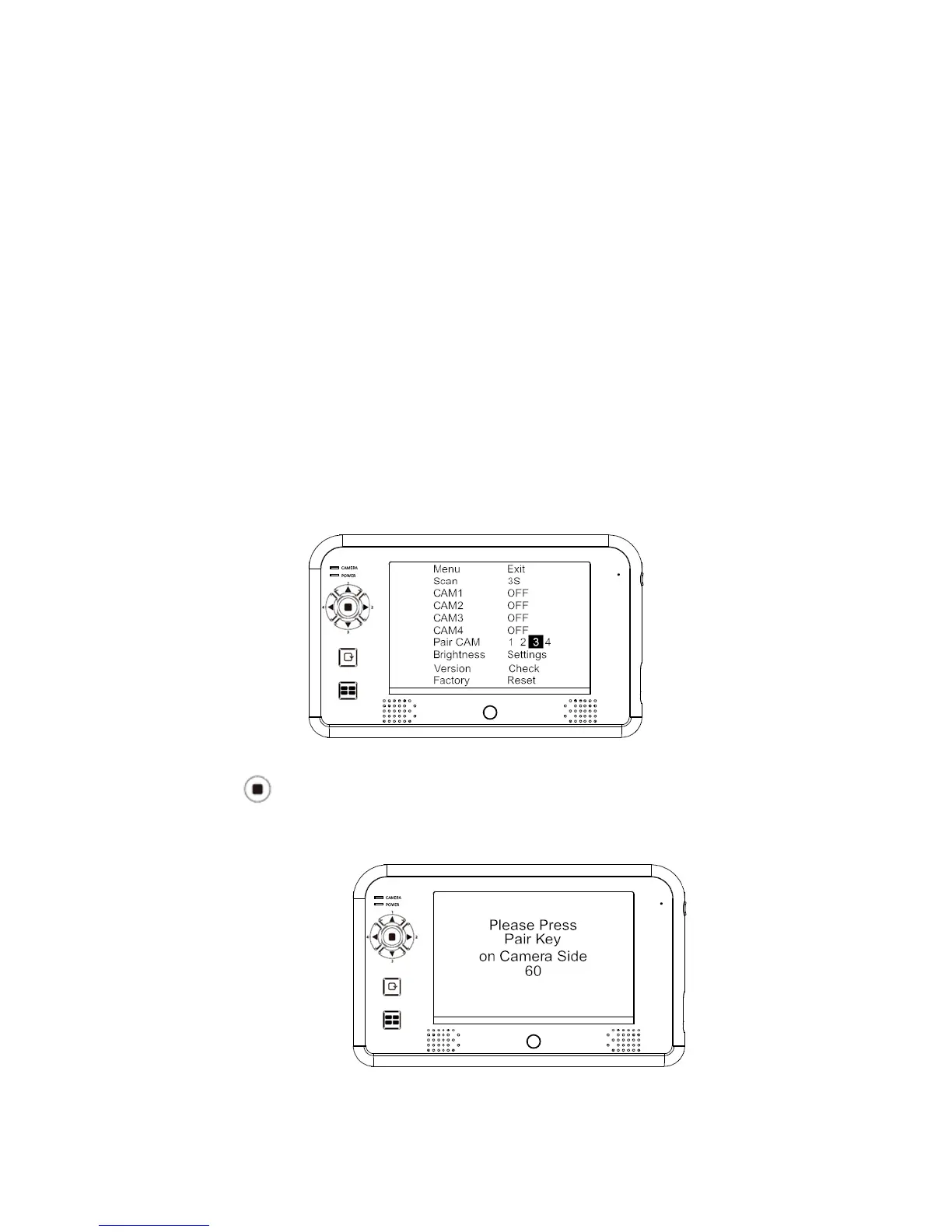
Example: To pair a new camera to channel
3, please follow the steps below:
1. Press (MENU button) to highlight channel 3 in the 'Pair CAM' function
and start the pairing
process.
2. System will count down within 60 sec
onds, system
message
as shown:
3. Within the 60-second count down, press the Pair Button on the camera
power cable.


 To Next Page