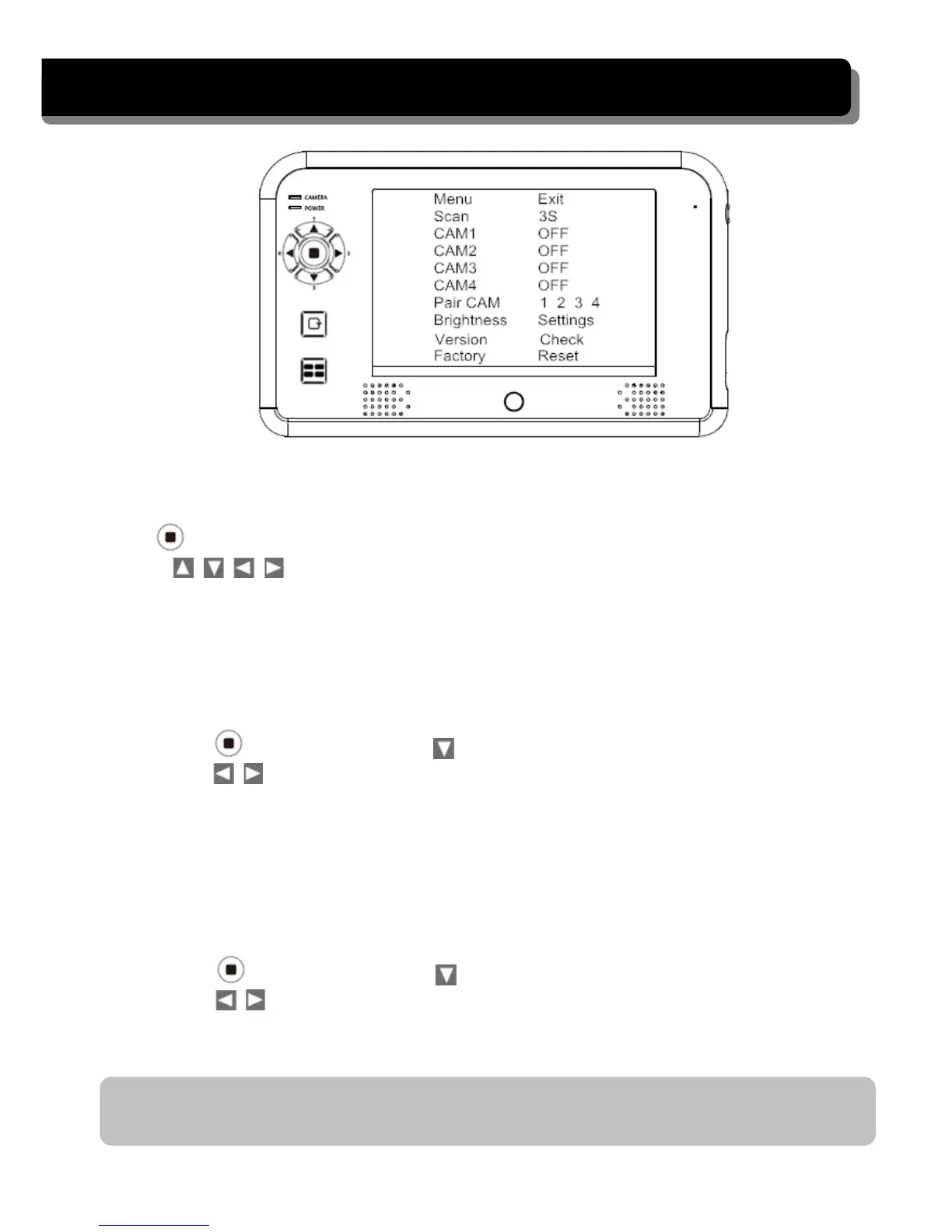
CONFIGURING THE MONITOR
Press the Power
button to switch the monitor ON. Press and hold to switch
the monitor OFF .
(MENU button) to enter/exit the Main menu.
Press
Use
the
(Left / Right / Up / Down) buttons to navigate through menu
items and change the settings.
Scan frequency
Setup the
time interval for the camera channels to be displayed in Scan
mode (3, 8 or 12 seconds).
1. Press (MENU button) and to choose the SCAN
function
2. Pres
s
to choose the scan
frequency. You can configure the system to
perform s
canning every
3
seconds / 8 seconds / 15 seconds.
Camera setting (CAM 1 – 4)
Turn ON/OFF the specified camera or set to Mirror to mirror the camera image. If
the camera is set OFF, the camera image won’t show on the monitor even it is
supplied with power.
1. Pres
s
(MENU button) and to choose CAM 1.
2. Pres
s
to turn ON/OFF CAMERA 1 or MIRROR the camera image.
3.
Repeat step 1 to 2 for cameras 2 ~ 4.
Note: If the camera(s) is installed upside down, please configure the camera to
'MIRROR' to acquire the normal screen image.
10


 To Next Page