104
RTAA-IOM-3
Menu 5 – Factory Display #2
50 - Number of Compressors: Set to
the number of compressor installed in
the unit.
51 - Compressor Tons: Set to the rating
in tons, of the each installed
compressor. See Table 2.
52 - Low Water Temperature EXV Gain
Compensation: Set to “E” if the unit
will ever operate with a leaving chilled
water temperature of 40 F or less.
53 - Fan Control: Set to “E”.
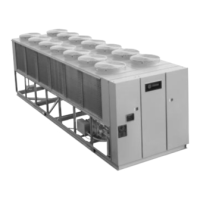
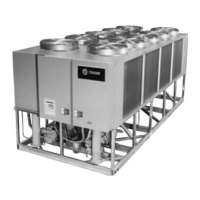
54 - Fans Per Circuit: Establishes the
number of fans installed on each
circuit. See Figures 45 and 46.
55 - Reduced Inrush Starting: Set to
“d” if across-the-line wiring or to “E” if
Wye-Delta wiring.
56 - Compressor Current Overload
Setting: Establishes the compressor
motor current overload setting, which
must agree with the DIP Switch
settings on the corresponding
compressor modules. See Table 16.
Compressor Compressor Module
A ................................. 1U4
B.................................. 1U5
C.................................. 1U6
D ................................. 1U7
57 - GP Compressor Unit: This menu
item must be set to “d”. The unit is not
to be operated unless a “d” is
displayed in this item.
58 - Low Ambient, Half Airflow Fan
(Halfpitch Blades on Lead Fan(s): Set
this menu item per the following unit
selections
RTAA 130 - 200 Standard Ambient = d
RTAA 130 - 200 Low Ambient = E
RTAA 240 - 400 All = E
59 - LATSM: Set this menu item to “d”.
5A - NNS: Set this menu item to “d”.
5b - Number of EXV Valves per Circuit:
Set this menu item per the following
unit selections
RTAA 130 - 200 Circuit 1 = 1
Circuit 2 = 1
RTAA 240 - 300 Circuit 1 = 2
Circuit 2 = 1
RTAA 340 - 400 Circuit 1 = 2
Circuit 2 = 2
5C - Future Option: Set this menu item
to “d” for both Circuit #1 and Circuit #2.
Table 16
Compressor Overload DIP Switch Settings
Overload Setting
Compressor CT DIP Sw/Decimal**
Tons Volts.Hz RLA Ext* 12345
70 200/230.60 280 -05 00100/04
460.60 122 -02 10000/16
575.60 98 -01 11110/30
85 200/230.60 306 -05 01011/11
460.60 133 -02 10110122
575.60 107 -02 00110/06
100 200/230.60 375 -05 11010/26
460.60 163 -03 10000/16
575.60 131 -02 10110122
*The CT base part number is X13580253. The numbers in this column are suffixes to the
base number.
**On the DIP switch, 1= ON, O= OFF. The decimal number is the setting Menu Item 56. The
DIP switch setting and the decimal display of Item 56 comprise a redundant overload
setting. If the values are not set to match, the related compressor(s) will continue to run,
but a diagnostic will be initiated, both settings will be ignored, and the UCM will use the
lowest possible trip setting value.



 To Next Page