EasyManua.ls Logo

Trane TZON1050 - User Manual

Trane TZON1050
32 pages
Print Icon
To Next Page IconTo Next Page
Loading...
TZON1050 Installation Guide
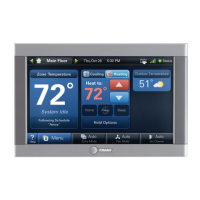
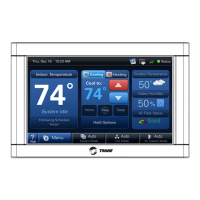
ComfortLink™ II XL1050
Communicating Connected Control
ALL phases of this installation must comply with NATIONAL, STATE AND LOCAL CODES
IMPORTANT — This Document is customer property and is to remain with this unit.
These instructions do not cover all variations in systems or provide for every possible contingency to be met in connection with
the installation. Should further information be desired or should particular problems arise which are not covered sufficiently
for the purchaser’s purposes, the matter should be referred to your installing dealer or local distributor.
18-HD80D1-6E-EN

Questions and Answers

  • C
    christopher19Aug 20, 2025
    Why is my Trane TZON1050 Control Panel not turning on?
    • I
      ijacksonAug 20, 2025
      If the display on your Trane 1050 Control Panel won't come on, it could be due to a loss of 24VAC between R & B. Here’s what you can do: 1) Check the wiring between R & B. 2) Check the transformer for 24VAC output. 3) Check for a broken or shorted thermostat wire.
  • W
    wlaneAug 22, 2025
    What to do if heating will not come on with Trane TZON1050?
    • T
      Tina AllenAug 22, 2025
      If your heating isn't turning on with the Trane 1050 Control Panel, here are a few things to check: * Make sure the system mode is set to Heat/Auto and the setpoint is higher than the room temperature. * Wait for 5 minutes to ensure the minimum off time delay isn't being enforced. * If the issue persists, the heating system may require service; check and repair the system.
  • J
    Jamie SanchezAug 25, 2025
    What to do if cooling will not come on with Trane TZON1050 Control Panel?
    • P
      Paul ReyesAug 25, 2025
      If your cooling isn't turning on with the Trane 1050 Control Panel, here are a few things to check: * Ensure the system mode is set to Cool/Auto and the setpoint is lower than the room temperature. * Wait for 5 minutes to ensure the minimum off time delay isn't being enforced. * If the issue continues, the cooling system may need service; check and repair the system.
  • A
    Amy WrightAug 26, 2025
    What to do if my Trane TZON1050 Control Panel displays an alert?
    • K
      Kevin SandovalAug 26, 2025
      If your Trane 1050 Control Panel displays an alert, navigate to the Diagnostic screen on the control panel to find a Problem Description and Possible Cause.
  • R
    Rodney WhiteAug 28, 2025
    What to do if heating or cooling is displayed on Trane Control Panel, but no warm or cool air is coming from the registers?
    • H
      Holly PorterAug 28, 2025
      If your Trane system displays heating or cooling but no air is coming from the registers, it could be due to a fan delay as the heating or cooling equipment turns on. Wait a minute for blower delays and recheck registers. If the issue persists, the equipment might not be working properly, so check and repair the system.
  • J
    john70Aug 29, 2025
    How to calibrate the indoor temperature display on a Trane Control Panel?
    • C
      christopher81Aug 29, 2025
      To calibrate the indoor temperature display on your Trane 1050 Control Panel, use the control’s menu to access and calibrate the temperature sensor. The incorrect temperature might also be caused by surrounding air flow affecting sensed temperature of the 1050 Control.
  • C
    Christina BrownAug 31, 2025
    Why does the fan run all the time on my Trane Control Panel?
    • C
      Clarence VasquezAug 31, 2025
      If the fan runs constantly on your Trane 1050 Control Panel, it might be because the fan mode is set to On, Circulate, or Clean mode. Check the 1050 Control settings to see if the fan is set to one of these modes. Also, there could be a failure in the indoor unit.
  • A
    Amber FitzgeraldSep 2, 2025
    What to do if the room temperature overshoots when the Heat/Cool setting is changed more than 2° on Trane TZON1050 Control Panel?
    • A
      Andrea RogersSep 2, 2025
      Room temperature overshooting on your Trane 1050 Control Panel when changing the Heat/Cool setting by more than 2° can occur if the heating/cooling equipment is oversized for the current conditions, preventing the 1050 Control from responding quickly enough. Also, it can be caused by an improper location of the 1050 Control. Compare heat load calculation to equipment chosen and relocate the 1050 Control or use a remote sensor.
  • V
    Victor TurnerSep 4, 2025
    How to calibrate the indoor humidity display on a Trane TZON1050 Control Panel?
    • L
      Lisa DrakeSep 4, 2025
      To calibrate the indoor humidity display on your Trane 1050 Control Panel, use the 1050 Control’s menu to calibrate the humidity sensor.
  • E
    Emily JohnsonSep 6, 2025
    What to do if the fan is set to ON but not running on my Trane TZON1050?
    • R
      Robert FlemingSep 6, 2025
      If the fan is set to ON but not running on your Trane 1050 Control Panel, the Smart Continuous Fan feature might be engaged. If indoor humidity is higher than the desired setpoint, the blower will cycle off with the equipment. A humidity icon will be displayed on the Fan Mode button when the blower operation is being inhibited due too high humidity. Also, the blower motor might not be functioning, so check and repair the system.

Summary

Safety

Wiring and Electrical Safety Precautions

Guidelines for proper wiring practices and warnings about live electrical components during installation.

Installation

Location

Guidance on selecting an optimal installation location for the 1050 Control.

Wiring

Procedures for connecting control wires and sealing the wall opening.

Field Wiring Connection Diagrams

System Setup

Installer Setup Screens

Overview of configuring parameters via Installer Setup Screens.

Group 1 - Standard Settings

Configure basic equipment components and system operation settings.

Group 2 - Zoning Settings

Settings for enabling and configuring zoning capabilities.

Group 2* - Equipment Settings

Configure equipment settings like cycles per hour for various stages.

Group 5* - Comfort Settings

Adjust comfort-related settings like dehumidification and aggressive recovery.

Group 6* - Airflow Settings

Configure blower on/off delays and compressor low stage airflow percentages.

Group 7* - Lockout Settings

Configure lockout settings based on outdoor temperature for various operations.

Indoor Sensor Setup

Procedure for assigning temperature sensors to specific zones.

Basic Operation - Non-Zoned

Stage Thresholds

Defines load value thresholds for enabling additional equipment stages.

Advanced Operation

Lockouts

Configure lockout settings based on outdoor temperature for various operations.

Stage Inhibits

Limits equipment staging by calculating recovery rate over a 10-minute period.

Diagnostic Tools

Test Modes

Tools for testing system components and operation.

Non-Variable Speed

Test modes for non-variable speed blower and compressor operations.

Variable Speed

Test modes for charging and checkout of variable speed systems.

Diagnostics

Accessing system alerts, summary tables, and history for diagnostics.

Alerts

View and categorize active and historical system alerts.

Troubleshooting

Trane TZON1050 Specifications

General IconGeneral
Power Source24V AC
DisplayColor Touchscreen
ConnectivityWired
User InterfaceTouchscreen
Energy ManagementYes
ProgrammableYes
Humidity ControlYes
Indoor Temperature SensorYes
Communication ProtocolProprietary
Remote AccessYes

Related product manuals