EasyManua.ls Logo

Trane TZON1050 - User Manual

Trane TZON1050
32 pages
Print Icon
To Next Page IconTo Next Page
Loading...
TZON1050 Installation Guide
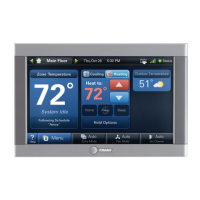
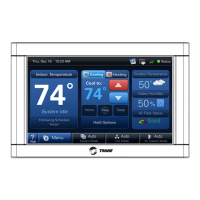
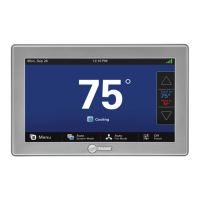
ComfortLink™ II XL1050
Communicating Connected Control
ALL phases of this installation must comply with NATIONAL, STATE AND LOCAL CODES
IMPORTANT — This Document is customer property and is to remain with this unit.
These instructions do not cover all variations in systems or provide for every possible contingency to be met in connection with
the installation. Should further information be desired or should particular problems arise which are not covered sufficiently
for the purchaser’s purposes, the matter should be referred to your installing dealer or local distributor.
18-HD80D1-6E-EN

Questions and Answers

  • E
    Ethan FoxSep 8, 2025
    Why does cooling or heating cycle too fast or slow on my Trane TZON1050?
    • E
      Emily RyanSep 8, 2025
      If the cooling or heating cycles too fast or slow on your Trane 1050 Control Panel, check the location of the 1050 Control for drafts and seal any air leaks behind it. Relocate the control or apply a remote indoor temperature sensor. Also, cycles per hour or aggressive recovery might be improperly set; adjust these features in the advanced installer setup.
  • T
    Tyler BarrySep 9, 2025
    Why can't I change the system mode on my Trane TZON1050?
    • D
      Donna RiveraSep 10, 2025
      If you cannot change the system mode to the desired setting on your Trane 1050 Control Panel, the equipment might not be configured properly. Check the standard installer setup screen to ensure the equipment is properly configured.
  • A
    amy55Sep 12, 2025
    What to do if the screen does not respond properly to a button press on Trane TZON1050 Control Panel?
    • A
      Anthony GrantSep 12, 2025
      If the screen on your Trane 1050 Control Panel isn't responding properly to button presses, the screen might be out of calibration. Remove the 1050 Control from the sub base and reset it, then follow the calibration instructions when the 1050 Control reboots. Also, there might be an internal 1050 Control fault. Remove the 1050 Control from the sub base and reset it. The Screen Lock might have been enabled, so press and hold the Menu button for 5 seconds to override the screen lock.
  • S
    shannonjohnsonSep 13, 2025
    Why is the zoning enable option not available in the Installer Settings on my Trane TZON1050 Control Panel?
    • L
      Luke WhiteSep 13, 2025
      If the zoning enable option is not available in the Installer Settings on your Trane 1050 Control Panel, the Zone Panel is either not installed or installed but not communicating. Install the Zone Panel or verify the wiring to the Zone Panel.
  • M
    Melissa FitzgeraldSep 15, 2025
    Why has zoning been disabled on my Trane system?
    • P
      paigebarrettSep 15, 2025
      If zoning has been disabled and the system is operating as a non-zoned system on your Trane setup, a system alert has likely occurred which disabled zoning but allows non-zoned operation. Check for system alerts in the Diagnostics > Current Alerts screen.
  • R
    robertsnatalieSep 18, 2025
    Why does the time set on my Trane TZON1050 Control Panel change every 24 hours?
    • M
      Michelle CarlsonSep 18, 2025
      If the time set on your Trane 1050 Control changes every 24 hours, the 1050 Control is connected to Trane Home, and the time zone set on your Trane Home account is incorrect. Correct the time zone set on your Trane Home account.

Summary

Safety

Wiring and Electrical Safety Precautions

Guidelines for proper wiring practices and warnings about live electrical components during installation.

Installation

Location

Guidance on selecting an optimal installation location for the 1050 Control.

Wiring

Procedures for connecting control wires and sealing the wall opening.

Field Wiring Connection Diagrams

System Setup

Installer Setup Screens

Overview of configuring parameters via Installer Setup Screens.

Group 1 - Standard Settings

Configure basic equipment components and system operation settings.

Group 2 - Zoning Settings

Settings for enabling and configuring zoning capabilities.

Group 2* - Equipment Settings

Configure equipment settings like cycles per hour for various stages.

Group 5* - Comfort Settings

Adjust comfort-related settings like dehumidification and aggressive recovery.

Group 6* - Airflow Settings

Configure blower on/off delays and compressor low stage airflow percentages.

Group 7* - Lockout Settings

Configure lockout settings based on outdoor temperature for various operations.

Indoor Sensor Setup

Procedure for assigning temperature sensors to specific zones.

Basic Operation - Non-Zoned

Stage Thresholds

Defines load value thresholds for enabling additional equipment stages.

Advanced Operation

Lockouts

Configure lockout settings based on outdoor temperature for various operations.

Stage Inhibits

Limits equipment staging by calculating recovery rate over a 10-minute period.

Diagnostic Tools

Test Modes

Tools for testing system components and operation.

Non-Variable Speed

Test modes for non-variable speed blower and compressor operations.

Variable Speed

Test modes for charging and checkout of variable speed systems.

Diagnostics

Accessing system alerts, summary tables, and history for diagnostics.

Alerts

View and categorize active and historical system alerts.

Troubleshooting

Trane TZON1050 Specifications

General IconGeneral
Power Source24V AC
DisplayColor Touchscreen
ConnectivityWired
User InterfaceTouchscreen
Energy ManagementYes
ProgrammableYes
Humidity ControlYes
Indoor Temperature SensorYes
Communication ProtocolProprietary
Remote AccessYes

Related product manuals