Printer Firmware Versions
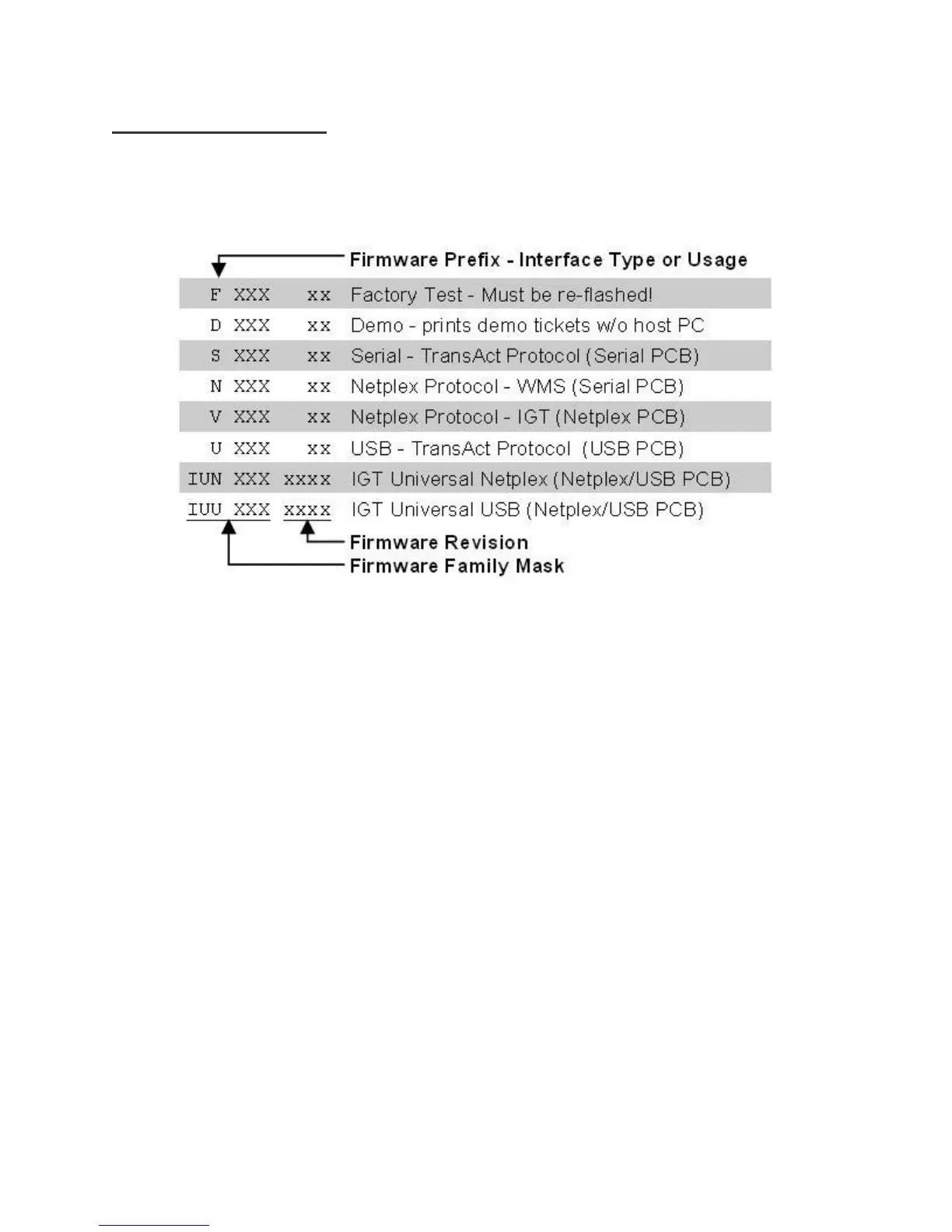
Firmware Naming Convention:
Each firmware file is named with a prefix and number that signify specific information about the firmware in the file.
The Family Mask is indicative of backwards compatible firmware.
Obtaining Printer Firmware:
Firmware files <*.cbt> are available for download from the TransAct Gaming FTP site (see page #2). After logging
in, browse to the Epic 950/Firmware folder, select the interface type and firmware version to download.
TransAct Firmware Disclaimer:
The firmware within all gaming ticket printers are subject to regulatory approval. It is the casino’s responsibility to
ensure that only approved firmware for the specific game platform is installed to avoid potential fines imposed by the
regulatory body. Please contact the game manufacture and/or regulatory agency to confirm the approval status prior
to using any new printer firmware version/s in your games.



 To Next Page