LED Master 64 manual
3. Overview
3.1 Front View
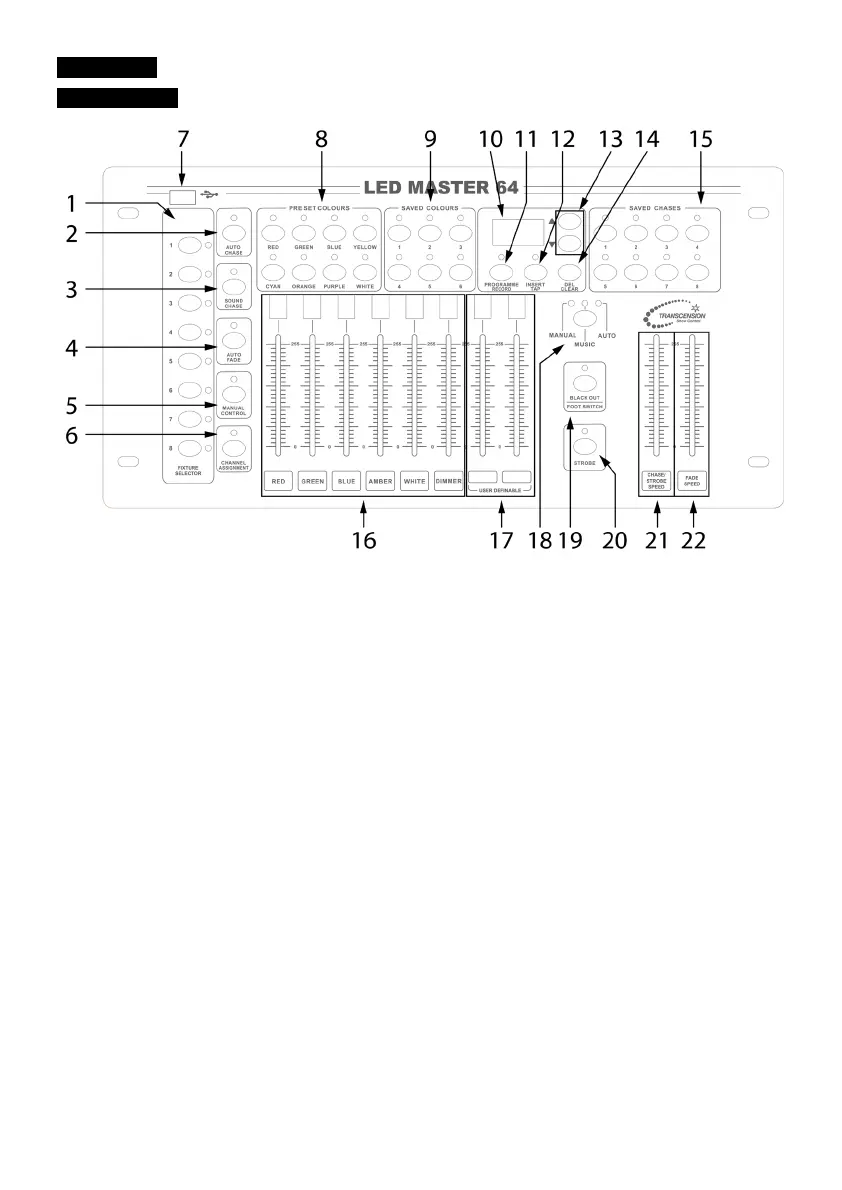
Run the built-in chase to the music
Press the button, for manual control
For channel assignment, in programme mode
Use to update software and connect a gooseneck lamp
For instant recall of colours
Select 24 colors by UP/DOWN button (4 banks of 6)
The operation values will show on the LED display
Enter or exit program/record mode
Insert one step/set up a tap speed for chases
Select bank, run chase manually, adjust the sound sensitivity and the
speed of chase auto run
Delete preset color, chase or step/clear output
Adjust the output of 1-6 channels
For user-defined operation
When using the CA-8F to control, the corresponding LED will be on
indicating Manual Mode, Sound Mode or Auto Mode
Used for blackout and to activate CA-8F operation
Activates strobe on all fixtures
Use to adjust the chase speed and set the strobe speed
Use to adjust the fade speed as a percentage of the run time


 To Next Page