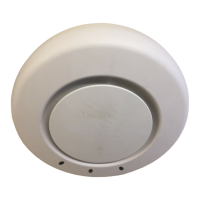
External Hardware Features
Chapter 2
Trapeze Mobility Point Installation Guide
Version 3.0
16
Confidential—Beta1 Draft—Confidential—Beta1 Draft—20 Sep 04
LEDs on Model MP-52
Figure 3 on page 10 shows the locations of the LEDs on model MP-52. Table 4
describes the LEDs.
Table 4. MP Access Point LEDs—MP-52
LED Appearance Meaning
Power Solid green MP is receiving power.
Unlit MP is not receiving power.
LINK Solid green All the following are true:
• Management link with an MX switch is
operational.
• MP access point has booted.
• MP access point has received a valid
configuration from an MX switch.
• At least one radio is enabled or is in sentry
mode.
Blinking green Management link with the MX is operational,
but at least one of the other conditions for a solid
green has not been achieved.
Unlit Management link with the MX is not
operational.
WLAN 5.0
GHz
WLAN 2.4
GHz
Solid green A client is associated with the radio.
Slowly blinking green Associated client is sending or receiving traffic.
Rapidly blinking
green
The radio is unable to transmit.
Unlit Either of the following is true:
• Radio is disabled.
• No clients are associated with the radio and
there is no traffic activity.


 To Next Page