© Copyright 2012 TRENDnet. All Rights Reserved.
TRENDnet User’s Guide
TEW-664UB
8
WiFi Protected Setup (WPS)
Wi-Fi Protected Setup (WPS) is an optional certification program from the Wi-Fi Alliance
that is designed to ease the task of setting up and configuring security on a wireless
network. There are two methods used in the WPS as below instruction.
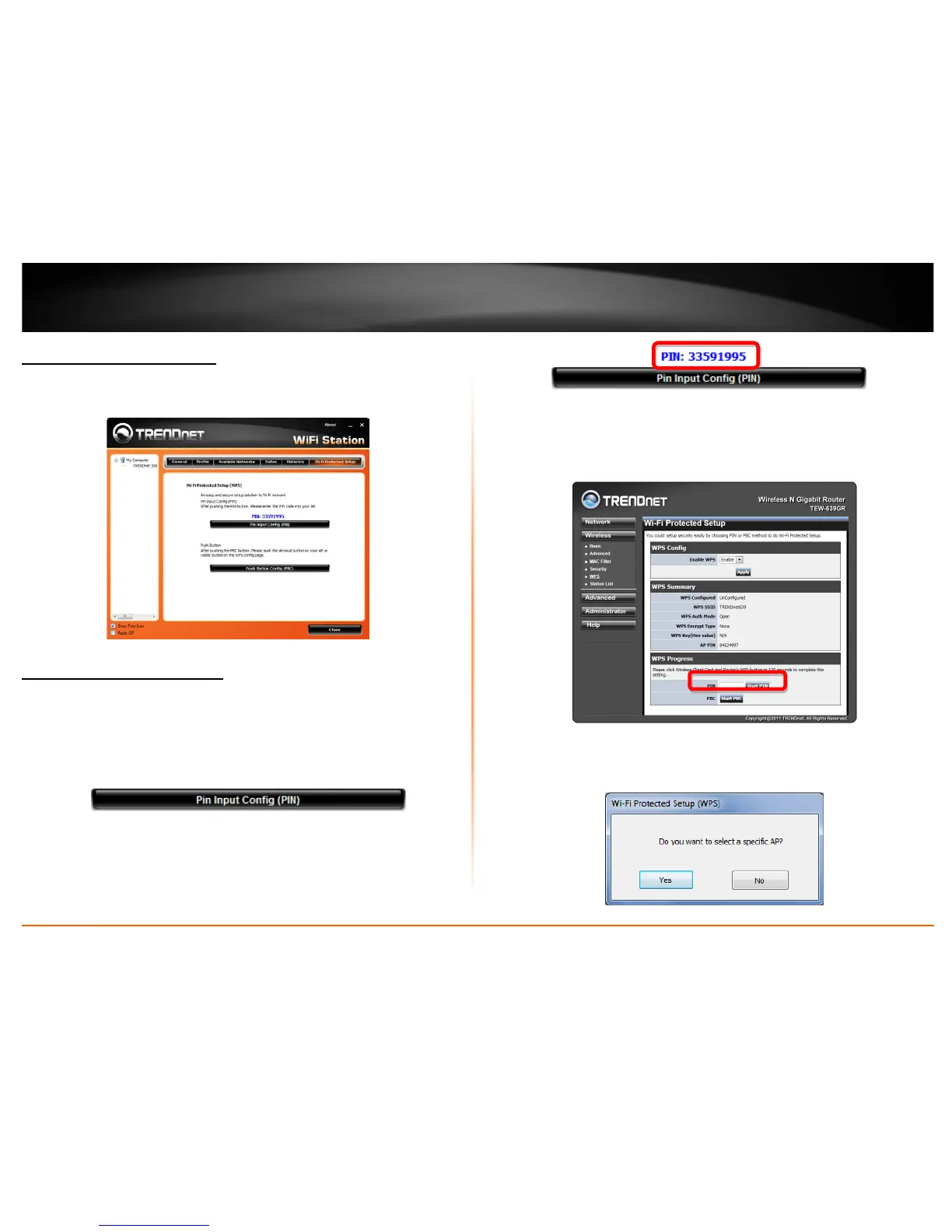
Pin Input Configuration (PIN)
Follow the steps below when using the WPS configuration with the Pin Input
Configuration method. Please note that WPS will attempt to authenticate in 120
seconds. Make sure you allow this time frame to prevent any failures.
1. Click on the Pin Input Configuration (PIN) button, the PIN is shown on the button of
the windows.
2. Enter the PIN code into the WPS “Client PIN number” of you wireless access point
or router ( in example, TRENDnet TEW-639GR Wireless N Gigabit Router) then click
the Start PIN button, the wireless access point or router will start the WPS
configuration process.
3. Choose to select the specific AP/Router or a WPS enabled device with client PIN
entered. Choose Yes to allow you to select your wireless network. Choose No to
have the wireless adapter select your wireless network on its own.











 To Next Page