PoE Web Smart Switch Series Product Overview
TEG-3102WS Overview
TEG-3102WS
Package Contents
In addition to your switch, the package includes:
• Quick Installation Guide
• Power adapter (12V DC, 1.5A)
If any package contents are missing or damaged, please contact the retail store, online
retailer, or reseller/distributor from which the product was purchased.
TPE-3102WS Hardware Features
Front View
Rear View
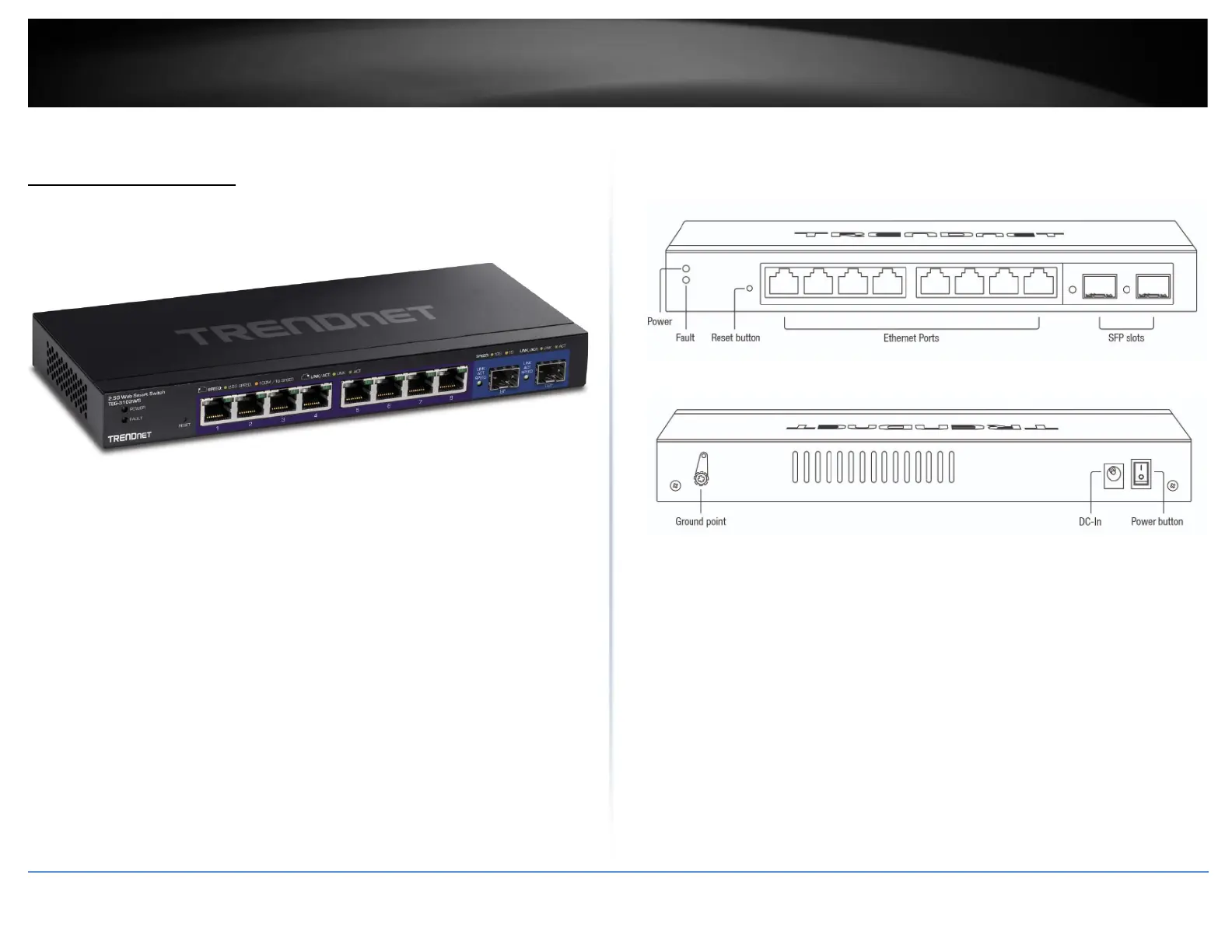
• Power and Fault LED – LED indicators for power and fault.
• Reset Button – Press and hold the button 1~3 seconds and release to
reboot the device. Pressing the button more than 5 seconds will reset
the switch to factory defaults. The ports LEDs will turn off to indicate
that the reset was initiated.
• Ethernet Ports (1-8) – Connect network devices at 2.5Gbps / 1Gbps /
100Mbps speed.
• SFP Slots (9-10) – Supports optional 10Gbps or 1Gbps mini-GBIC SFP
modules for uplink or downlink connections.
• Ground Point – Switch can be grounded from this point
• DC-In







 To Next Page