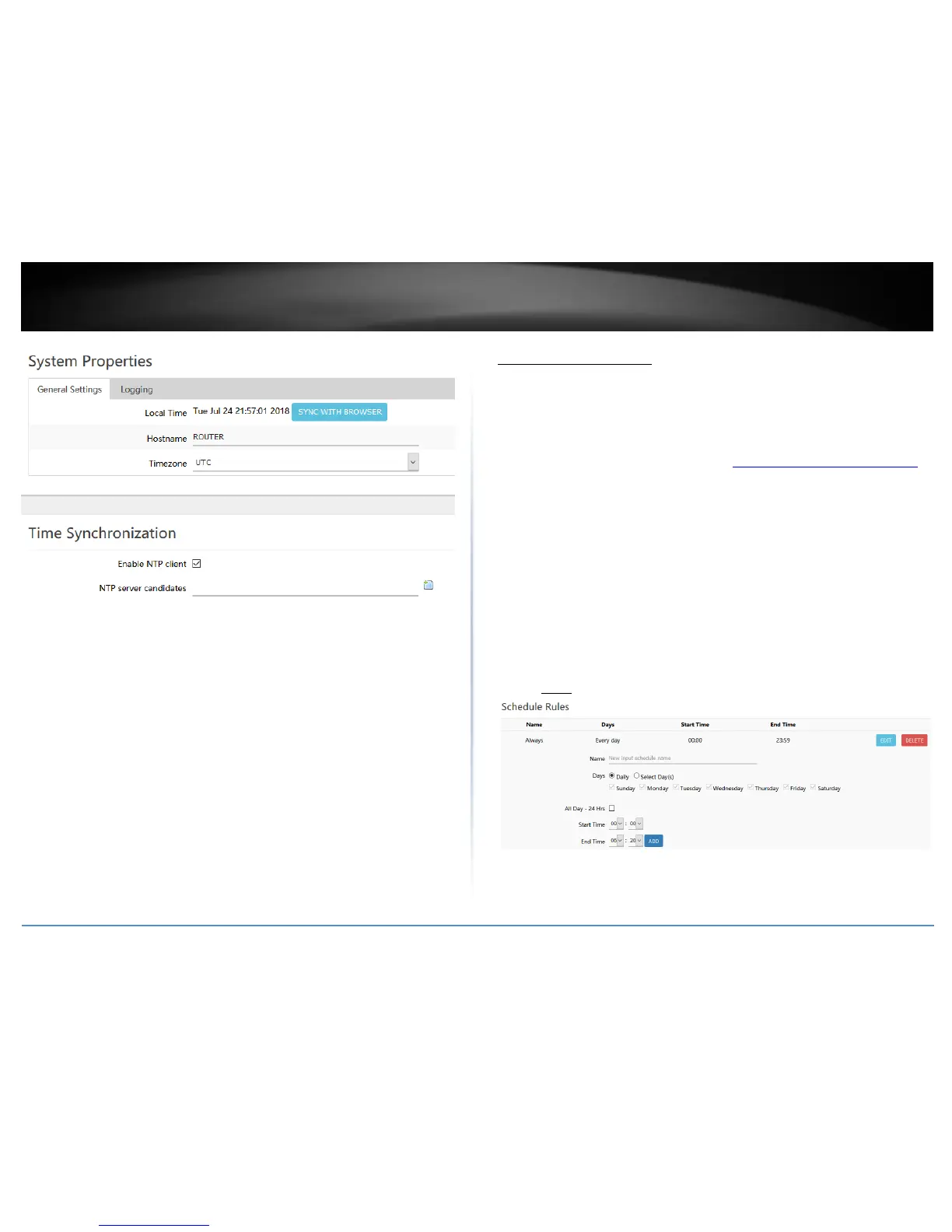
Create time schedules
Administrator > Schedule
Your router allows you to create schedules to specify a time period when a feature
should be activated and deactivated. Before you use the scheduling feature on your
router, ensure that your router system time and date settings are configured correctly.
1. Log into your router management page (see “Access your router management page”
on page 8).
2. Click on Administrator and click Schedule.
3. Review the settings below. Click Add to add the new schedule to the list and Apply to
save and commit the changes.
Name – Enter a name for the new schedule rule.
Days – Choosing Daily will set the set the schedule rule to occur at the specified
time every day. Choosing Select Day(s) will allow to manually select which
specific days for the schedule.
All Day – 24 Hrs – Checking this option will set the schedule to run all 24 hours
instead of manually configured a specified time period.
Start Time / End Time – Manually define a time period for the schedule.
Note: The time period is specified in 24 hour format.













 To Next Page