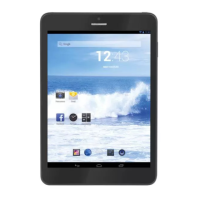
TAB 7 C4
24
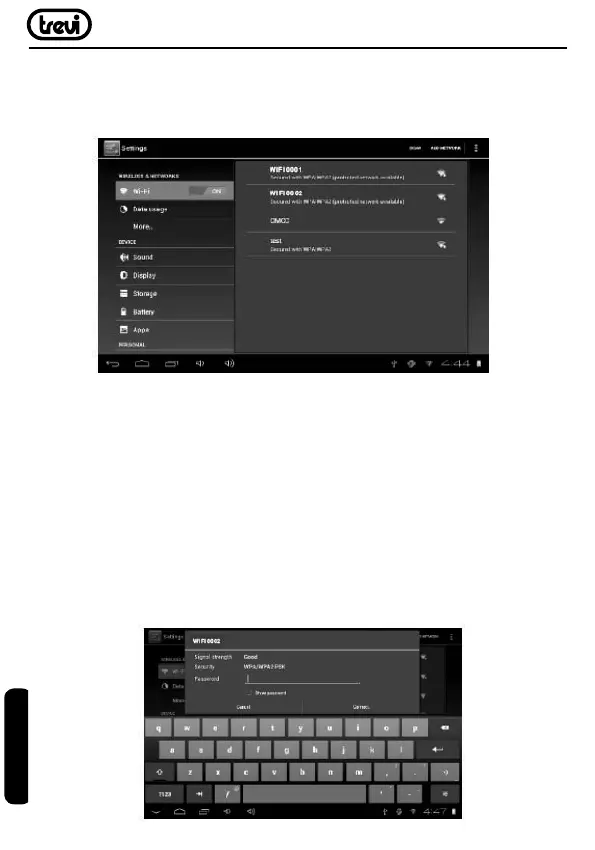
a.GototheHomescreen:PresstheHomekey.
b.OpentheSettingsmenu:taptheiconrightuponthehomescreentogetintothelauncher,
then touch Settings icon.
c.OpentheWireless&networksmenu:SlidetheicontoONstatus.
WhenWi-Fiison,thetabletwilllookforanddisplayalistofavailableWi-Finetworks.
Note:Ifanetworkthatyouhaveconnectedtopreviouslyisfound,thetabletwillconnect
toit.Ifyoudon’tseeyournetworkinthelist,youcanforcethetablettore-scan.Toscan
fornetworks,taptheMenukey,andthentouchScan.
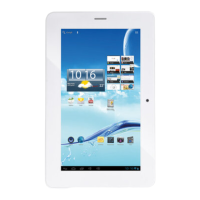
2.SelectanavailableWi-FinetworktoconnectTo:
InthesameWi-Fisettingsmenuabove,touchanetworkinthelist.
Ifthenetworkisopen,thetabletwillpromptyoutoconfirmconnectiontothenetwork.
Touch Connect to confirm.
Ifthenetworkissecured(asindicatedbyaLockicon),thetabletwillpromptyoutoentera
passwordorothercredentials.TouchtheWirelesspasswordboxtoshowtheon-screen
keyboardandthenuseittoenterthepassword.TouchConnecttoconfirm.
ENGLISH


 To Next Page