12
Rev. 05 - 2011 - B
TDX Service Tool
Select the country in which your TDX headend system is located.
The country you selected is now displayed in the Country field.
To enter the Time zone settings area, click the arrow bracket to the left of
Time zone settings.
Time zone
settings
13
Rev. 05 - 2011 - B
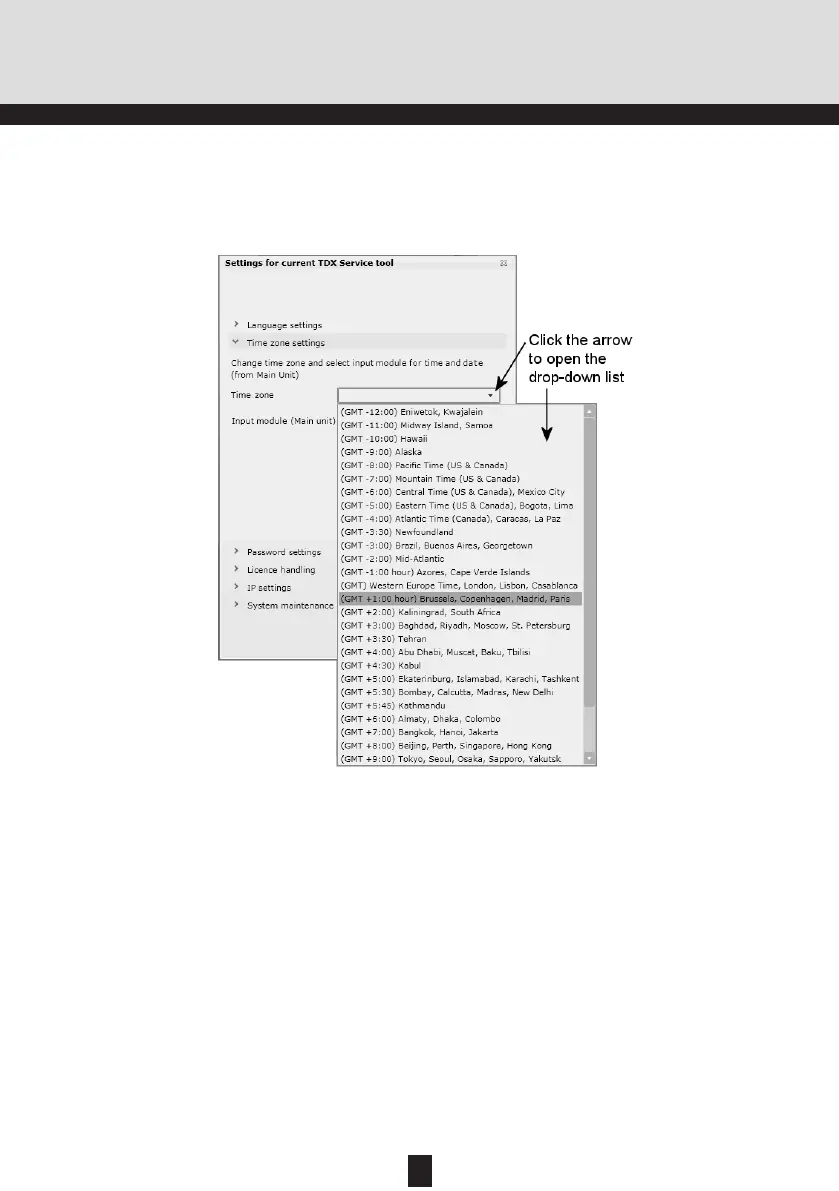
To set the time zone of your TDX headend system, click the arrow to the right
of the Time zone field to open the drop-down list with the time zones you can
choose from.
TDX Service Tool
To set time in accordance with the time zone, click the arrow to the right of
the Input module field to open the drop-down list that contains all the input
modules installed in your main unit.
Select the time zone you want to use in connection with your TDX headend
system.
The time zone you selected is now displayed in the Time zone field.


 To Next Page