22
Rev. 05 - 2011 - B
TDX Service Tool
CA Modules
window
Click the CA Modules tab in the TDX Service Tool to display the CA Modules
window.
The first time you display the CA Modules window in a new configuration the
module list only displays the number and type of the CA modules that you
have inserted in the main and subunits.
You have to configure the CA modules one by one.
To display the Configuration window, click the Setup button of the CA mod-
ule you want to configure.
23
Rev. 05 - 2011 - B
TDX Service Tool
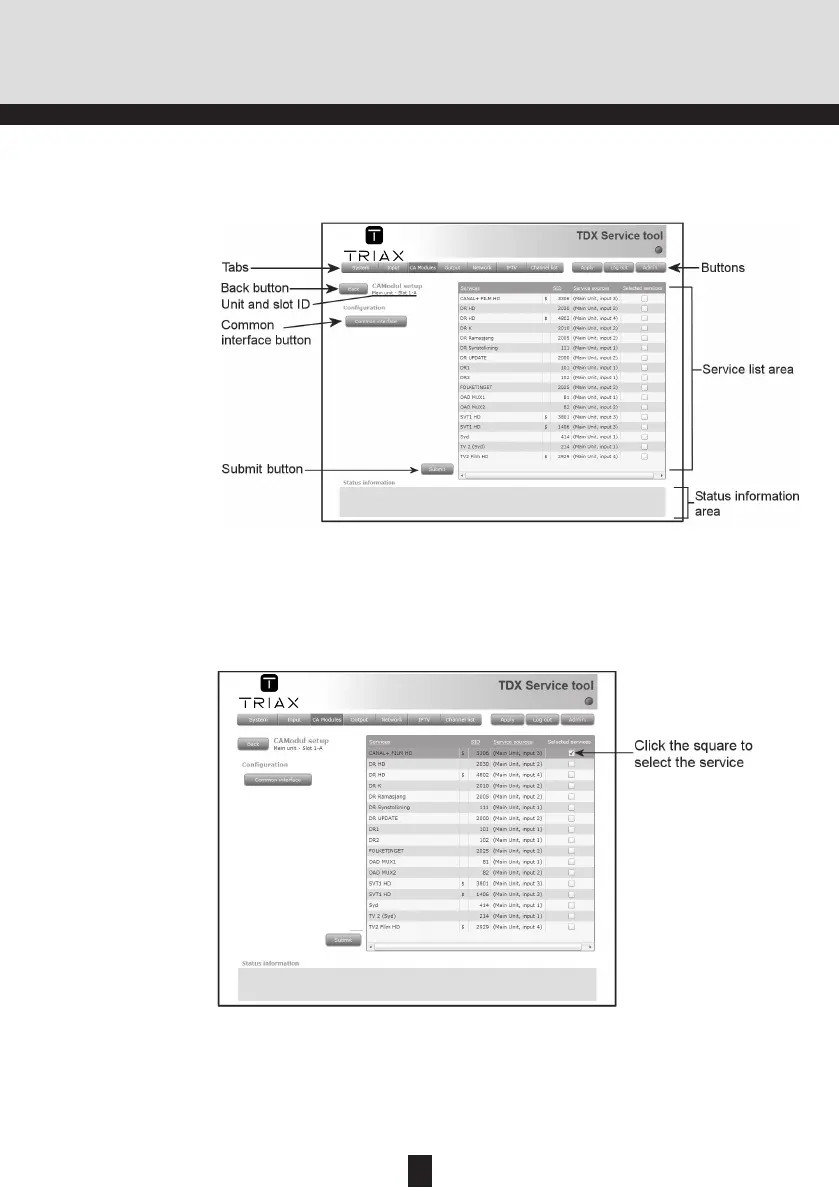
The first time the TDX Service Tool displays the Configuration window for a
CA module in a new configuration nothing is selected in the service list area.
CA Modules con-
figuration window
When you have selected the service you want to descramble you have to
click the Submit button to save this information in the headend system and
return to the CA Modules window.
In the Service list area you can select the service or services that you want to
descramble. The services that have to be descrambled before you can out-
put them are marked with a dollar sign - $.
To select a service, click the check box (square) to the right of the service
you want in the service list area.
You only need to use the Common interface button when you encounter
problems with descrambled services.


 To Next Page