8
Rev. 05 - 2011 - B
TDX Service Tool
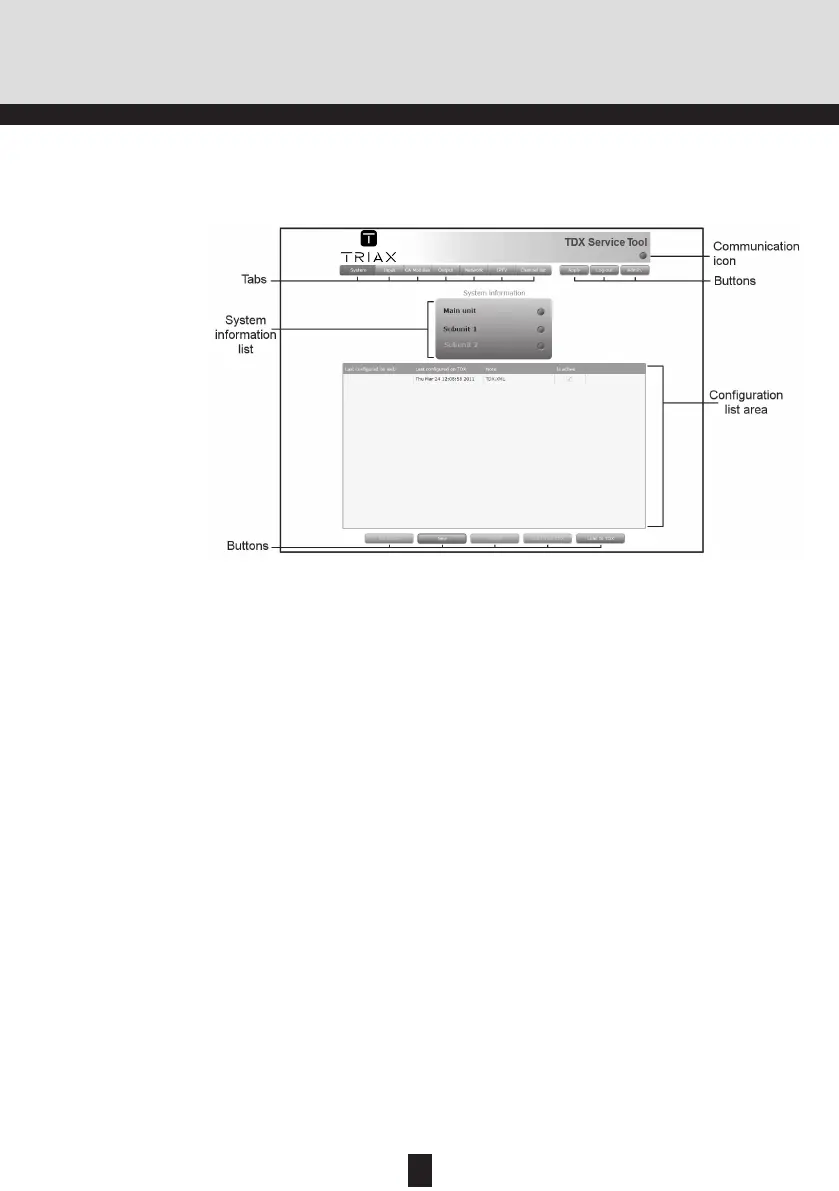
System window
The System window contains a number of tabs and buttons, information
about connected units and a configuration list area.
Via the tabs you enter the different stages of set-
ting up your input and output modules.
You use the buttons in the upper right-hand corner
in connection with the TDX Service tool whereas
you use the buttons below the configuration list
area in connection with the entire setup itself.
This list displays whether any subunits are con-
nected to the main headend unit and also whether
they are up and running.
This list area will display your present configuration
of your headend system as well as the previous
versions of the configuration.
Configuration list
area
System information
list
Buttons
Tabs
Informs you when the communication between the
TDX system and the TDX Service Tool fails. For
more information, see “Communication icon” on
page 9.
Communication icon
In connection with every new headend system the System win-
dow in the TDX Service Tool will display an empty configuration
list area.
Note


 To Next Page