28
Rev. 05 - 2011 - B
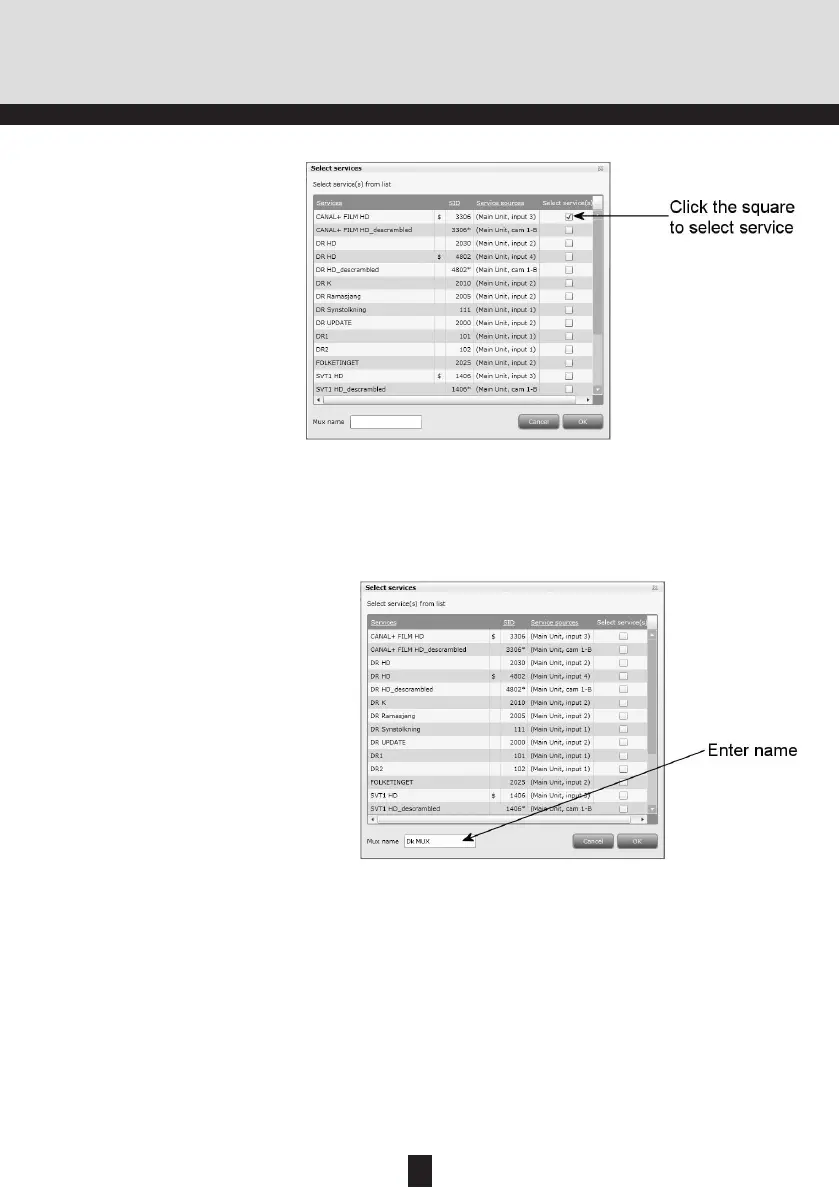
In the Select Services window you can select the serv-
ice or services that you want to output.
TDX Service Tool
Note
By clicking one of those column headlines
that are underlined in the Select services win-
dow you can sort the list into alphabetical or
numerical order depending on which column
headline you click.
29
Rev. 05 - 2011 - B
TDX Service Tool
Click OK to return to the Configuration window.
Now you continue to select or enter values in the other
fields in the Configuration window.
To select a service, click the check box (square) to the
right of the service you want.
If you want to give your selection of services a name,
enter the name in the Mux name field.
Note
When you have selected a service this service
will no longer be available in the TDX-pool.
Services from input module
To select the services from a particular input module,
click the arrow to the right of the Select input field to
open the drop-down list.
Select “Transparent” from the drop-down list.


 To Next Page