TROUBLESHOOTING
1919
19
PROBLEM POSSIBLE CAUSE SOLUTION
THE APPLIANCE DOES NOT SWITCH ON
The power cable extension is not connected
to the mains socket.
Check that the plug on the extension cable
has been inserted into the mains supply
socket.
The power cable extension is not connected
to the appliance's power cable.
Check that the plug on the cable of the
appliance has been inserted into the socket
on the extension cable.
The electrical specications of the appliance
should correspond to the electrical
specications of the power supply network.
Make sure that the electrical specications
of the appliance correspond to the electrical
specications of the power supply network,
check the technical information on the serial
number plate.
Extension cable damaged.
Check the extension cable is not damaged,
and if it is, replace it.
Overheating of the brush head motor.
Make sure that the thermal breaker on the
back of the handlebar has not tripped. If it
has, wait a few minutes until it has cooled
down, then press the specic circuit breaker
button to reactivate the power supply and
motor operation
INSUFFICIENT DETERGENT SOLUTION
ON THE PAD HOLDER
The amount of detergent in the solution tank
is insufcient for the work that needs doing.
Make sure that the amount of detergent
solution in the solution tank is sufcient for
the work to be carried out, and if necessary
ll the solution tank.
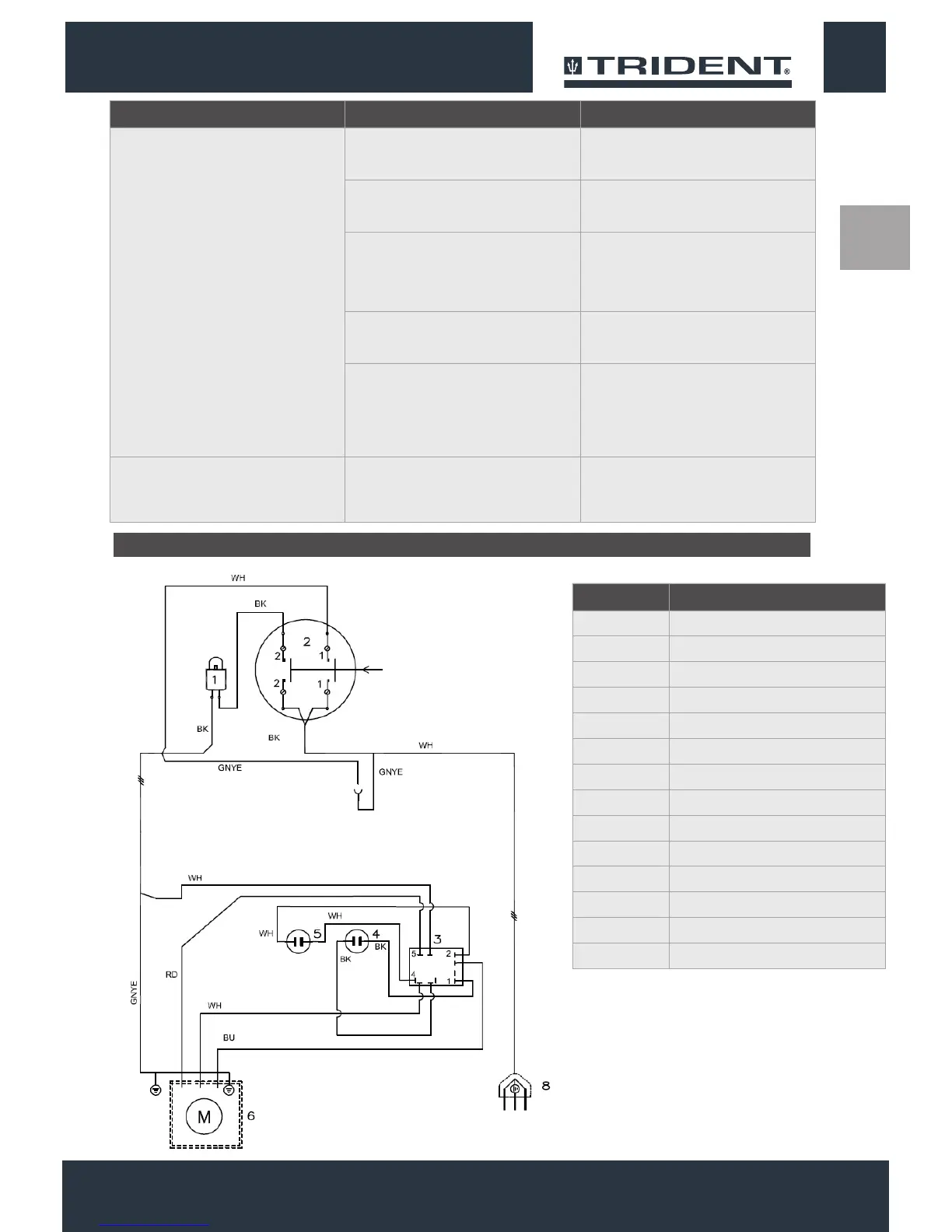
POS. COMPONENT
1 CONTACT BREAKER 16A
2 SWITCH 20A
3 START RELAY
4 START CONDENSER
5 WORK CONDENSER
6 MOTOR 1100W 100/115V 50/60HZ
8 PLUG
BK BLACK
BU BLUE
BN BROWN
RD RED
WH WHITE
GNYE YELLOW/GREEN
ELECTRICAL DIAGRAM


 To Next Page