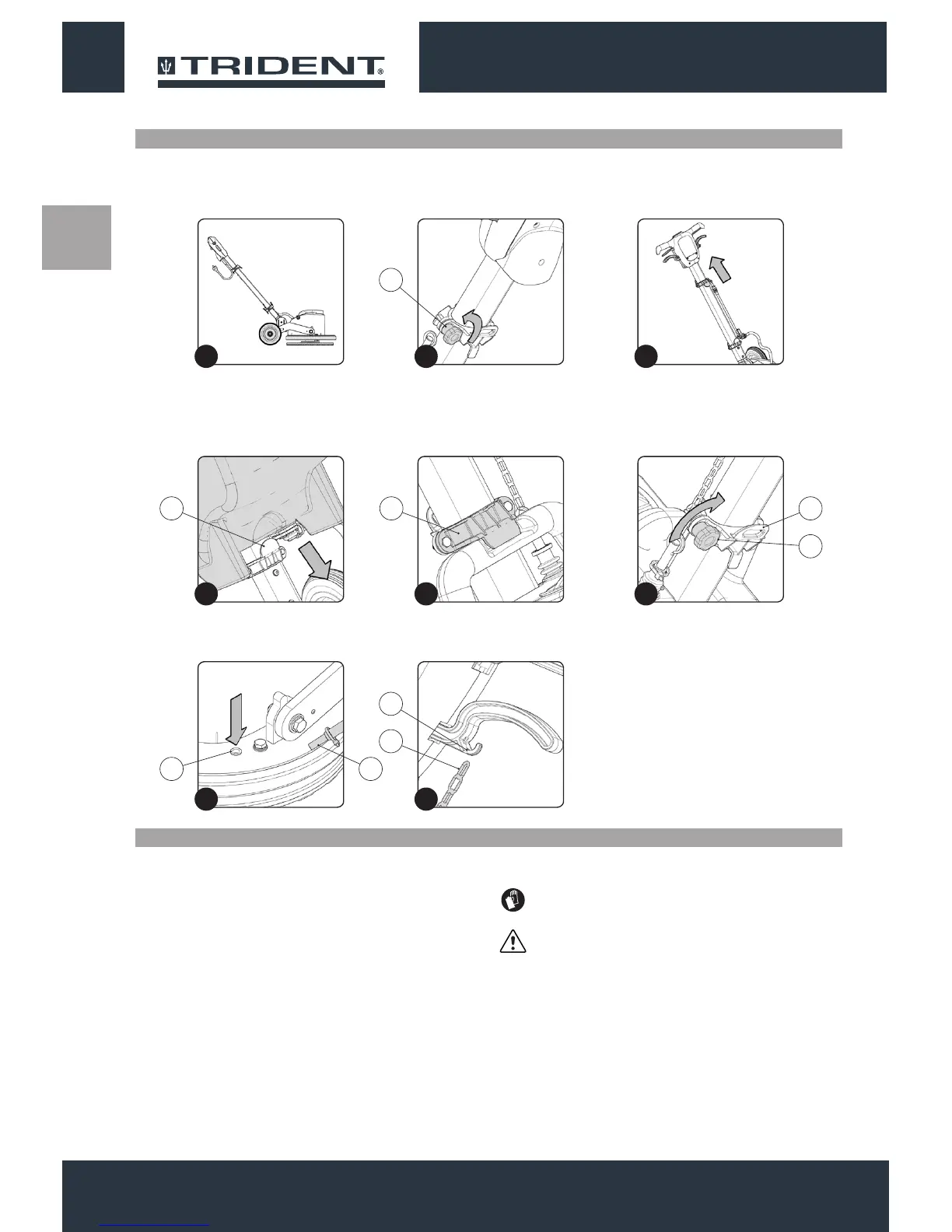
To insert the solution tank onto the handlebars, proceed as follows:
1. Secure the handlebar in a position at about 45° with respect to
the ground (Fig.1).
Fill the solution tank only when the column is in vertical position, by
proceeding as follows:
1. Remove the solution tank cap (1) (Fig.1).
2. Fill with clean water, at a temperature no higher than 50°C.
3. Add the liquid detergent to the tank in the concentration and
manner indicated on the detergent manufacturer's label. The
formation of excess foam could damage the internal components
of the machine, so only use the minimum amount of detergent
needed.
2. Unscrewing the closing knob (1) (Fig.2) position the upper
brackets beyond half of the column (Fig.3) (if it has not already
been positioned).
4. Insert the solution tank cap (1) (Fig.2).
ATTENTION: You are advised to always wear protective
gloves, to avoid the risk of serious injury to your hands.
ATTENTION: We recommend that you vacuum at intervals
the dirt-loaded foam with a vacuum cleaner for liquids.
INSERTING THE SOLUTION TANK (OPTIONAL)
INSERTING THE DETERGENT SOLUTION (OPTIONAL)
3. Put the solution tank on the column, so that the bottom of the tank
is anchored to the xed bracket (2) on the column itself (Fig.4).
4. Holding the tank with one hand, move the mobile bracket (3)
down until the solution tank is locked to the column (Fig.5).
5. Lock the position of the mobile bracket (3) by tightening the
closing knob (1) (Fig.6).
6. Insert the water distribution pipe (4) in the hole on the brush head
(5) (Fig.7).
7. Insert the solution tank tap tie chain (6) in the coupling in the tap
control handle (7) (Fig.8).
1414
14
1
4
7
2
5
8
3
6
1
2
5 4
6
7
3 3
1


 To Next Page