TT21/TT22 Transponder Installation Manual 22 August 2017
00560-00 AP
______________________
40 Trig Avionics Limited
8.3 Mode Selector Knob
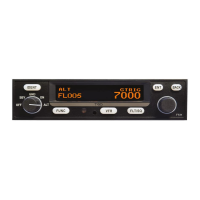
The left hand knob controls the power to the transponder and the operating
mode.
Power is removed from the transponder.
The transponder is on, but will not reply to any interrogations.
The transponder will respond to Mode S ground interrogations from
surface movement radar.
The transponder will respond to all interrogations, but altitude
reporting is suppressed.
The transponder will respond to all interrogations.
When airborne, the transponder should always be set to ALT unless otherwise
directed by Air Traffic Control. When you are taxiing on the ground, the
transponder should be set to GND unless your installation includes a gear squat
switch or GPS based automatic Air/Ground determination which will
automatically select GND on landing. In these cases the mode switch can be
left in ALT on the ground.
8.4 Push Buttons
Press the IDT button when ATC instructs you to “Ident” or
“Squawk Ident”. This activates the SPI pulse in the transponder
replies for 18 seconds. IDT will appear in the display.
Pressing the FN button provides access to changing the Flight ID
and the ADS-B position monitor and display brightness control.
Pressing the VFR button sets the transponder to the pre-
programmed conspicuity code. Pressing the button again
restores the previous squawk code.
The ENT button enters a digit in the code selector.


 To Next Page