V3 / V4 / V5 / V6 / V8
750 50 0045 03 35
9. CONFIGURATION
Various parameters of the instrument can be configured,
Press the
key during 2 seconds to enter set-up
menu
A simple pressure on
validates the choice
and allows passing on to the next menu.
Quitting the set-up mode is automatically made after
passing the last menu. It is however possible to quit at any
moment by pressing the
Validation key
during 2 seconds.
> 2 s
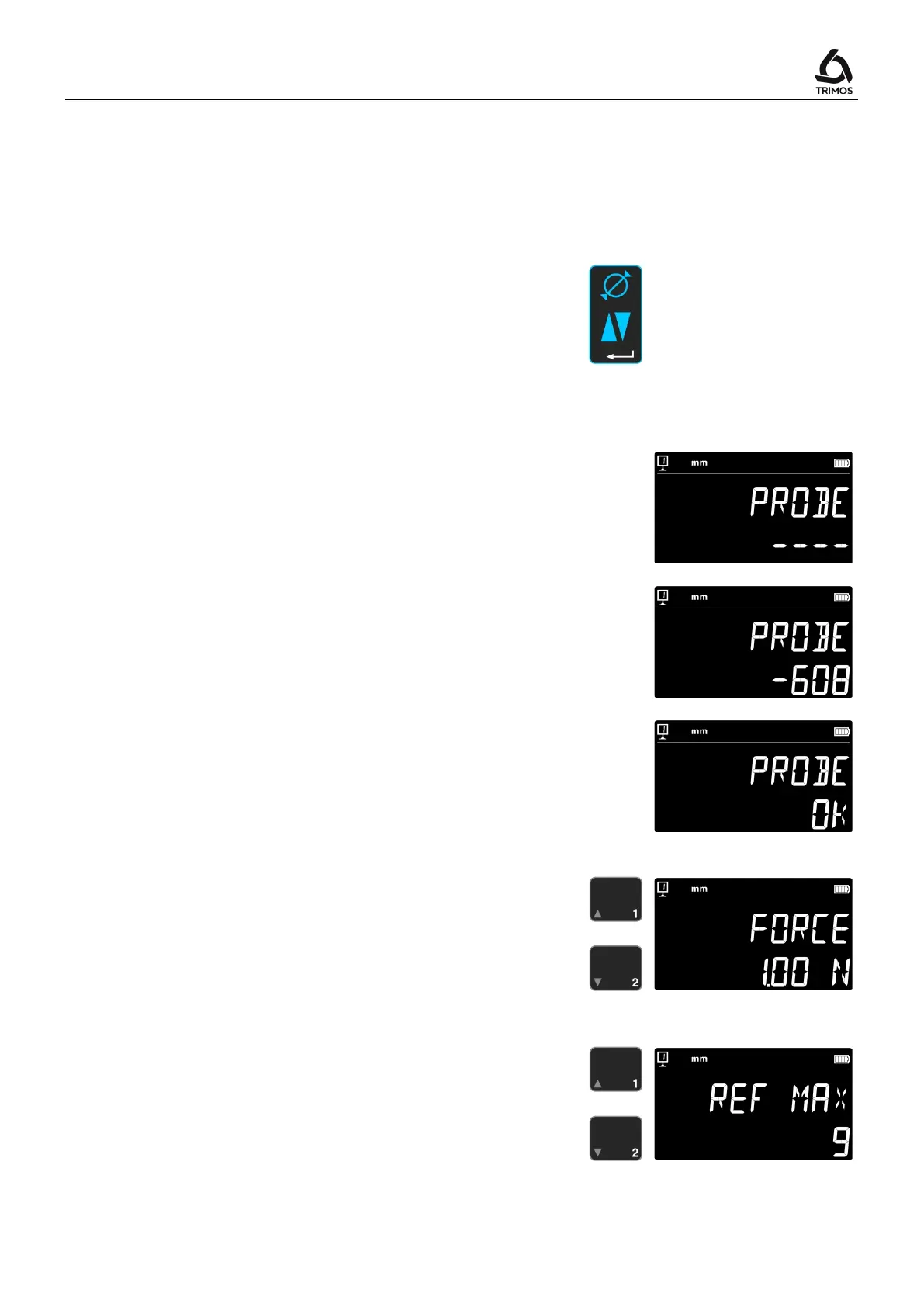
Control of probe weight balancing
This function allows adjusting the balancing of the probe
weight.
1. Start-up display
2. As soon as a movement of the carriage is detected, a
numeric value corresponding to the position of the
double carriage is displayed.
3. The carriage is considered as balanced when
is
displayed in neutral position. The balancing procedure
is described in § 10.3.
1.
2.
3.
Measuring force adjustment
The measuring force can be electronically adjusted from
0.75 N to 1.5 N. To adjust, press the keys opposite.
Factory setting: 1N
Number of references definition
The number of references available for the user can be
defined (1 ÷ 9). To do so, press keys opposite.



 To Next Page