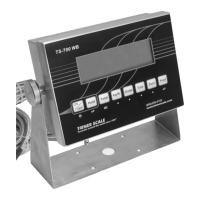
FUNCTION/OPERATION
To Add Weights:
With weight on scale, press the Total key to
place weight and count in memory. Remove
weight, place next item on scale, press Total to
add weight to total weight and total count.
To View Accumulated Total:
Press Total and Print key at the same time. The
total weight will flash continuously.
To Print Accumulated Total:
Press and hold the Print key for 3 seconds while in
View Totals mode (requires optional printer).
To Go Out of View Accumulated Total Mode:
Press and hold the Total key. “Clr n” will
display.
If you wish to continue adding to the totals,
press the Print to accept the “Clear-No” prompt.
Continue weighing and adding items as
required.
To Clear the Totals Memory:
Press the Zero/Up Arrow key to change the
“Clr n” display to “Clr y”. Press the Print key to
accept the “Clear-Yes” prompt.


 To Next Page
 Loading...