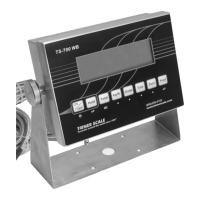
Calibration Switch, TS-700 MS: Remove the screws
and the back plate of the enclosure. A white-capped
calibration switch is located at the bottom left corner of
the circuit board. Press the switch fully in and release.
This will place the switch in the up position, allowing
access to the calibration parameters. Loosely reattach
the rear plate.
Calibration Switch, TS-700 SS: Remove the screws
and the back plate of the enclosure. A calibration
switch is located at the bottom left corner of the circuit
board. Move the switch to the “On” position, allowing
access to the calibration parameters. Loosely reattach
the rear plate.
Calibration Switch, TS-700 WB:
Enclosure With No Bolts: Power off the unit. To open
the enclosure, place the indicator upside down (not
face down) on a work surface. Locate the two slotted
holes near the connection sockets. Insert a flat blade
screwdriver into each slot (one at a time), pushing the
blade inward while angled towards the back of the
indicator. This will release the retaining prong and
enable removal of the front cover. Carefully open the
enclosure.
A white-capped calibration switch is located at the
bottom left corner of the circuit board. Press the switch
fully in and release. This will place the switch in the up
position, allowing access to the calibration parameters.
Close the enclosure.
Enclosure With Bolts: Power off the unit. Unfasten
and remove the four bolts from the enclosure back.
Carefully open the enclosure.


 To Next Page
 Loading...