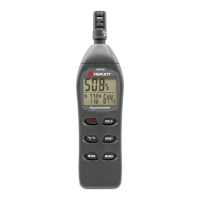
99 Point Memory
Up to 99 readings can be stored manually for later viewing directly on the
meter’s LCD. This data can also be transferred to a PC using the supplied
software program.
1. With the meter ON, press the REC button momentarily to store a
reading
2. The MEM display icon will appear with the memory address number
(01 -99)
3. If the 99-reading memory is full, the MEM icon and memory location
number will not appear
4. To view stored readings, press and hold the LOAD button until the
MEM display icon appears alongside the memory address number.
5. Use the up and down arrow buttons to scroll through the stored
readings.
6. To clear the data, press and hold the REC/SETUP and LOAD
buttons simultaneously until ‘CL’ appears in the memory location
field on the LCD
16,000 Point Datalogger
The LT68 can automatically record up to 16,000 readings in its internal
memory. To view the data, the readings must be transferred to a PC via
the supplied software.
1. Using the SETUP mode, set the time and sample rate. The default
sample rate is 1 sec.
2. To begin recording, Press and Hold the REC button until the MEM
display icon begins blinking. Data will store at the sample rate while
the MEM icon is blinking.
3. To stop recording. Press and Hold the REC button until the MEM
icon disappears.
4. If the memory is full, OL will appears as the memory number.
5. To clear the memory, with the meter off, press and hold the REC
button and then press the power button. “dEL” will appear in the
display. Release the REC button when “MEM” appears in the
display, the memory has been cleared.



 To Next Page