EasyManua.ls Logo

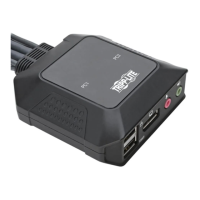
Tripp Lite B032-DPUA2 - User Manual

Tripp Lite B032-DPUA2
32 pages
Print Icon
To Next Page IconTo Next Page
Loading...
1
Owner’s Manual
2-Port USB/DP Cable
KVM Switch with Audio
Model: B032-DPUA2
Español 8 • Français 16 • Русский 24
PROTECT YOUR INVESTMENT!
Register your product for quicker service
and ultimate peace of mind.
You could also win an ISOBAR6ULTRA
surge protector—a $100 value!
www.tripplite.com/warranty
1111 W. 35th Street, Chicago, IL 60609 USA
www.tripplite.com/support
Copyright © 2018 Tripp Lite. All rights reserved.
18-10-178-933895.indb 1 10/23/2018 1:49:33 PM

Questions and Answers

  • A
    Andrew WilliamsAug 9, 2025
    What to do if mouse and/or keyboard is not responding on Tripp Lite B032-DPUA2 Switch?
    • Z
      zjohnsonAug 9, 2025
      If your mouse and/or keyboard aren't responding when connected to the Tripp Lite Switch, it might need a reset. To resolve this, power off all devices, then power off the B032-DPUA2. Wait five seconds, and then power the B032-DPUA2 back on.
  • K
    kellicohenAug 23, 2025
    Why monitor does not display after KVM cable set is hot-plugged into Tripp Lite B032-DPUA2?
    • M
      Mary BakerAug 23, 2025
      If your monitor doesn't display anything after hot-plugging the KVM cable set into the Tripp Lite Switch, there could be a couple of reasons: 1. Your HD audio/video graphics card might not be compatible with cable set hot-plugging. In this case, power off all devices, including the B032-DPUA2. Ensure all KVM cables are properly connected, then power on the B032-DPUA2, followed by the computers. 2. Your graphics card driver may be outdated. Try upgrading to the latest graphics card driver.

Tripp Lite B032-DPUA2 Specifications

General IconGeneral
Device TypeKVM switch
Number of Ports2
Audio SupportYes
Form FactorDesktop
Computer Connections2
Console Connections1
Video PortsDisplayPort
HDCP SupportYes
Port TypeDisplayPort
Input ConnectorDisplayPort
Output ConnectorDisplayPort
Power SourceUSB
CompatibilityWindows, Mac, Linux

Related product manuals