5
ADDITIONAL DISPLAY ITEMS
BATTERY INDICATORSOPERATING MODE INDICATORS
TEST
MUTE
1
2
3
4
5
10
9
7
6
8
11
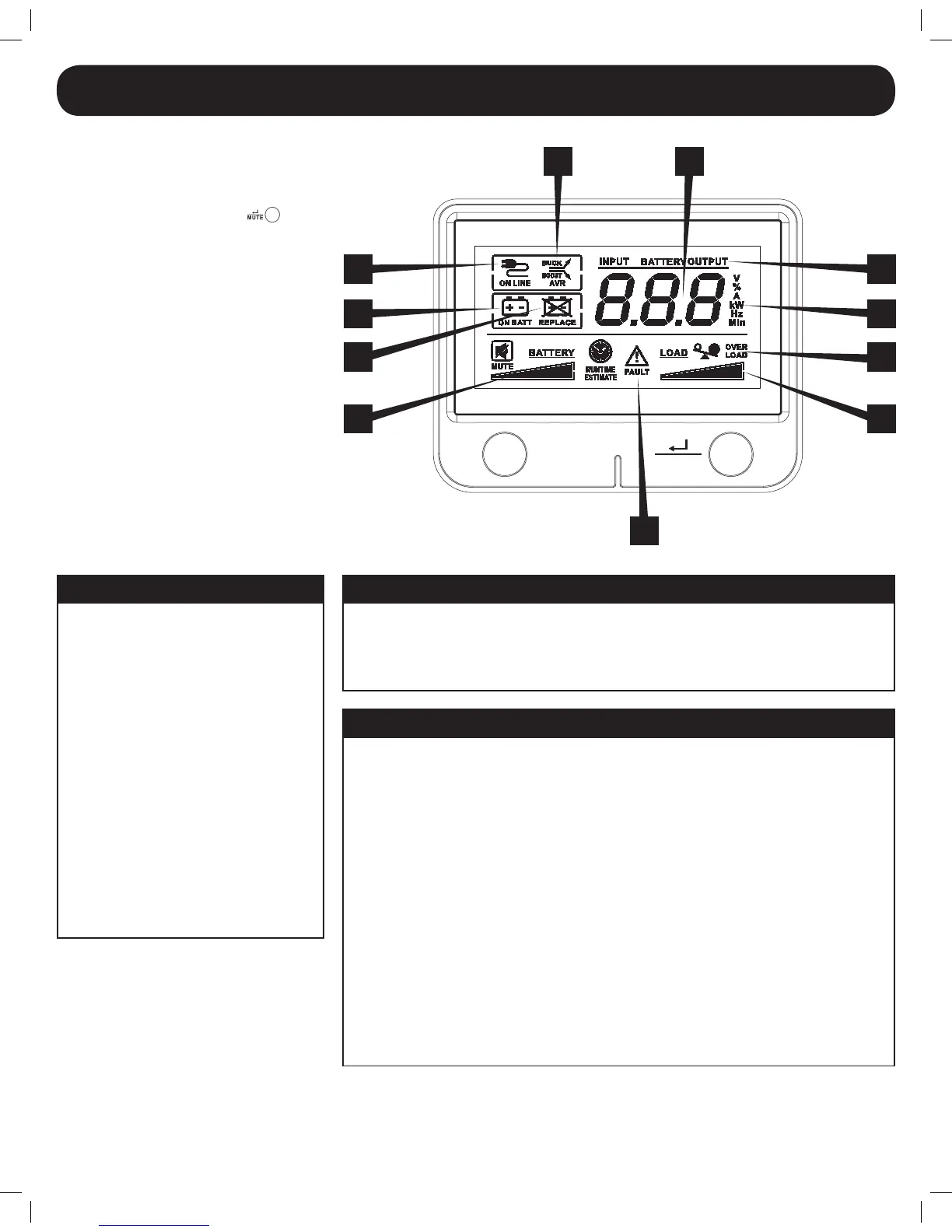
LCD Display
The LCD Display indicates a variety of UPS
modes and operating conditions. To view
the various screens, press the
button
while the UPS is operating in line or battery
power mode.
The LCD DISPLAY is shown here fully
illuminated to identify all available icons
and labels. This is for explanation only—
there are no operating modes where the
screenisfullyilluminatedlikethisexceptfor
afewsecondsastheUPSisrstpluggedin.
5. BATTERY CHARGE METER continuously reports battery charge level.
6. LOAD LEVEL METER continuously reports load-level on UPS supported outlets.
7. OVERLOAD ICON comes on to report that UPS supported outlets are overloaded.
8. 3-DIGIT DISPLAY lights along with associated labeling and icons to report a variety of UPS
and site power related conditions.
9. 3-DIGIT DISPLAY SUFFIX display labels will selectively illuminate to describe the unit of
measurement the 3-digit display is currently reporting (V=volts, %=percent, A=amps,
kW=kilowatts,Hz=frequency,Min=minutes).
10. 3-DIGIT DISPLAY PREFIXES
•INPUTlightstoindicatethe3-digitdisplayisreportinganinputcondition(inputvoltage,
inputfrequency)
•OUTPUT lights to indicate the 3-digit display is reporting an output condition (output
voltage,outputHz,etc)
•BATTERYlightstoindicatethe3-digitdisplayisreportingabatteryrelatedcondition(battery
voltage)
•ESTIMATED RUNTIME lights to indicate that the 3-digit display is currently reporting
estimated runtime in minutes
11. FAULT ICON lights to indicate a variety of possible UPS fault conditions (see Error Messages
section for information on other reported faults)
1. ON-LINE MODE ICON indicates that AC
power is present and the UPS is running
from an input line power source.
2. AVR BUCK & AVR BOOST ICONS will
selectively illuminate during line power
mode to indicate Automatic Voltage
Regulation (AVR) is engaged. “AVR”
& “BUCK” indicates an overvoltage
condition and output is reduced back to
usablelevels.“AVR”&“BOOST”indicates
brownout/undervoltage conditions and
output is boosted back to usable levels.
3. ON BATT ICON indicates that the UPS
is running in battery mode, due to power
failureorsevereinputvoltageuctuation.
4. REPLACE BATTERY ICON will illuminate
to inform users that the UPS battery is
weakandrequiresreplacement.
Basic Operation continued
12-12-069-93-327C.indb 5 12/6/2012 9:28:35 AM



 To Next Page