9
Battery Replacement
Undernormalconditions,theoriginalbatteryinyourUPSwilllastseveralyears.Batteryreplacementshouldonlybeperformedby
qualiedpersonnel.Referto“BatteryWarnings”intheSafetysectionforcompletebatterysafetyinformation.
YourUPSrequirestwo Tripp Lite RBC51 replacement battery cartridges. For further information about replacement compatibility and
ordering,visitTrippLiteontheWebatwww.tripplite.com/support/battery/index.cfm.
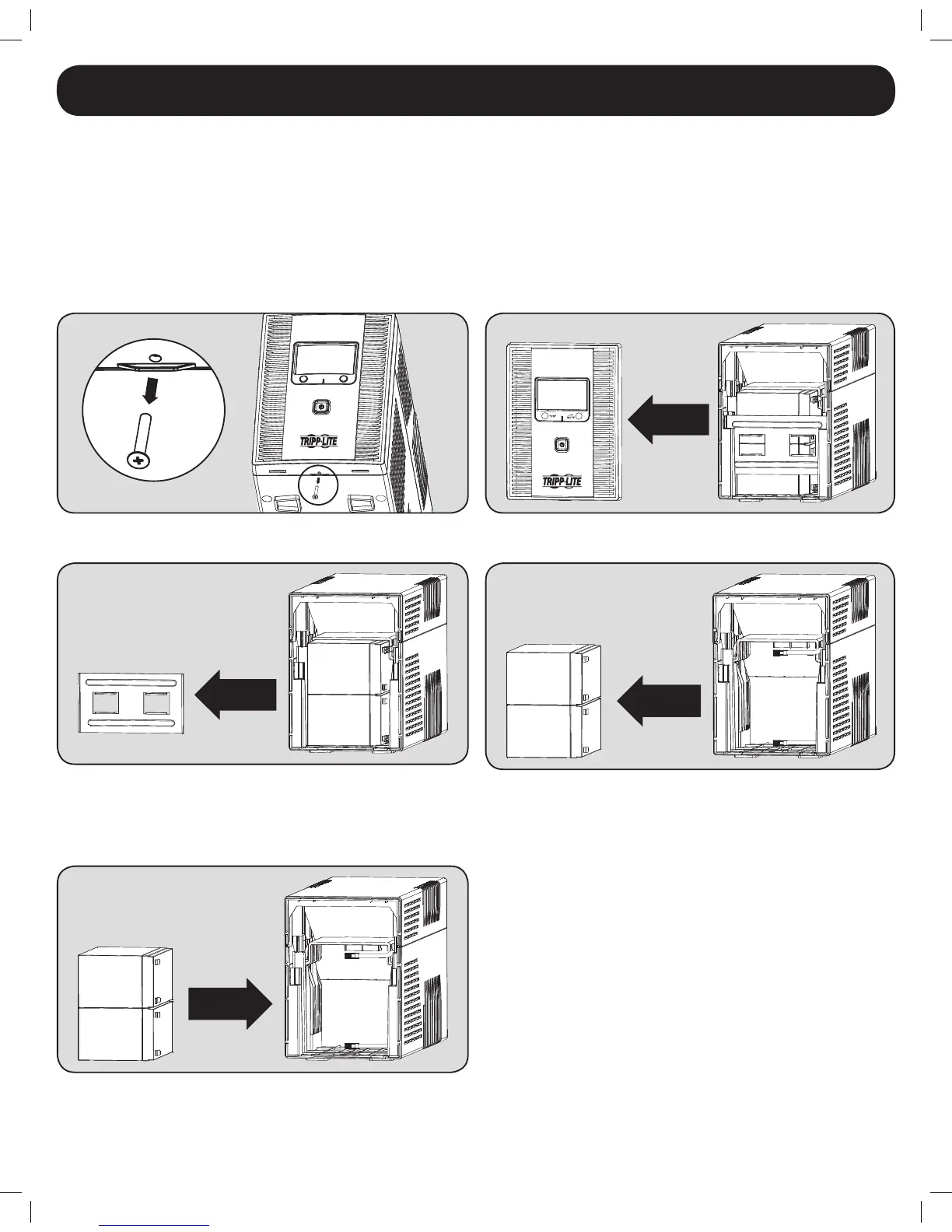
To Replace the Batteries:
1. Removescrewatthebottomoftheunit’sfrontpanel. 2. Carefully pull the front panel away from the UPS.
3. Removethebatterysupportbar. 4. Carefully pull the old batteries from the UPS and disconnect them.
5. Connect the new batteries in exactly the same manner as
the old ones: positive (red) connectors together and negative
(black) connectors together. Carefully push the batteries back
into the UPS.
6. Reinstall the battery support bar and replace the front panel.
12-12-069-93-327C.indb 9 12/6/2012 9:28:42 AM



 To Next Page