8
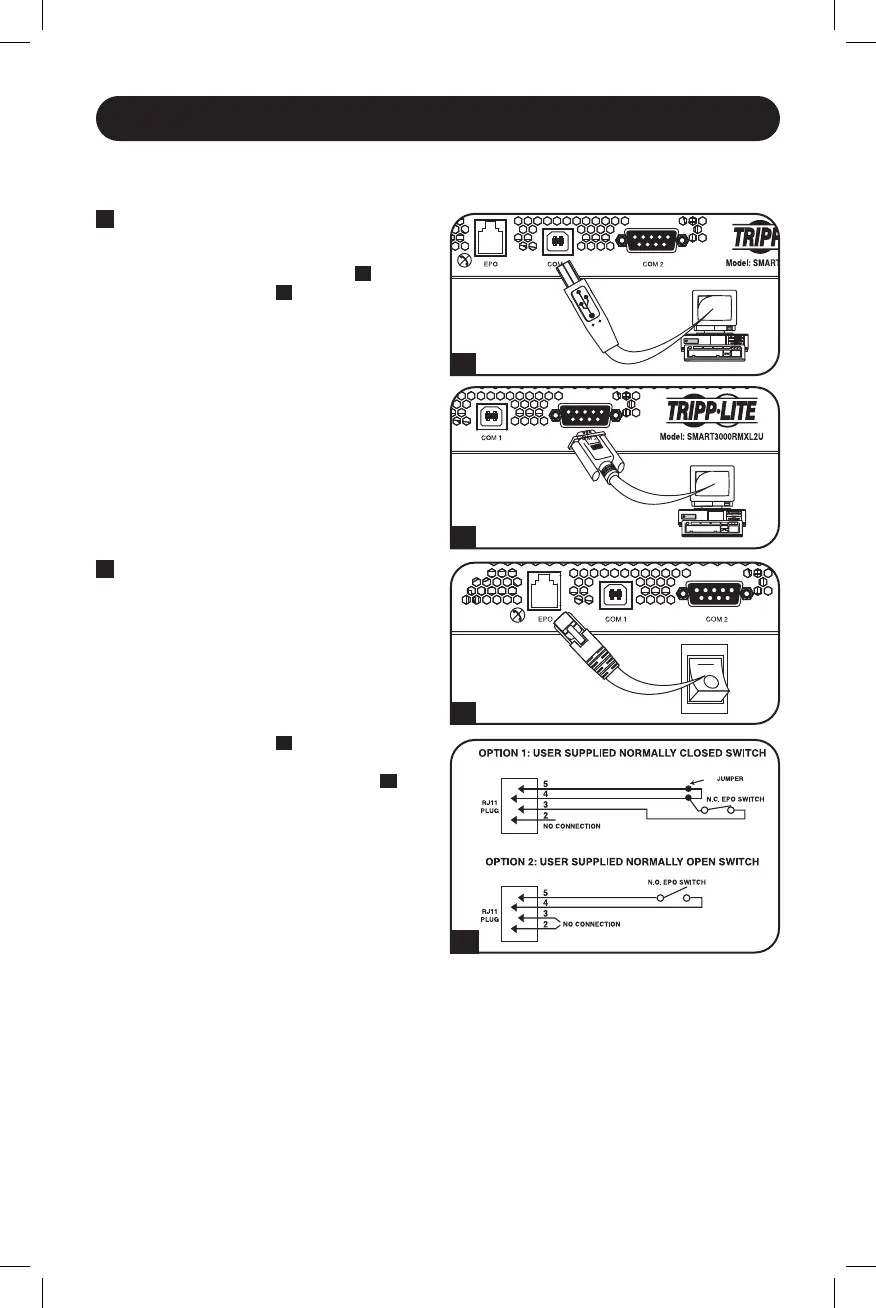
1A
1B
2A
2B
Optional Installation
These connections are optional. Your UPS will function properly without these connections.
1
USB and RS-232 Serial
Communications
Use the included USB cable (see
1A
) or
DB9 serial cable (see
1B
) to connect the
communication port on your computer to
the communication port of your UPS. Install
on your computer the Tripp Lite PowerAlert
®
Software appropriate to your computer’s
operating system.
2
EPO Port Connection
This optional feature is only for applications
requiring connection to a facility’s
Emergency Power Off (EPO) circuit. When
the UPS is connected to this circuit, it
enables emergency shutdown of the UPS’s
inverter.
Using the cable provided, connect the EPO
port of your UPS (see
2A
) to a user-supplied
normally closed or normally open switch
according to the circuit diagram (see
2B
).
The EPO port is not a phone line surge
suppressor; do not connect a phone line to
this port.
21-07-111-933088-Book.indb 821-07-111-933088-Book.indb 8 7/28/2021 4:49:38 PM7/28/2021 4:49:38 PM




 To Next Page