19
1
3
2
4A
4B
4 x screws
4 x screws
Battery Replacement
Under normal conditions, the original batteries in your UPS will last many years. See Safety section
before replacing batteries. The batteries are designed for hot-swap replacement (i.e. leaving the
UPS in ON mode), but some qualified service personnel may wish to put the UPS in the OFF mode
and disconnect equipment before proceeding. Note: Refer to the label on the battery retention
plate for the R.B.C. part number.
RBC58-2U Battery Replacement Procedure (Applies to
SMART3000RM2UP, SMART3000RMXL2U and SMART3000RMXLN
Models)
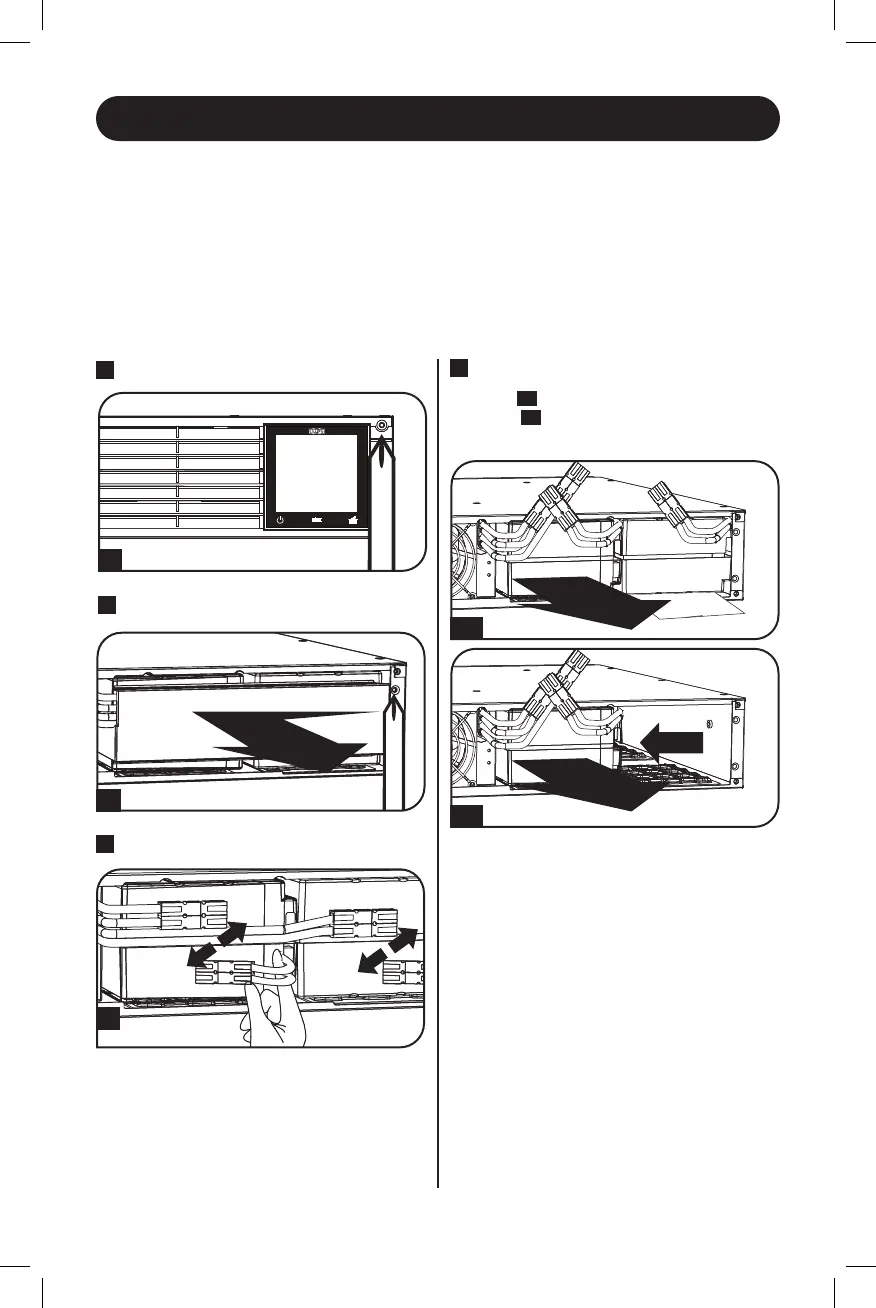
2
Remove Battery Retention Plate
3
Disconnect Batteries
4
Remove/Recycle Batteries
First,
4A
remove the left row of batteries.
Then,
4B
slide the right row of batteries to
the left and remove.
1
Remove Front Panel
21-07-111-933088-Book.indb 1921-07-111-933088-Book.indb 19 7/28/2021 4:49:40 PM7/28/2021 4:49:40 PM




 To Next Page