EasyManua.ls Logo

Triton AX 720 - User Manual

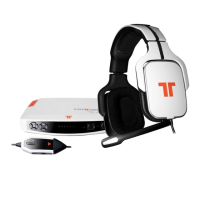
Triton AX 720
24 pages
Print Icon
To Next Page IconTo Next Page
Loading...
.com
TRITTONUSA
.com
TRITTONUSA
AX 720
Product Manual
technologies
Question and Answer IconNeed help?

Do you have a question about the Triton AX 720 and is the answer not in the manual?

Summary

Package Contents

AX 720 Features - Headset

Microphone Insertion

Instructions for inserting the microphone into the headset correctly and securely.

Headrail Pad Removal

Guide on how to remove the top headrail pad from the headset.

AX 720 Features - Inline Controller

AX 720 Features - 720 AMP

Resetting the 720 AMP

Procedure to reset the 720 AMP by holding specific buttons.

AX 720 Optical Interface Setup

Optical Interface Setup Steps

Step-by-step guide for setting up the optical interface before platform connection.

Platform Specific Connections

Instructions for connecting the headset to specific gaming platforms.

Connect to XBOX 360

Connect to PS3

Connect to PC;Mac with Optical

Connect to PC with Analog

Connect to DVD Player

Warranty Information

Summary

Package Contents

AX 720 Features - Headset

Microphone Insertion

Instructions for inserting the microphone into the headset correctly and securely.

Headrail Pad Removal

Guide on how to remove the top headrail pad from the headset.

AX 720 Features - Inline Controller

AX 720 Features - 720 AMP

Resetting the 720 AMP

Procedure to reset the 720 AMP by holding specific buttons.

AX 720 Optical Interface Setup

Optical Interface Setup Steps

Step-by-step guide for setting up the optical interface before platform connection.

Platform Specific Connections

Instructions for connecting the headset to specific gaming platforms.

Connect to XBOX 360

Connect to PS3

Connect to PC;Mac with Optical

Connect to PC with Analog

Connect to DVD Player

Warranty Information

Triton AX 720 Specifications

General IconGeneral
BrandTriton
ModelAX 720
CategoryHeadsets
LanguageEnglish

Related product manuals