7-17
System Menu and Client Tool > Default Settings on the PC (Client Tool)
Screen Overview
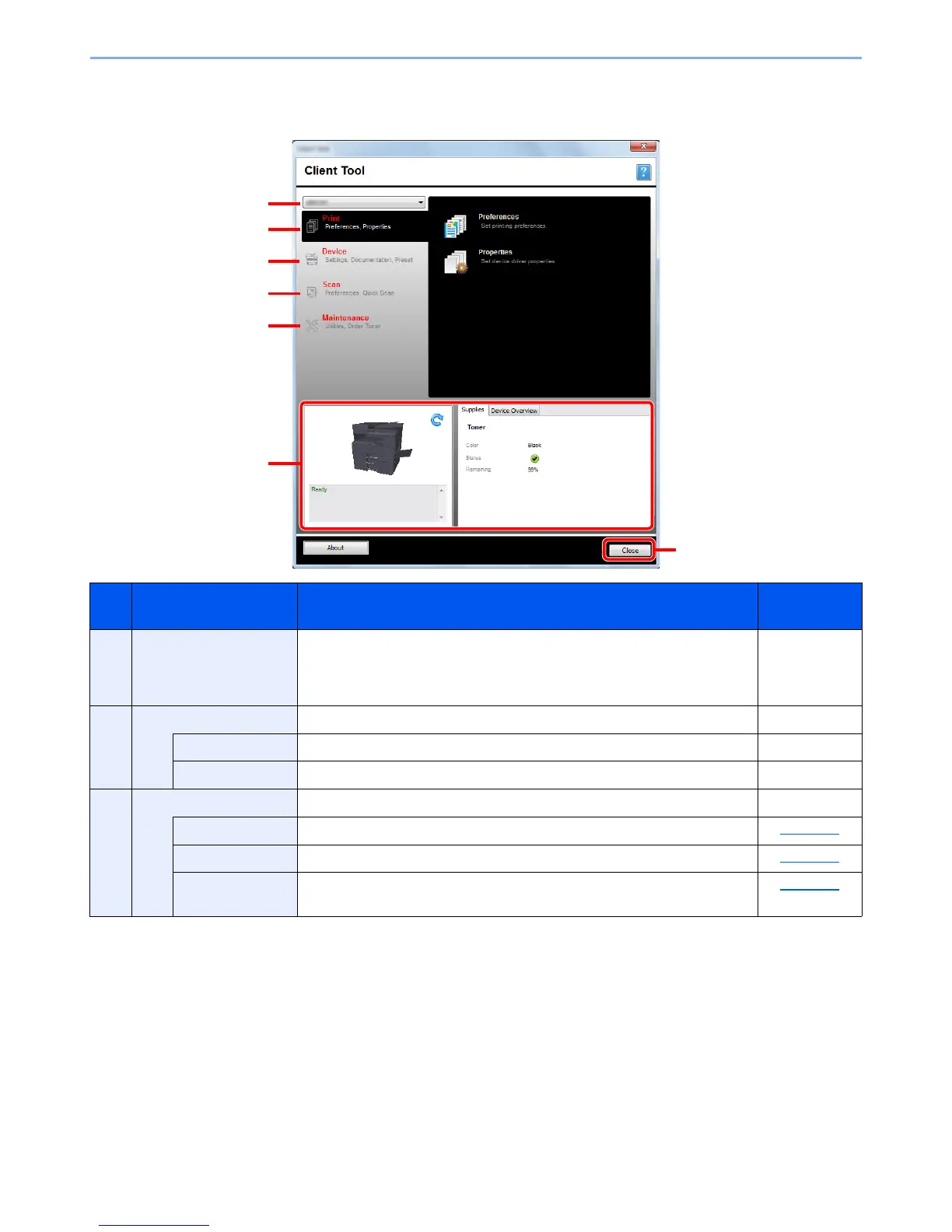
The screen overview of the Client Tool is as follows.
No. Item Description Reference
Page
1 Machine list The list at the top of Client Tool screen includes all of the supported
machines installed on your computer. You can select a machine from this list
to view its properties and select available options, such as configuration and
maintenance.
—
2 Print Access to printing preferences and machine driver properties. —
Preferences Open the "Printing Preferences" screen for the selected machine. —
Properties Open the "Properties" screen for the selected machine. —
3 Device Configure Status Monitor, Scan Destination, and Print Box settings. —
Configuration Open the "Configuration" screen for the selected machine. page 7-19
Scan Destination Configure the Scan Destination settings. page 7-20
Print Box
Destination
Configure the Print Box settings. page 7-26


 To Next Page