33
General Information
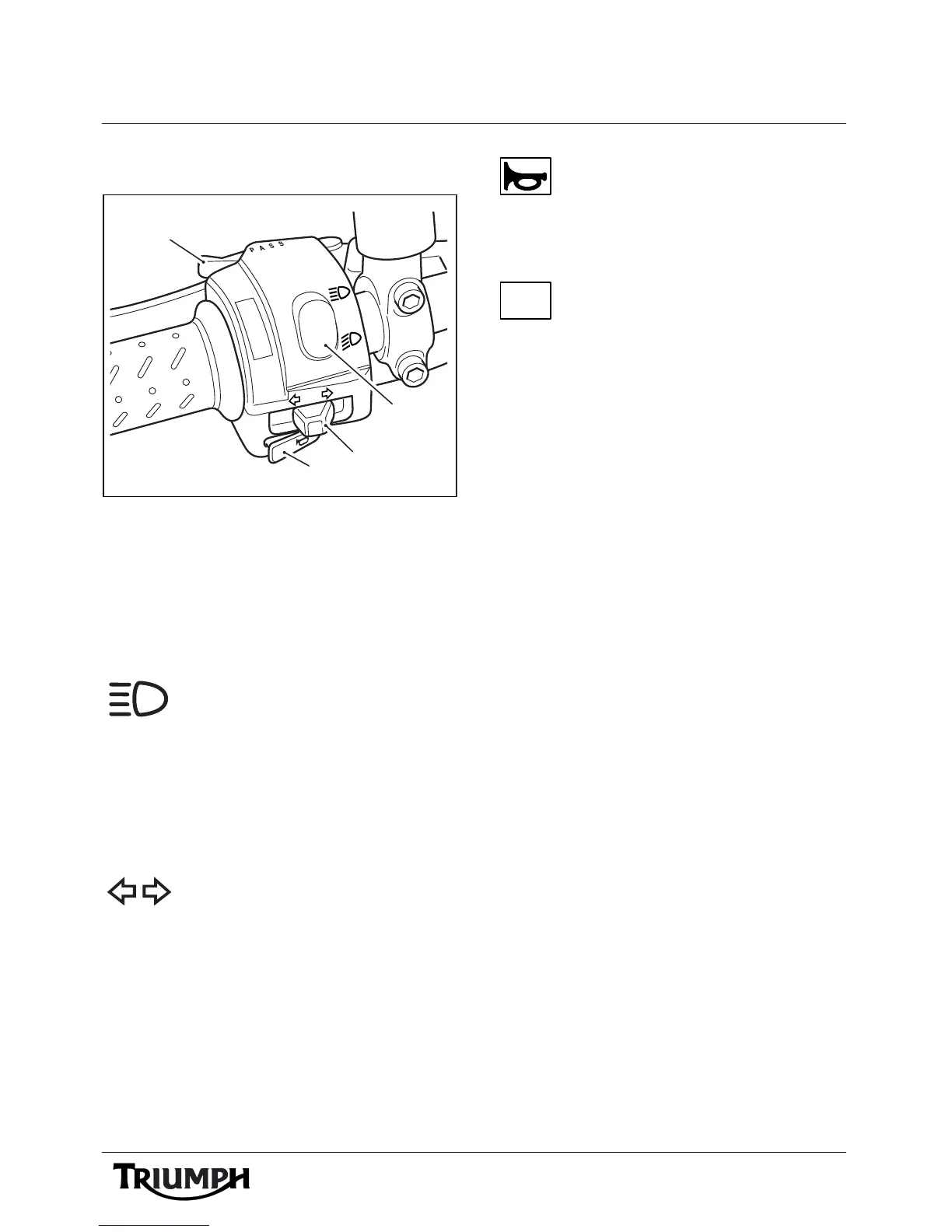
Left Handlebar Switches
1. Headlight dimmer switch
2. Turn signal switch
3. Horn button
4. Passing button (Bonneville,
Bonneville SE and Scrambler models
only)
Headlight Dimmer Switch
High or low beam can be selected
with the headlight dimmer switch.
To select high beam, push the switch forward.
To select low beam, push the switch
rearwards. When the high beam is turned on,
the high beam warning light will illuminate.
Turn Signal Switch
When the turn signal switch is
pushed to the left or the right and
released, the corresponding turn signal
flashes. To turn off the turn signals, push and
release the button in the center of the switch.
Horn Button
When the horn button is pushed,
with the ignition switch turned to
the ON position, the horn will sound.
Pass Button
When the pass button is pressed,
the headlight main beam will be
switched on. It will remain on as long as the
button is held in and will turn off as soon as
the button is released.
ccmg







 To Next Page